As a freelancer, you’re the CEO, creative director, and, yes, the chief financial officer. Juggling projects is tough enough without wrestling with complex finances. That disorganized folder of invoices and the dreaded “receipts shoebox” aren’t just messy; they’re costing you valuable time and money. Manually tracking income, chasing late payments, and preparing for tax season can quickly become a second full-time job.
Choosing the right tool isn’t just about tracking numbers; it’s about reclaiming your time, ensuring you get paid promptly, and making tax season less of a headache. The best accounting software for freelancers streamlines your entire financial workflow, from sending professional invoices to tracking expenses and estimating quarterly taxes. It provides a clear, real-time view of your business’s health, empowering you to make smarter financial decisions without needing a degree in accounting. Forget the spreadsheet chaos and the end-of-year panic.
This guide cuts through the noise to compare the absolute best accounting software for freelancers, analyzing each tool for specific use cases. We move beyond generic feature lists to provide a practical, in-depth analysis of what makes each platform stand out. You’ll find a detailed breakdown of options like QuickBooks Online, FreshBooks, Xero, Wave, and more, complete with screenshots, direct trial links, and honest assessments. We’ll explore who each platform is truly built for, its real-world pros and cons, and how to get started, so you can pick the perfect partner for your freelance business’s financial clarity.
1. QuickBooks Online: The Industry Standard for Scalability
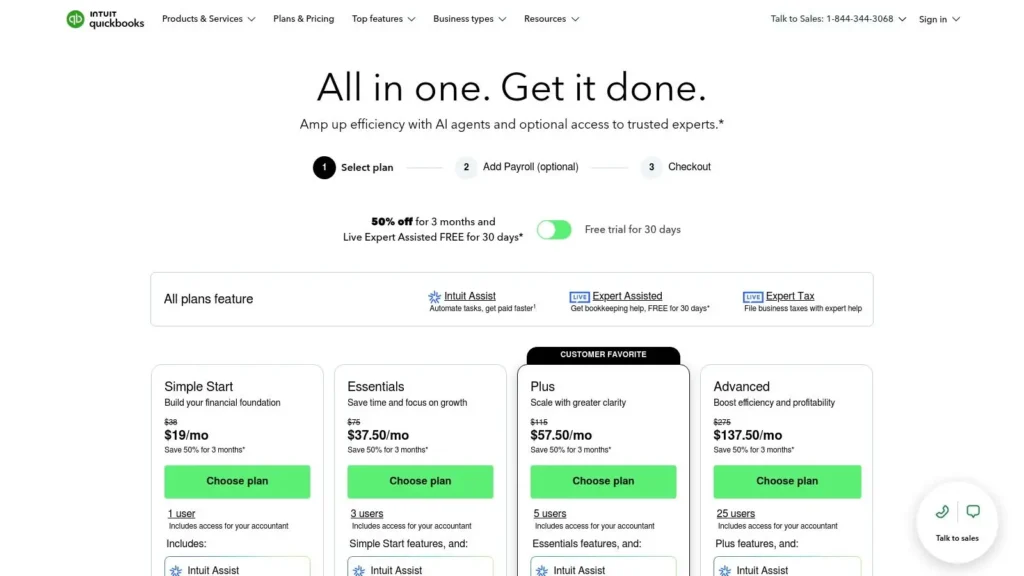
QuickBooks Online is often considered the default accounting software for a reason: it’s a comprehensive, full-featured bookkeeping solution that scales with your freelance business. While many tools are built just for solopreneurs, QuickBooks provides a direct growth path if you decide to hire contractors, add employees, or incorporate. Its deep integration with the U.S. tax system and near-universal adoption by accountants makes collaboration seamless, a key advantage when it’s time to file quarterly or annual returns.
This platform is more than just an invoicing tool; it’s a complete accounting hub. Core features include automated bank feeds that import and suggest categories for your transactions, robust financial reporting (like Profit & Loss statements), and excellent receipt capture via its mobile app. For freelancers, this means having a real-time, accurate picture of your business’s financial health.
Key Considerations
While its power is undeniable, QuickBooks Online can feel overwhelming for a brand new freelancer. The interface is packed with features that you might not need initially, and its pricing is on the higher end compared to simpler, freelancer-focused alternatives. However, if you anticipate your business growing or need detailed financial reporting from day one, it’s arguably the best accounting software for freelancers looking for a long-term solution.
- Best For: Freelancers who plan to scale, hire contractors, or need to share access directly with their CPA.
- Pricing: Plans start at $30/month for Simple Start, with frequent promotional discounts for new users. A 30-day free trial is typically available.
- Website: https://quickbooks.intuit.com/pricing/
2. FreshBooks: The Service Freelancer’s Invoicing Powerhouse
FreshBooks was designed from the ground up with service-based freelancers and creative professionals in mind. Its core strength lies in its intuitive and client-friendly approach to invoicing, time tracking, and project management. Where other platforms can feel like complex accounting ledgers, FreshBooks focuses on the tools that help freelancers get paid faster, track their billable hours effortlessly, and present a professional image with polished proposals and estimates.
This platform excels at simplifying the entire client workflow, from initial proposal to final payment. Core features include unlimited and customizable invoices, a built-in time tracker that seamlessly adds hours to invoices, and the ability to manage retainers and project-based billing. Its mobile app is equally powerful, allowing you to manage your business from anywhere, making it one of the best accounting software for freelancers who are often on the go.
Key Considerations
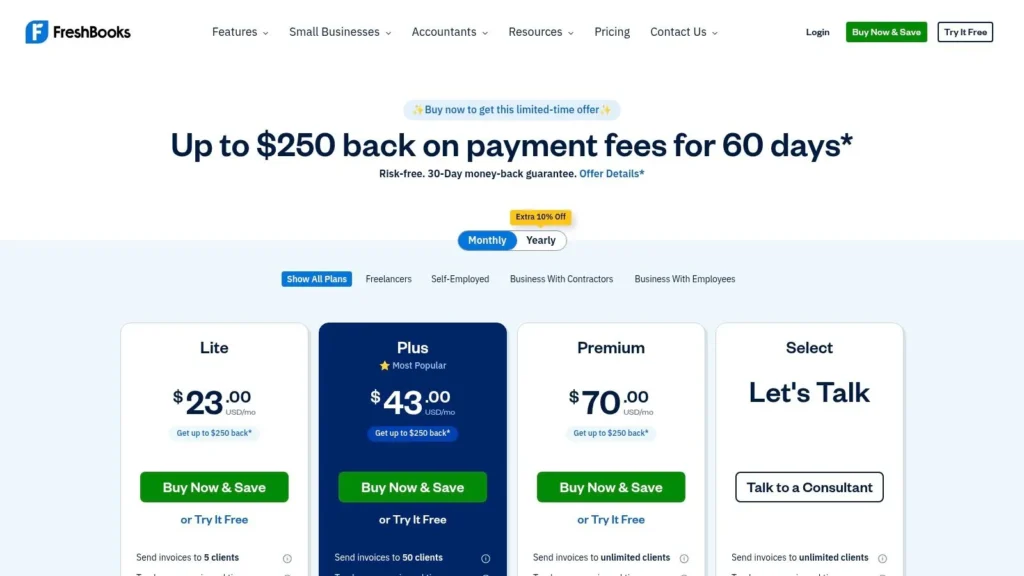
While FreshBooks is incredibly easy to use, its simplicity comes with a few trade-offs. The lower-tiered plans limit the number of billable clients you can have, which can be a hurdle for freelancers with a wide roster of small projects. Furthermore, adding team members or contractors incurs an additional per-person fee. However, for solopreneurs who prioritize a stellar mobile experience, top-tier invoicing, and excellent support, it’s a perfect fit. The company is known for its responsive support team, a key component of great customer service best practices.
- Best For: Service-based freelancers like designers, writers, and consultants who need strong invoicing and time-tracking features.
- Pricing: Plans start at $19/month for the Lite version, which is limited to 5 billable clients. A 30-day free trial is available.
- Website: https://www.freshbooks.com/pricing/
3. Xero: The Collaboration-Friendly Alternative
Xero stands out with its clean, modern interface and a strong emphasis on collaboration, making it a powerful contender for the best accounting software for freelancers who work closely with others. A key differentiator is that all plans include unlimited users, allowing you to give access to an accountant, bookkeeper, or virtual assistant without incurring extra costs. This is a significant advantage for freelancers who delegate financial tasks or want seamless professional oversight from day one.
The platform provides a comprehensive suite of tools, including customizable online invoicing, bank reconciliation, and powerful receipt and bill capture through its integration with Hubdoc. Its massive app marketplace allows you to connect Xero with project management tools, CRMs, and payment gateways, creating a customized and efficient workflow. This makes it an excellent choice for freelancers who rely on a specific stack of digital tools to run their business.
Key Considerations
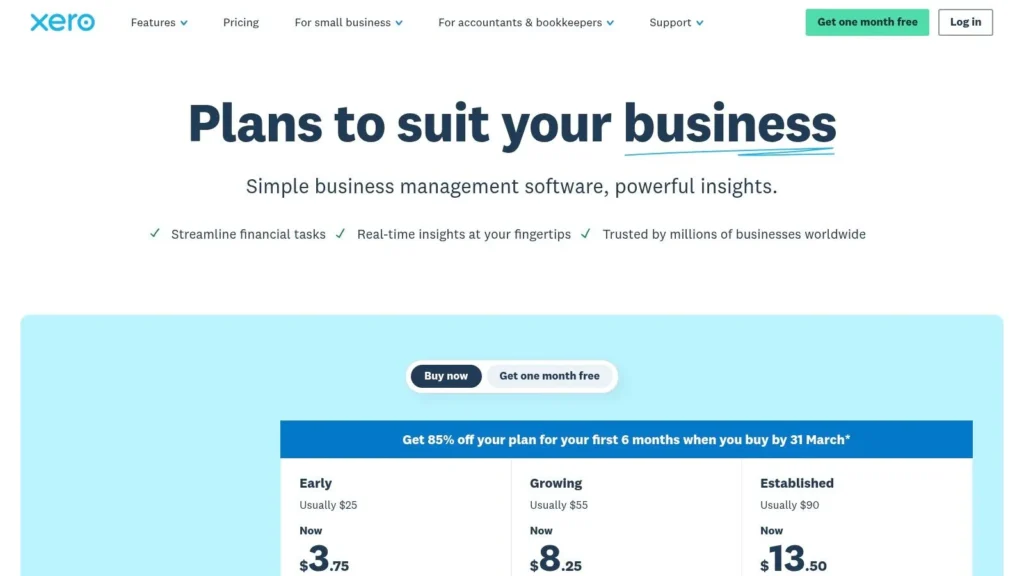
While its collaborative features are a major plus, Xero’s entry-level plan, “Early,” imposes limitations that may frustrate some freelancers, such as capping the number of invoices and bills you can send or enter per month. To unlock unlimited transactions and more advanced features like expense claims, you need to upgrade to a higher-tier plan. However, for a freelancer who plans to grow into a small agency or needs deep third-party integrations, Xero provides a scalable and user-friendly foundation.
- Best For: Freelancers who collaborate with an accountant or assistant, and those needing extensive third-party app integrations.
- Pricing: Plans start at $15/month for the “Early” plan, with more comprehensive plans available at higher price points. A 30-day free trial is offered.
- Website: https://www.xero.com/us/pricing-plans/
4. Zoho Books: The Ultimate Value for Integrated Workflows
Zoho Books stands out by offering a comprehensive, full-featured accounting platform within a much larger ecosystem of business apps. For freelancers already using or considering other Zoho products (like Zoho CRM or Projects), this integration provides a seamless flow of data from client acquisition to final payment. Its strength lies in deep automation, allowing you to set up workflows for tasks like payment reminders and recurring invoices, saving significant administrative time.
The platform offers a robust feature set, including professional invoicing, expense tracking, time tracking, and client portals. Its free plan is a major draw for new or low-earning freelancers, providing professional-grade tools without the initial investment, a unique value proposition that makes it one of the best accounting software for freelancers just starting out.
Key Considerations
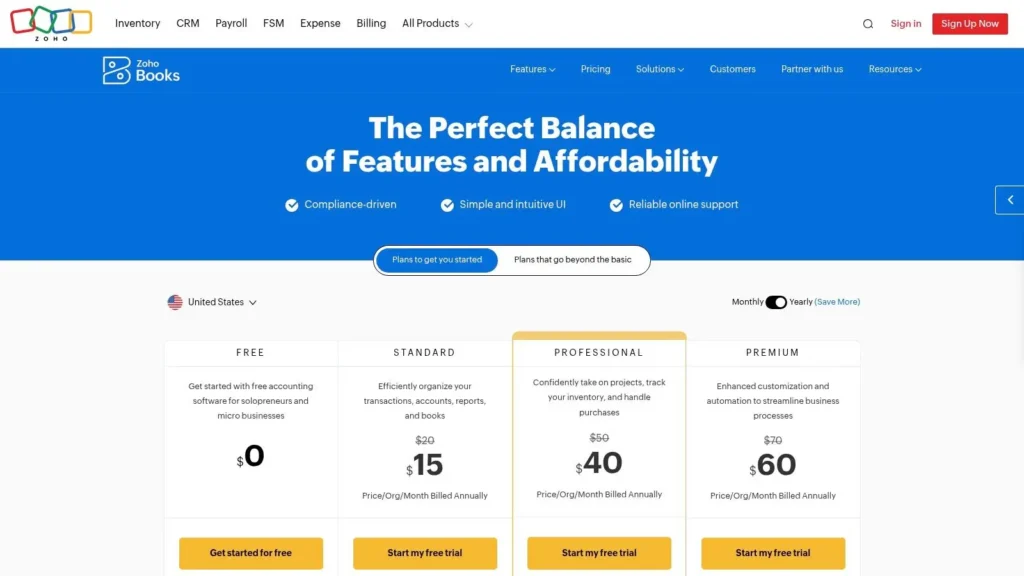
The primary limitation is the free plan’s eligibility requirements, which are based on annual revenue. As your business grows, you will need to upgrade to a paid plan to continue service. While the interface is clean and the mobile app is highly functional, the sheer breadth of features and settings can present a learning curve for those unfamiliar with accounting software or the Zoho environment. However, for those seeking power and scalability on a budget, it’s an unmatched option.
- Best For: Freelancers who need powerful automation or use other Zoho suite products and want an integrated system.
- Pricing: A free plan is available for businesses with revenue under a certain threshold. Paid plans start at $20/month per organization.
- Website: https://www.zoho.com/books/pricing/
5. Wave: The Best Free Option for Simple Needs
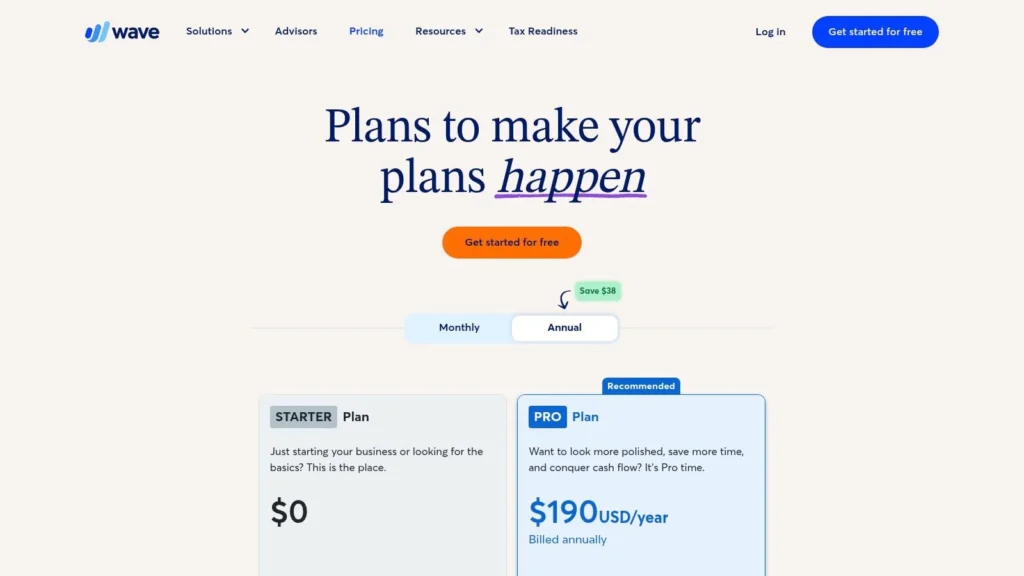
Wave stands out in a crowded market by offering a genuinely free accounting and invoicing platform, making it a powerful entry point for new freelancers or those with very simple bookkeeping needs. Focused on solopreneurs in the U.S. and Canada, Wave provides unlimited invoicing, expense tracking, and basic accounting reports without a monthly subscription fee. Its business model relies on optional, pay-per-use services like payment processing and payroll, allowing you to add features only when you need them.
This approach makes it an incredibly low-risk choice to get your financial systems organized from day one. You can send professional invoices, accept online payments (for a standard fee), and run essential reports like Profit & Loss without any upfront investment. For freelancers just starting out, this removes a significant cost barrier and provides core tools to manage money effectively.
Key Considerations
The main trade-off for its free price tag is a lack of advanced features and limited customer support for non-paying users. The free version requires manual transaction entry, which can become time-consuming. To get automated bank feeds, you must upgrade to the Pro plan. While its interface is clean and user-friendly, Wave doesn’t offer the deep reporting or third-party integrations found in more robust platforms like QuickBooks, which can be a limitation as your business grows more complex.
- Best For: New freelancers, side-hustlers, or solopreneurs with simple finances who need professional invoicing and basic bookkeeping at no cost.
- Pricing: Accounting and invoicing are free. The Pro plan with automated features is $16/month. Payment processing and payroll are pay-per-use.
- Website: https://www.waveapps.com/pricing
6. Fiverr Workspace (formerly AND.CO): The All-in-One Client Workflow Tool
Fiverr Workspace, formerly known as AND.CO, is less of a traditional accounting platform and more of a complete freelancer business management suite. Its strength lies in its seamless workflow, taking you from proposal to contract, and finally to invoicing and payment, all within one system. This makes it ideal for freelancers who prioritize client management and project organization over deep, ledger-based bookkeeping.
The platform excels at the front-end of the client relationship. You can generate professional proposals, use legally vetted contract templates, and track your time against projects, which then converts directly into invoices. While its expense tracking is simpler than dedicated accounting tools, its integration with Fiverr makes it a natural choice for sellers on that platform, streamlining their income and project management.
Key Considerations
Fiverr Workspace is an excellent tool for managing the client lifecycle, but it is not a full-double-entry accounting system. This means it lacks the robust reporting, bank reconciliation, and tax preparation features found in platforms like QuickBooks or Xero. However, for a freelancer who just needs to send polished proposals, get contracts signed, and issue invoices without the complexity of a general ledger, it’s one of the best accounting software for freelancers focused on workflow efficiency. For those also working on growing their client base, understanding how to build an email list can be a powerful complementary skill.
- Best For: Service-based freelancers who need a single tool for proposals, contracts, time tracking, and invoicing.
- Pricing: A free plan is available for one client. The Unlimited plan is $24/month.
- Website: https://workspace.fiverr.com/pricing/
7. HoneyBook: The All-in-One Clientflow Platform
HoneyBook carves out a unique space by focusing less on traditional double-entry bookkeeping and more on the entire client management lifecycle. It’s a clientflow platform designed for service-based freelancers, combining proposals, contracts, invoicing, and payments into one seamless, automated workflow. Instead of juggling multiple apps, you can manage a client from initial inquiry to final payment within a single system, creating a highly professional and streamlined experience for both you and your clients.
This end-to-end approach is its main differentiator. HoneyBook excels at automating administrative tasks like sending follow-ups, scheduling meetings, and delivering files upon payment. For creative freelancers, consultants, and coaches, this means more time spent on billable work and less on tedious back-office management. While it offers basic financial reporting like profit and loss summaries, its strength lies in managing the flow of client work and revenue, not in deep accounting analysis.
Key Considerations
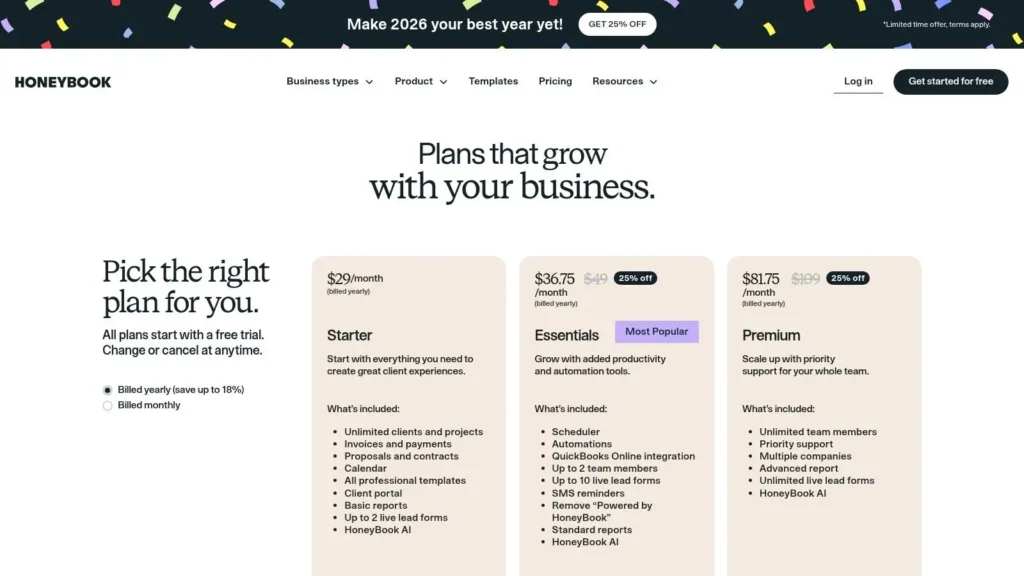
HoneyBook is not a full-fledged accounting system; it lacks features like expense tracking and detailed financial reporting found in dedicated software. However, higher-tier plans integrate directly with QuickBooks Online, offering the best of both worlds. It’s an ideal choice if your primary challenge is client management and workflow automation, rather than complex bookkeeping. For service professionals looking to elevate their client experience, a strategy similar to learning how to increase engagement on Instagram, HoneyBook provides the right tools to build and maintain strong business relationships.
- Best For: Service-based freelancers (designers, photographers, consultants) who prioritize client experience, proposals, and contracts over complex accounting.
- Pricing: Plans start at $19/month for Starter, with the best value offered on annual billing. A 7-day free trial is available.
- Website: https://www.honeybook.com/pricing
8. Square Invoices: The Go-To for Simple, Integrated Payments
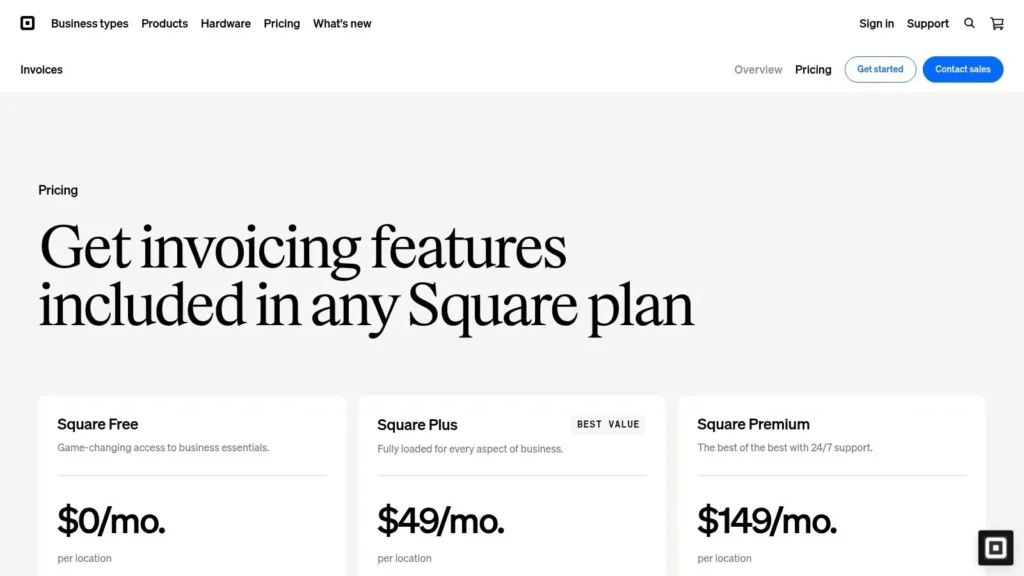
For freelancers already in the Square ecosystem or those whose primary need is robust invoicing and payment collection, Square Invoices is a powerful, free-to-start solution. Rather than being a full-fledged accounting suite, it excels at its core function: helping you get paid quickly and professionally. It handles everything from creating and sending unlimited invoices to setting up recurring billing schedules and accepting deposits, all without a monthly subscription fee on its free tier.
The platform’s strength lies in its seamless integration with Square’s broader suite of tools and its straightforward payment processing. You can accept payments via credit/debit cards or ACH bank transfers, with the latter offering a low, capped fee that is particularly attractive for high-value invoices. This focus on payments makes it an excellent starting point for service-based freelancers who need a reliable way to bill clients but aren’t ready for a complex bookkeeping system.
Key Considerations
Square Invoices is not a complete accounting system. It lacks core bookkeeping features like expense tracking, bank reconciliation, and detailed financial reporting found in tools like QuickBooks or Wave. Therefore, it is best used as a top-tier invoicing tool that you pair with a separate spreadsheet or a dedicated accounting app. While the free plan is excellent, you must be mindful of the processing fees, which are the primary cost and can accumulate as your business grows.
- Best For: Freelancers who primarily need a powerful invoicing and payment processing tool and may already use other Square products.
- Pricing: A Free plan is available with standard processing fees. The Plus plan is $20/month for advanced features like custom invoice fields.
- Website: https://squareup.com/us/en/invoices/pricing
9. Stripe Invoicing: For Seamless Payment Collection
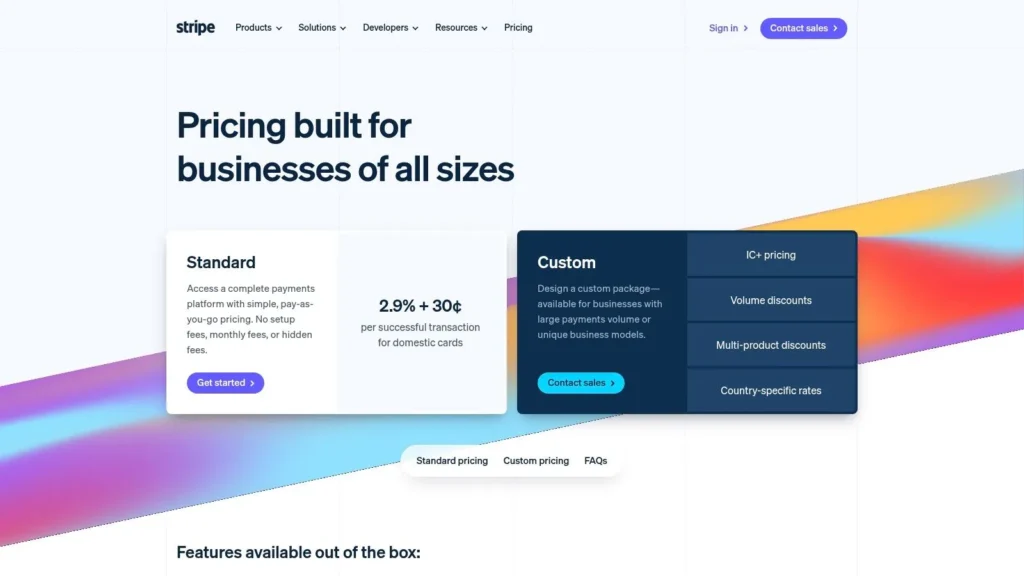
For freelancers already integrated into the Stripe ecosystem, Stripe Invoicing is less a standalone accounting platform and more of a powerful, built-in billing solution. Its core strength is leveraging Stripe’s world-class payment processing infrastructure, allowing you to create and send professional invoices that clients can pay instantly with credit cards, ACH transfers, and various international payment methods. It’s designed for speed and conversion, focused squarely on getting you paid.
The platform excels at payment-related automation, such as sending automatic reminders for overdue invoices (dunning) and providing clear metrics on your billing activity. While it doesn’t offer the comprehensive expense tracking or financial reporting of a full bookkeeping system, it serves a critical role for freelancers whose primary challenge is efficient and reliable accounts receivable management. It is a top-tier invoicing tool first and foremost.
Key Considerations
Stripe Invoicing is not a replacement for dedicated accounting software if you need to manage expenses, run profit and loss reports, or track tax deductions. Its value is in its tight integration with Stripe Payments, providing a polished and trustworthy payment experience for your clients. The usage-based pricing can also become more expensive than a flat-fee service for high-volume invoicing, but the lack of a monthly subscription on its Starter plan is a major advantage for those just starting out.
- Best For: Freelancers who primarily need a robust system for creating, sending, and collecting payments, especially internationally.
- Pricing: The Starter plan has no monthly fee, charging 0.4% per paid invoice. The Plus plan is $25/month with advanced automation features. Standard Stripe processing fees apply on top of this.
- Website: https://stripe.com/invoicing
10. ZipBooks: The Budget-Friendly All-Rounder
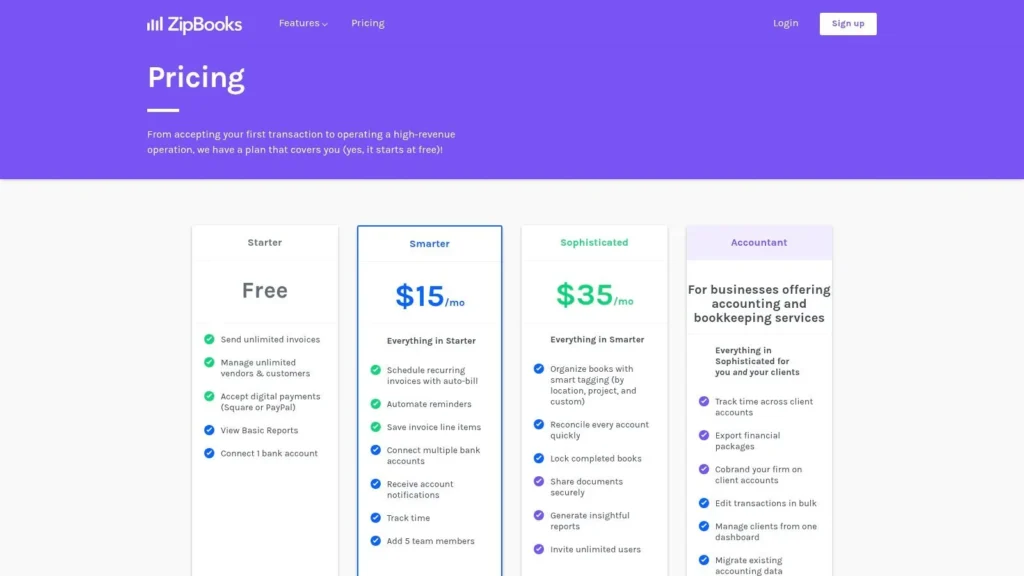
ZipBooks positions itself as a smart, modern accounting solution, appealing to freelancers who value a clean interface and intelligent features without a hefty price tag. Its standout characteristic is simplicity paired with a surprisingly robust free tier, making it an excellent entry point for new sole proprietors. The platform handles core needs like invoicing, expense tracking, and accepting online payments with an intuitive design that doesn’t require an accounting degree to navigate.
As you grow, ZipBooks scales with affordable paid plans that unlock crucial features like automated bank reconciliation, recurring invoices, and time tracking. This makes it one of the best accounting software for freelancers who are starting with a minimal budget but want a tool that can support their business as it becomes more complex. Its “intelligence” features, which offer feedback on your business health and invoice quality, provide unique value not often seen in competitors at this price point.
Key Considerations
While its user-friendly approach is a major benefit, ZipBooks has a smaller ecosystem of third-party integrations compared to giants like QuickBooks. This might be a limitation if you rely on a wide range of specialized business apps. The free plan is fantastic for basics, but freelancers needing to connect their bank accounts for automated transaction imports will need to upgrade to a paid tier. Even so, its affordable pricing makes it a top contender.
- Best For: New freelancers seeking a powerful free plan and solo business owners who prioritize a clean, easy-to-use interface over extensive integrations.
- Pricing: Offers a free “Starter” plan for unlimited invoices. Paid plans with bank integration start at $15/month.
- Website: https://zipbooks.com/pricing
11. Kashoo (and TrulySmall): Simplicity for the Solo Operator
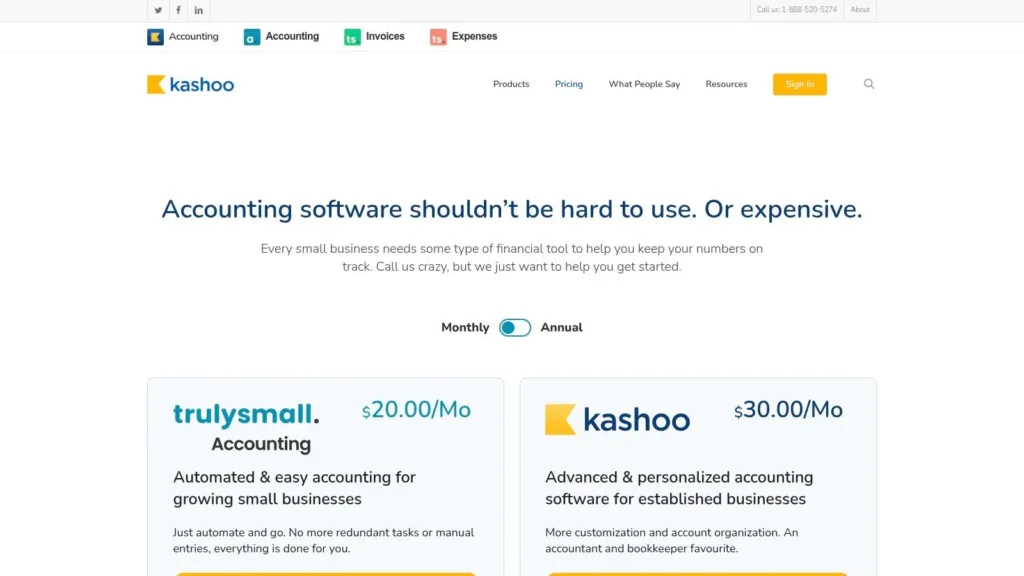
Kashoo is built on the premise that not every freelancer needs a complex, feature-heavy accounting suite. Its platform, including the streamlined TrulySmall Accounting and TrulySmall Invoices tiers, focuses on providing the core essentials with a minimal learning curve. This makes it an excellent choice for solo operators who are new to bookkeeping and want a straightforward way to track income, manage expenses, and send invoices without getting bogged down in advanced accounting functions.
The platform provides fundamental double-entry accounting tools, including bank feeds for transaction reconciliation, basic financial reports, and payment processing. Its primary advantage lies in its simplicity; the interface is clean and uncluttered, guiding you through essential tasks like creating an invoice or categorizing an expense. It strips away the complexity found in larger systems, making it one of the best accounting software for freelancers who prioritize ease of use over an expansive feature set.
Key Considerations
While Kashoo’s simplicity is its strength, it can also be a limitation for a growing business. The ecosystem is leaner than its major competitors, with fewer integrations and less robust reporting capabilities. Freelancers who need advanced features like project tracking, time tracking, or inventory management will likely find the platform too basic. However, for those seeking an affordable, no-frills solution to manage core finances, Kashoo presents a compelling and accessible option.
- Best For: Brand new freelancers, solopreneurs, and micro-businesses who need basic invoicing and expense tracking without a steep learning curve.
- Pricing: TrulySmall Invoices is free. TrulySmall Accounting starts at $20/month. Kashoo plans for more complex needs are priced higher.
- Website: https://kashoo.com/pricing/
12. NerdWallet: A Smart Starting Point for Research
Before committing to a single platform, an editorially vetted comparison guide can be an invaluable resource. NerdWallet provides one of the most comprehensive and up-to-date U.S. buying guides, specifically comparing the best accounting software for freelancers. Instead of being a software platform itself, it functions as a research hub to help you shortlist the right tools based on independent analysis. It’s a strategic first stop to understand the market landscape before diving into free trials.
NerdWallet excels at presenting complex information in an easily digestible format. The guide features at-a-glance summaries of top contenders like QuickBooks, Xero, and Wave, complete with starting prices, pros and cons, and best-for scenarios. It also tracks current promotions and intro discounts, potentially saving you money. By outlining the trade-offs of each option from a neutral perspective, it saves you hours of manual research and helps you make a more informed decision.
Key Considerations
While NerdWallet offers a fantastic overview, it’s important to remember that it’s a guide, not the software itself. Some of its recommendations are affiliate-supported, which is a standard practice for such sites but worth noting. The real value is using its curated data and independent reviews to narrow your choices down to two or three platforms, which you can then test directly using their free trials. This approach ensures you find a solution truly tailored to your freelance needs.
- Best For: Freelancers who want to compare top accounting software options efficiently before signing up for trials.
- Pricing: Free to access and use the comparison guide.
- Website: https://www.nerdwallet.com/business/software/best/freelancer-accounting-software
Top 12 Freelance Accounting Software Comparison
| Product | Key features | UX & support | Value proposition | Best for | Price / Notes |
|---|---|---|---|---|---|
| QuickBooks Online (Intuit) | Bank feeds, invoicing, reporting, accountant access | Robust accountant ecosystem; steeper learning curve | Full bookkeeping + CPA collaboration; scalable | U.S. freelancers → small teams | Pricier than peers; frequent promos/trials |
| FreshBooks | Invoicing, time tracking, proposals, retainers | Very easy to use; strong mobile & weekday support | Simple billing + time capture for creatives | Service freelancers & creatives | Client caps on low tiers; team add‑ons paid |
| Xero | Unlimited users, online invoices, Hubdoc, apps | Modern UI; powerful reports; deep integrations | Scales well with extensive third‑party apps | Freelancers planning to grow to teams | Entry plan limits invoices; some features tiered |
| Zoho Books | Invoicing, automation/workflows, client portals | Good mobile; integrates with Zoho suite | High value; free plan for qualifying small earners | Low‑volume freelancers using Zoho apps | Free plan has eligibility/volume limits |
| Wave | Accounting & invoicing (free starter), payments, payroll | Simple UI; limited human support for free users | True free starter for solo users | Very small/solo freelancers on tight budget | Starter free; Pro adds bank feeds/payroll fees |
| Fiverr Workspace (AND.CO) | Contracts, invoicing, client mgmt, basic analytics | Fast setup; affordable unlimited plan | All‑in‑one client/contract/invoice workflow | Freelancers wanting contract + billing combo | Affordable paid unlimited; lightweight accounting |
| HoneyBook | Proposals, contracts, invoicing, automations | Strong templates & workflows; client portal | End‑to‑end client experience (not full accounting) | Independent service professionals | Best value annual; prices rose in 2025 |
| Square Invoices | Unlimited invoices, recurring, ACH, Square integration | Easy mobile/web experience | No monthly fee; pay processing only | Freelancers who primarily bill & collect payments | Free plan (processing fees apply) |
| Stripe Invoicing | Quick invoices, multiple payment rails, dunning | Enterprise‑grade payments; scales globally | Flexible global billing + Stripe ecosystem | Freelancers with international clients | No starter monthly fee; usage‑based fees |
| ZipBooks | Invoicing, time tracking, reports, bank connections | Clean, simple interface for non‑accountants | Budget‑friendly bookkeeping | Sole proprietors seeking low cost | Free starter tier; affordable upgrades |
| Kashoo (and TrulySmall) | Double‑entry accounting, bank feeds, invoicing | Simple, low learning curve | Straightforward accounting for microbusinesses | Very small businesses & solo operators | Generally lower cost than full SMB suites |
| NerdWallet (comparison guide) | Side‑by‑side vendor comparisons, promos, reviews | Editorial, up‑to‑date summaries (not product use) | Saves time shortlisting and checking promos | Buyers researching accounting tools | Free guide; some listings affiliate‑supported |
Making Your Final Choice and Next Steps
Navigating the landscape of financial tools can feel overwhelming, but arriving at this point means you’re equipped with the insights needed to make an informed decision. We’ve dissected everything from the industry-standard power of QuickBooks Online to the client management prowess of HoneyBook, and the streamlined, no-cost efficiency of Wave. The central lesson is clear: the best accounting software for freelancers isn’t a one-size-fits-all solution; it’s the one that aligns perfectly with your unique business rhythm.
Your ideal choice hinges on a thoughtful self-assessment of your freelance operations. Are you a creative who needs robust project and proposal management built-in? Tools like HoneyBook or Fiverr Workspace are designed with your workflow in mind. Are you a consultant juggling multiple clients with complex, recurring invoices? The customization and automation within FreshBooks or Zoho Books could be your greatest asset. For freelancers who process payments through platforms like Square or Stripe, leveraging their native invoicing tools offers unparalleled convenience, even if it means sacrificing some deeper accounting features.
Ultimately, the goal is to find software that simplifies your life. It should make tracking expenses feel effortless, turn invoicing into a quick task, and demystify tax preparation. A tool that adds complexity or requires a steep learning curve you don’t have time for will only become another source of administrative friction, defeating its very purpose.
How to Confidently Choose Your Software
Before you commit, run through this final checklist. This structured approach ensures you’re not just picking a popular name, but selecting a true business partner.
- Identify Your Core Need: What is the single biggest financial headache you want to solve? Is it disorganized expense tracking, chasing late payments, or quarterly tax anxiety? Prioritize solutions that excel in solving that specific problem. For example, if taxes are your main concern, a platform with strong tax reporting like QuickBooks is a front-runner.
- Define Your Budget Realistically: While free tools like Wave or Zoho Books’ free tier are incredibly compelling, don’t let price be the only factor. Consider the value of your time. If a $20-per-month subscription saves you five hours of administrative work, the return on investment is significant. Map out your budget and compare it against the features that will deliver the most time-savings.
- Evaluate Your Tech Stack: How will this new software integrate with the tools you already use? Consider your bank, payment gateways (Stripe, PayPal), project management apps (Asana, Trello), and calendar. Seamless integration prevents manual data entry and creates a more efficient, automated workflow. Check each software’s integration list before making a final decision.
- Leverage the Free Trial Period: This is the most crucial step. A feature list can only tell you so much; hands-on experience is everything. Sign up for two or three of your top contenders and use them in parallel for a week. Send a real invoice, connect your bank account, and categorize a few actual expenses. This real-world test will quickly reveal which interface feels most intuitive and which workflow best suits your style.
Your Action Plan for Implementation
Once you’ve made your selection, a smooth rollout is key to long-term success. Don’t just sign up and hope for the best. Take these deliberate steps to integrate your new accounting software into your business operations effectively.
- Schedule a “Money Day”: Block out 2-3 hours on your calendar dedicated solely to setup. Use this time to connect your bank accounts, customize invoice templates with your branding, and import any existing client data.
- Establish a Routine: The power of accounting software is unlocked through consistency. Decide when you will manage your finances. Will you spend 15 minutes every Friday categorizing expenses? Or will you handle invoicing on the 1st and 15th of every month? Set a recurring event in your calendar to build this critical habit.
- Explore One Advanced Feature: Don’t try to master the entire platform at once. In your first month, focus on learning one powerful feature, like setting up recurring invoices, creating expense rules, or generating a profit and loss report. This gradual approach makes learning manageable and impactful.
Choosing the right accounting software is a foundational step in transforming your freelance hustle into a sustainable, professional business. It’s an investment in your own efficiency, clarity, and peace of mind, freeing you to focus on what you truly love: your craft.
At maxijournal.com, we’re dedicated to providing freelancers and independent creators with the resources they need to thrive, from in-depth software reviews to actionable business guides. Our platform is a hub for high-quality content designed to help you navigate the challenges and opportunities of the modern creative economy. Explore more articles and insights at maxijournal.com to continue building a stronger, more profitable freelance career.
Discover more from Maxi Journal
Subscribe to get the latest posts sent to your email.