Ever wondered how you could build something from the ground up, not by carving it away, but by adding to it, one tiny layer at a time? That’s the simplest way to get your head around what is 3D printing. It’s all about turning a digital file on your computer into a solid, physical object by meticulously building it layer by layer.
A New Dimension in Creation
At its core, 3D printing—also known as additive manufacturing—flips the old way of making things on its head. Think of a sculptor chiseling away at a block of marble. That’s subtractive manufacturing, where you remove material to reveal the final shape. 3D printing is the exact opposite; it adds material like plastic, resin, or even metal powder to build an object from scratch.
A great way to visualize it is to picture a very, very precise hot glue gun following a digital blueprint. Instead of a person squeezing it, a machine lays down incredibly thin, exact layers of material, one after another, until a whole object appears out of thin air.
This desktop FDM 3D printer is caught in the act of creating a plastic part, showing that layer-by-layer process perfectly.
You can see the printer’s nozzle moving with precision across the build plate, extruding a fine filament of plastic to build the object one cross-section at a time.
From Niche Tool to Industry Mainstay
This method completely changes the game from how we’ve made things for centuries. We’re moving away from the world of one-size-fits-all mass production and into an era of highly customized, on-demand creation. It’s no wonder it’s been picked up by so many different fields.
The real magic of additive manufacturing is its power to create incredibly complex shapes directly from a digital file. This cuts down on waste and unlocks designs that were simply impossible to make before.
The growth has been nothing short of explosive. What started as a specialized tool for making prototypes is now a cornerstone of modern manufacturing. The global market is projected to skyrocket from USD 23.41 billion in 2025 to USD 136.76 billion by 2034, growing at a compound annual rate of 21.60%. You can dive deeper into these market trends and their drivers in the full report.
This boom is really being fueled by a few massive advantages:
- Design Freedom: Engineers and artists can dream up intricate internal structures and wild shapes that old-school manufacturing just can’t handle.
- Rapid Prototyping: Companies can go from a design on a screen to a physical part they can hold and test in hours, not weeks.
- Customization: It makes creating one-of-a-kind items affordable, whether that’s a personalized medical implant for a patient or custom-fit earbuds for a consumer.
Once you get this fundamental idea—building up instead of cutting away—you start to see why 3D printing isn’t just a cool hobby. It’s a major force shaping the world we live in.
From Digital File to Physical Object
The journey from a digital file on your computer to a solid object you can actually hold is where the magic of 3D printing really comes alive. It’s a straightforward three-stage process. Once you get the hang of this workflow, you’ll see it’s less magic and more just a really clever, logical system for bringing ideas into the real world.
This simple visual breaks down the entire journey. Every print starts as a digital concept, gets processed by the printer, and ends up as a tangible product.
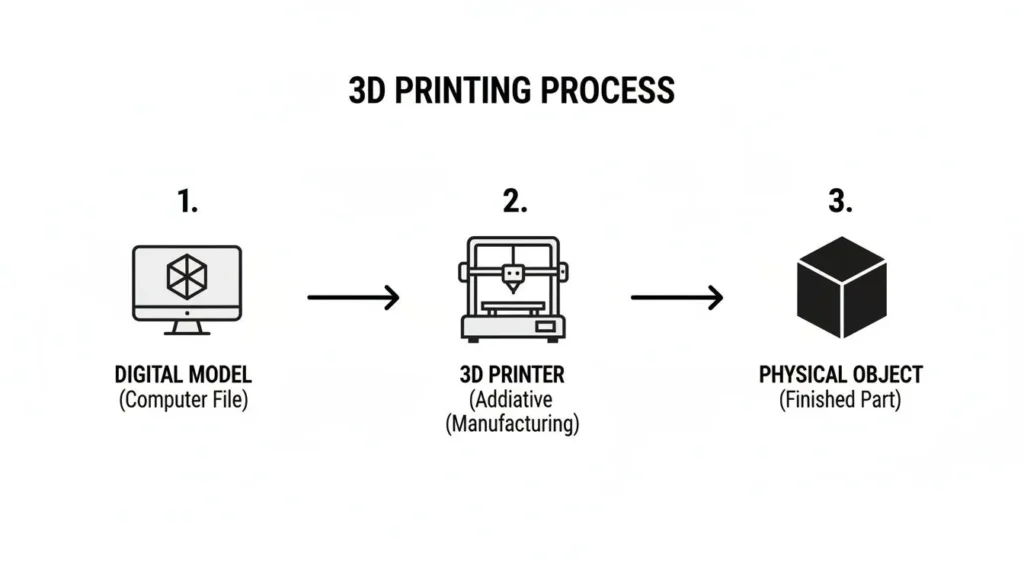
Let’s walk through how each step works, from the blueprint to the final object.
Stage 1: Modeling The Digital Blueprint
Everything begins with a 3D model. This is the digital blueprint for whatever you want to print. You generally have two options here: make one yourself or find one that’s already been made.
Designing your own model means using Computer-Aided Design (CAD) software. There’s a huge range of tools available, from super accessible web apps like Tinkercad to powerful, professional programs like FreeCAD or Fusion 360. This route gives you total creative control to design custom parts or unique creations from scratch.
If you don’t want to design, you can tap into a massive online community. Websites like Thingiverse, Printables, and MyMiniFactory are treasure troves, hosting millions of models that are ready to download. This means you can start printing cool, useful stuff right away, no design experience needed.
Stage 2: Slicing The Model For Printing
Once you have your 3D model file (usually a .STL or .3MF file), you can’t just send it straight to the printer. A printer doesn’t think in 3D shapes; it thinks in simple, flat layers. This is where slicing software comes into play.
Think of slicing like getting a loaf of bread pre-sliced at the bakery. The slicer software takes your whole 3D model and digitally cuts it into hundreds or thousands of ultra-thin horizontal layers.
For every single one of those layers, the software maps out a precise path for the printer to follow. This is also where you tell the printer how to print by adjusting some key settings:
- Layer Height: Thinner layers create a more detailed, smoother surface but take much longer to print.
- Infill: This determines how hollow or solid your object is on the inside, which impacts its strength, weight, and total print time.
- Supports: The slicer can automatically build temporary stilts to hold up any parts of your model that overhang, preventing them from drooping or failing mid-print.
The final output from the slicer is a file known as G-code. This is the universal language for 3D printers—a detailed script that tells your machine exactly where to move, how fast, and how much material to use at every single point. Combining digital information with the physical world is what makes technologies like 3D printing and augmented reality so interesting; you can explore the differences in our guide on what is augmented reality.
Stage 3: Printing The Physical Object
This last step is the most satisfying one to watch. You load your G-code file onto the printer—typically with a USB drive, SD card, or over a network—and hit “print.” The machine will then follow the G-code instructions with incredible accuracy.
After a brief warm-up, the printer gets to work, meticulously building your object one layer at a time from the ground up. Whether it’s melting plastic filament, using UV light to harden resin, or fusing powder with a laser, the core principle is the same. After a few minutes or even many hours, what was once just a file becomes a real, three-dimensional object you can pick up and use.
Understanding Core 3D Printing Technologies
Dive into the world of 3D printing, and you’ll quickly discover it’s not a one-size-fits-all technology. While every printer builds objects layer by layer, how they do it makes all the difference. This core process dictates the final object’s strength, appearance, detail, and cost.
Think of it like the difference between baking a cake and grilling a steak. Both are cooking, but the methods, tools, and results are worlds apart. To really get a handle on 3D printing, we need to break down the three most common technologies you’ll run into: Fused Deposition Modeling (FDM), Stereolithography (SLA), and Selective Laser Sintering (SLS).
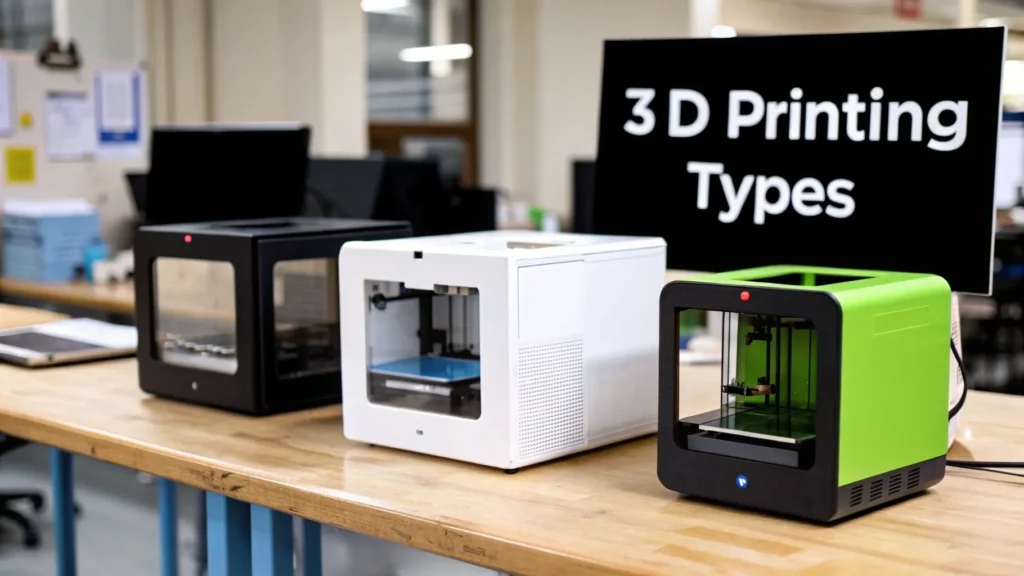
Fused Deposition Modeling (FDM): The Everyday Workhorse
FDM is almost certainly the type of 3D printing you’ve seen before. It’s the most common and accessible technology, especially for hobbyists, schools, and quick prototyping. This is the printer that works like a high-tech hot glue gun.
It takes a spool of plastic filament, feeds it through a heated nozzle to melt it, and then draws the shape of each layer onto a build plate. The plate then moves down a fraction of a millimeter, and the process repeats. Simple, effective, and affordable—with entry-level printers costing just a few hundred dollars—FDM is what brought 3D printing into our homes and classrooms.
- Primary Materials: Spools of thermoplastic filaments like PLA (a plant-based, biodegradable plastic), ABS (the same stuff LEGO bricks are made of), and PETG (known for its durability).
- Ideal Use Cases: Rapid prototypes, classroom models, hobbyist creations, and functional parts that don’t need a perfectly smooth, high-resolution finish.
Stereolithography (SLA): Drawing With Light
If FDM is a glue gun, Stereolithography (SLA) is more like drawing with a laser. This method uses a tank of liquid photopolymer resin and a precision UV laser. The laser traces the object’s layer onto the surface of the resin, and wherever the light hits, the liquid instantly hardens (or cures).
Once a layer is complete, the build platform shifts slightly, submerging the newly hardened layer back into the resin. The laser then gets to work on the next layer right on top of the last one, slowly pulling the solid object out of the liquid.
The real magic of SLA is its incredible precision. By using a focused beam of light, it can create objects with stunningly smooth surfaces and tiny, intricate details that FDM printers simply can’t match.
This level of detail makes SLA the go-to choice when looks and fine features matter most.
- Primary Materials: A huge variety of UV-curable resins, from standard prototyping resins to tough engineering-grade formulas, flexible materials, and even castable waxes for making jewelry.
- Ideal Use Cases: High-fidelity prototypes, molds for jewelry, dental models and surgical guides, and detailed miniatures for tabletop gaming.
Selective Laser Sintering (SLS): Fusing Powder Into Parts
Selective Laser Sintering (SLS) operates on a completely different principle. There’s no filament and no liquid resin. Instead, SLS printers use a bed of fine polymer powder. A powerful laser scans the cross-section of a part, heating the powder particles just enough to fuse—or sinter—them together into a solid layer.
After one layer is finished, a roller spreads a fresh, thin layer of powder over the top, and the laser sinters the next cross-section. What’s really clever about this is that the unused powder surrounding the part acts as a natural support structure. This allows you to print incredibly complex, interlocking, or hollow geometries without needing to build and remove temporary supports later. The final parts are exceptionally strong and durable, often ready for real-world use right out of the printer.
- Primary Materials: Mostly polymer powders, with nylon being the most common choice due to its excellent mechanical properties.
- Ideal Use Cases: Functional prototypes, end-use parts with complex internal channels, low-volume manufacturing runs, and durable components for industries like aerospace and medicine.
Comparing Common 3D Printing Technologies
Choosing the right technology can feel daunting, but it really boils down to what you need your part to do. Are you prioritizing cost, detail, or strength? This table gives you a quick side-by-side look at the big three.
| Technology | Material Type | Best For | Key Advantage |
|---|---|---|---|
| FDM | Thermoplastic Filament (e.g., PLA, ABS) | Rapid Prototyping, Hobbyist Projects | Low Cost & Accessibility |
| SLA | Photopolymer Resin | High-Detail Models, Jewelry, Dental | Exceptional Surface Finish & Precision |
| SLS | Polymer Powder (e.g., Nylon) | Functional Parts, Complex Geometries | Strength & Design Freedom |
As you can see, each method brings something unique to the table. Your project’s specific demands—whether it’s for a quick visual model or a robust, functional component—will ultimately point you to the right printer for the job.
The Expanding Universe of 3D Printing Materials
A great 3D printer is only half the story. The real magic—and the true potential of your prints—lies in the ever-expanding world of materials you can use. After all, a perfect design is only as strong, flexible, or useful as the stuff it’s made from.
Think about it like building with LEGOs. You start with the classic plastic bricks, which are great. But what if you could suddenly snap together bricks made of rubber? Or wood? Or even metal? That’s exactly what’s happened in 3D printing. We’ve moved far beyond basic plastics into a wild and wonderful range of materials for just about any job you can imagine.
Everyday Plastics: The Foundation of FDM Printing
For anyone just dipping their toes into 3D printing, especially with an FDM machine, the journey almost always starts with a couple of workhorse plastics: PLA and ABS. They’re popular for a reason.
Polylactic Acid (PLA) is the quintessential beginner-friendly material. It’s made from renewable resources like corn starch, so it has a much gentler environmental footprint than other plastics. More importantly, PLA is incredibly forgiving to print with, delivers fantastic detail, and is perfect for visual models, decorative pieces, and getting a quick feel for a prototype.
Acrylonitrile Butadiene Styrene (ABS) is what you reach for when you need a little more muscle. This is the same tough, impact-resistant plastic that official LEGO bricks and car dashboards are made of. It handles higher temperatures than PLA, making it a solid choice for functional parts that need to survive some real-world stress or heat.
The material you choose fundamentally changes what your printed object can do. A model printed in PLA might be a great display piece, but the same model printed in a high-temperature nylon could become a functional gear in a machine.
Specialized Polymers For Functional Needs
Once you get past the basics, a whole new world of specialized polymers opens up. These are the materials that start to blur the line between a hobbyist prototype and a professional, end-use part.
- Thermoplastic Polyurethane (TPU): This is your go-to for anything that needs to be flexible and rubber-like. It’s perfect for printing things that have to bend, stretch, or absorb shock, like custom phone cases, vibration-dampening feet for machines, or soft-touch tool grips.
- Nylon: Known for its incredible toughness, durability, and low-friction surface, nylon is a true engineering-grade workhorse. It’s used to print rugged mechanical components like gears, living hinges, and other parts that need to stand up to repeated wear and tear without failing.
With these advanced materials, 3D printing really begins to compete with traditional manufacturing for making final, usable products. Their specific performance traits allow you to produce durable goods on demand.
Exotic Composites and High-Performance Materials
Now we’re getting into the really cool stuff. The leading edge of 3D printing involves composite materials that blend plastics with other elements to create entirely new properties.
For instance, wood-filled filaments mix fine wood fibers into a PLA base. The resulting prints look, feel, and even smell a bit like real wood. You can sand them, stain them, and finish them just like a piece of lumber. Similarly, carbon fiber-filled filaments infuse a polymer base with chopped carbon fibers, creating parts that are dramatically stiffer, stronger, and more lightweight than the plastic alone.
At the very top end, industrial printers can work with pure metals like titanium and aluminum. Using powerful processes like Selective Laser Sintering (SLS), these machines fuse metal powder together, layer by layer. This creates impossibly complex, lightweight, and incredibly strong parts for aerospace, custom medical implants, and high-performance race cars. It’s a stunning example of how far 3D printing has come—from plastic trinkets to mission-critical metal components.
How 3D Printing Is Changing Our World
The real story of 3D printing isn’t about the tech itself—it’s about the incredible ways it’s reshaping countless industries. What started as a niche tool for making prototypes has become a go-to for solving complex problems and bringing new ideas to life. From hospitals to high-tech factories, additive manufacturing is opening doors that were firmly shut just a decade ago.
These real-world examples show that understanding 3D printing means seeing how it directly changes lives and pushes boundaries. This technology is far from a novelty; it’s a practical tool with tangible benefits.
Revolutionizing Healthcare
Nowhere is the impact of 3D printing felt more personally than in healthcare. The ability to create perfectly tailored, one-of-a-kind objects has kicked off a new era in patient-specific care.
Instead of ill-fitting, mass-produced items, clinicians can now 3D scan a patient’s limb and print a lightweight, custom-fit prosthetic that’s both more comfortable and more functional. This approach is not only changing lives but is often more affordable, making advanced care accessible to more people around the globe.
In surgical suites, doctors are using 3D-printed replicas of a patient’s actual organs to plan and practice complex operations. Holding a precise model of a heart or kidney before making the first incision allows surgeons to anticipate challenges, reduce time in surgery, and improve patient outcomes.
This level of personalization extends to dental work, where custom-printed crowns, bridges, and surgical guides are quickly becoming standard practice. The fusion of medical imaging and 3D printing is a perfect example of how different technologies can combine for amazing results, much like the advancements explored in our article on nanotechnology applications in medicine.
Accelerating Automotive Innovation
The automotive world, defined by speed and precision, has fully embraced 3D printing as a core part of its design and manufacturing cycle. Car companies now use it to rapidly create and test new part designs, dramatically shortening the time it takes to get from a concept sketch to a production vehicle.
In this fast-paced industry, 3D printing’s market share is expected to hit a dominant 30.6% by 2026. Think about it: where engineers once waited weeks for a new prototype from a mold, they can now use technologies like FDM to produce a functional test part overnight. This agility has been shown to speed up development cycles by an incredible 50-70%, allowing for more innovation in less time. You can read more about these findings in the automotive 3D printing market.
It’s not just for prototypes, either. Manufacturers are also printing custom jigs, fixtures, and tools for the assembly line, creating specialized solutions that make the work more efficient and ergonomic for employees.
Empowering Creativity and Education
The influence of 3D printing also runs deep in the creative and educational fields, giving people powerful new tools for expression and learning.
- For Artists and Designers: Jewelers, sculptors, and digital artists are crafting intricate geometries and complex forms that would be impossible to make by hand. This freedom is fueling a new wave of artistic expression limited only by the creator’s imagination.
- For Students and Educators: In schools, 3D printers are turning abstract concepts into physical objects that students can actually hold and inspect. A biology student can print a detailed model of a cell, while an engineering student can design and test a new gear mechanism, turning learning into a hands-on, interactive experience.
By making complex ideas physical, 3D printers inspire curiosity and give the next generation the skills they need to become tomorrow’s innovators. From a life-saving surgical model to a simple classroom teaching aid, 3D printing is proving to be a versatile tool that reshapes our world, one layer at a time.
Weighing the Pros and Cons of 3D Printing
To really get a feel for 3D printing’s place in the world, you have to look at the whole picture. It’s an incredible technology, for sure, but it’s not a magic fix for every problem. Knowing when to use it versus when to stick with traditional methods comes down to understanding both its strengths and its weaknesses.
Let’s cut through the hype and look at where this technology truly shines—and where it still has some growing to do.
The Game-Changing Advantages
Most of the big wins with 3D printing come down to speed, customization, and the ability to create things that were once flat-out impossible. It’s this combination that has made it such a fixture in so many industries.
Unmatched Design Freedom: Imagine trying to build something with your hands tied. That’s often what traditional manufacturing feels like, limited by the constraints of molds and cutting tools. 3D printing unties those hands, letting designers create wild, complex shapes, internal support lattices, and flowing, organic forms that simply couldn’t be made in one piece before.
Cost-Effective Customization: With old-school manufacturing, making just one custom item is a nightmare of expensive, one-off tooling. 3D printing changes the game completely. The cost to print a single, personalized part is the same as printing a standard one. This has unlocked mass personalization for everything from custom medical implants to one-of-a-kind sneakers.
Rapid Prototyping and Iteration: This is the advantage that first put 3D printing on the map. An engineer can dream up a part in the morning, print it overnight, and be holding it in their hands the next day. This ridiculously fast feedback loop—where you can tweak a design and test it almost immediately—has slashed development time and pushed innovation into overdrive.
At its core, 3D printing isn’t just about making things. It’s about turning a digital thought into a physical object almost instantly, closing the gap between idea and reality.
- On-Demand Production: Why keep a massive warehouse full of parts you might need? With 3D printing, companies can produce parts only when an order comes in. This “just-in-time” model gets rid of huge inventory costs and dramatically cuts down on waste. You only make what you need, right when you need it.
The Current Challenges and Limitations
For all its strengths, 3D printing isn’t perfect. It’s these limitations that explain why you don’t see it being used to crank out millions of simple, identical products.
Slower Speeds for Mass Production: While it’s a champion for prototypes and small batches, 3D printing just can’t keep up with something like injection molding when you need to produce thousands or millions of the same item. For sheer volume, traditional methods still have a massive speed advantage.
Material and Strength Limitations: The library of 3D printing materials is growing every day, but printed parts sometimes just aren’t as tough as their traditionally made cousins. The layer-by-layer build process can create weak points along those lines, making them a poor fit for certain high-stress jobs without some clever design work to compensate.
Post-Processing Requirements: A printed part rarely comes off the machine ready to go. More often than not, it needs some cleanup. This could mean snapping off support structures, sanding down surfaces for a smooth finish, or curing a resin part under UV light to fully harden it. These extra steps add time and labor, which naturally impacts the final cost and how quickly you can get the part out the door.
Answering Your Top 3D Printing Questions
Jumping into 3D printing can feel like a lot at first, and it’s totally normal to have questions. The tech might seem complicated on the surface, but you’d be surprised how easy it is to get started. Let’s tackle some of the most common questions people have when they’re new to this fascinating world.
How Much Does A 3D Printer Actually Cost?
The cost of a 3D printer is all over the map, which is great news because it means there’s a machine for just about any budget. The market really breaks down into three main tiers, each serving different kinds of users.
For anyone just dipping their toes in, you can find a solid hobbyist printer for as little as $200 to $500. These are perfect for getting the hang of things, printing fun models, or even making small parts for projects around the house. It’s a fantastic, low-risk way to explore 3D printing without a huge financial commitment.
If you find yourself needing more power, better reliability, or the ability to print bigger objects, you’ll be looking at “prosumer” models. These printers typically run between $1,000 and $5,000. They bring upgrades like faster print speeds, multi-material printing, and tougher construction, making them a go-to for serious makers and small businesses.
At the very top end, you have industrial-grade machines built for serious manufacturing. These printers can handle materials like metal, carbon fiber, and other high-performance polymers. Their price tags can easily stretch into the tens or even hundreds of thousands of dollars, reflecting their role in creating production-ready parts for the aerospace, automotive, and medical industries.
Is 3D Printing Hard To Learn?
It’s more accessible than ever, but yes, there’s a learning curve. The best way to think about it is like picking up a new hands-on hobby, maybe like woodworking or photography, not like learning to code. While the technology itself is complex, modern printers are built to be as user-friendly as possible.
Most beginners are shocked to find they can get their first good print just a few hours after opening the box. That’s thanks to a few key things:
- Intuitive Software: Modern slicer programs have clean, simple interfaces with presets that get you printing right away.
- Massive Online Communities: If you hit a snag, someone else has been there before. Forums, YouTube, and Facebook groups are packed with experts and fellow enthusiasts happy to help you figure it out.
- Countless Tutorials: From setting up your printer to mastering advanced design tricks, there are thousands of free video and written guides to walk you through everything.
The basic act of downloading a model and hitting “print” is pretty straightforward. The real skill comes from learning to troubleshoot a failed print, tweaking your slicer settings to get that perfect finish, and, eventually, designing your own custom parts from scratch.
What Software Do I Need For 3D Printing?
To get going, you only need one essential piece of software: a slicer. This program is the middleman between your 3D model file and your printer. It “slices” the digital model into hundreds of thin layers and generates the G-code, which is the instruction file your printer reads to build the object.
Happily, many of the best and most popular slicers are completely free. You can’t go wrong with any of these:
- Ultimaker Cura: A powerhouse that’s compatible with most printers and has settings for both beginners and pros.
- PrusaSlicer: Famous for its powerful features and excellent results, especially if you have a Prusa printer.
- Bambu Studio: A newer slicer that’s gained a huge following for its simplicity and slick cloud integration with Bambu Lab printers.
Once you want to go beyond just downloading models, you’ll need CAD (Computer-Aided Design) software. For absolute beginners, web-based tools like Tinkercad are a fantastic starting point. It’s free, super easy to learn, and lets you build things by combining simple shapes. As your skills grow, you can move on to more powerful free options like FreeCAD or professional-grade subscription software. For anyone keen on the latest advancements, keeping up with the best tech news websites can offer great insight into new software and hardware hitting the market.
At maxijournal.com, we’re dedicated to bringing you clear and engaging content across a wide range of topics. Explore more of our articles on science, technology, and more at https://maxijournal.com.
Discover more from Maxi Journal
Subscribe to get the latest posts sent to your email.