You open your banking app for something routine, then spot a charge you don’t recognize at first. After a few seconds, it clicks. It’s that streaming app, workout plan, news trial, or productivity tool you meant to cancel weeks ago.
That moment is irritating for a reason. The charge feels small enough to ignore, but annoying enough to stick in your head all day. You know you signed up quickly. You also know canceling probably won’t be nearly as smooth.
The problem isn’t just forgetfulness. The subscription economy is projected to reach $1.5 trillion by 2025 after growing 600% over the past decade, and that expansion has gone hand in hand with subscription fatigue and growing regulatory pressure on companies to make cancellation easier, as summarized by Shortform’s writeup on subscription fatigue and the FTC’s click-to-cancel push.
A lot of guides stop at “log in and click cancel.” That advice is incomplete. Cancellations usually happen in one of three environments:
- on the company’s own website
- inside an app store account
- through a payment processor such as PayPal
If you use the wrong route, you can think you canceled when you only deleted the app, closed the tab, or turned off emails. Then the next billing date arrives and the charge lands again.
This guide is built for that reality. It’s practical, blunt, and focused on what works when a company makes things harder than they need to be. You’ll learn how to find every subscription first, how to cancel based on where billing lives, how to send a clean cancellation request when support gets involved, and how to escalate when charges keep coming.
The Unwanted Charge and the Fight for Your Wallet
You check your bank app over coffee and spot a charge you were sure was gone. You log into the service, see no active plan, and assume the problem is solved. Then the same charge hits again because the billing was tied to Apple, Google, PayPal, or a different account than the one you just checked.
That is the fight.
Unwanted subscription charges usually survive because people cancel in the wrong place. A website login may show nothing while the active subscription is sitting inside an app store. A deleted app does not stop billing. A closed browser tab does not revoke a recurring payment authorization. An email preference change does not cancel a paid plan.
I have seen the same pattern over and over. The problem is rarely just “forgetting.” The problem is split billing systems, vague renewal notices, and cancellation flows designed to wear you down until the charge feels easier to ignore than to challenge.
Start with one rule.
Practical rule: Treat every cancellation like a financial dispute in progress. Save emails. Screenshot account pages. Record dates, times, and the exact path you used.
That paper trail matters because online subscriptions live in three different environments, and each one has its own failure points. Some are billed directly by the company. Others are controlled through Apple or Google. Others keep renewing through a payment processor such as PayPal even after you stop using the service.
If you miss that distinction, you can do everything that feels reasonable and still get billed.
This is also why small charges cause outsized frustration. The amount may not wreck your budget, but repeated renewals train you to tolerate money leaking out of your account. For freelancers and anyone tracking business software costs, keeping a tighter expense system helps catch this early. A good accounting setup for freelancers makes recurring charges easier to spot before they stack up for months.
The goal is not just to click “cancel.” The goal is to identify the billing source, end the recurring authorization there, and keep proof in case the company, app store, or processor says the subscription is still active.
That is how you get your wallet back under your control.
First Find Every Hidden Subscription You Pay For
A cancellation attempt usually fails before you ever click the cancel button. It fails when you miss the charge that is hiding under a parent company name, an old email address, or a billing route you forgot you used.
Build the full list first. Then act.
Audit your bank and card statements
Start with the accounts that paid the bill. Bank and card statements are harder to argue with than memory, app icons, or a half-used inbox search.
Review at least the last few months line by line. Annual plans, paused memberships, and free trials turned paid plans often show up only once in a while, which is why a quick glance misses them.
Watch for patterns like these:
- The same merchant name repeating every month
- Charges that hit around the same date each cycle
- Descriptors that do not match the brand you remember using
- Low-dollar charges you kept ignoring because they did not feel urgent
Create a working list with five columns:
| Subscription | Amount | Billing date | Payment method | Where you think it was purchased |
|---|---|---|---|---|
| Name on statement | As shown | Approximate renewal date | Card, PayPal, Apple, Google | Website, app, unknown |
That last column does real work. It helps you sort each charge into one of the three cancellation environments that matter later: direct billing, app store billing, or payment processor billing.
Search your email like a receipt archive
Statements tell you that money left. Email usually tells you who set the rules.
Search your inbox, promotions tab, spam folder, and any older email accounts you may have used when you signed up. Use terms such as:
- welcome
- subscription
- trial
- renewal
- receipt
- invoice
- membership
- your plan
- auto-renew
- billing
More targeted searches save time:
- Brand name + receipt
- Brand name + renewal
- Brand name + invoice
- from:paypal subscription
- from:apple receipt
- from:google play order
- free trial
- will renew
A good receipt email usually answers one question that matters most at this stage: where is the billing managed?
In practice, you will usually find one of three setups:
- The company billed you directly through its website
- Apple or Google controls the subscription
- PayPal or another processor holds the recurring payment authorization
That distinction is the difference between a five-minute cancellation and an hour wasted in the wrong account menu.
Don’t confuse account access with active billing
People often log into a service, see no plan page, and assume the subscription is gone. That is how charges keep running.
The billing may sit under a different email address. The purchase may have happened in the mobile app, not on the website. The merchant may still be charging through PayPal even though your account inside the service looks inactive. In some cases, a card replacement does not stop the subscription because the billing relationship continues through updated card credentials.
If the charge is still posting, treat the subscription as active until you find the exact billing source.
Decide whether a subscription tracker is worth it
Subscription trackers can help if your spending is scattered across multiple cards, app stores, and business accounts. They are less useful if you only have a short list and can verify each charge yourself in one sitting.
The trade-off is simple:
- Useful when: You manage a long list of recurring charges or mix personal and work spending
- Less useful when: A manual review of statements and receipts gives you a clear list
- Potential downside: Some cancellation or concierge-style savings tools may charge fees, which can wipe out the benefit if you are only cutting a few small subscriptions
For freelancers and solo operators, software subscriptions often blend into normal overhead. Separating business tools from personal subscriptions gets easier when expenses are categorized cleanly in accounting software built for freelancers.
Build one cancellation list before you act
Finish the inventory before you cancel anything. Randomly closing accounts as you find them is how people miss the annual plan, forget the PayPal authorization, or lose track of what was resolved.
Use this checklist:
- List every recurring charge from your statements
- Match each one to a receipt, renewal email, or account page
- Mark the billing route as website, Apple, Google, PayPal, or unknown
- Write down the next renewal date
- Flag annual plans and higher-cost subscriptions first
- Take screenshots of active billing pages before making changes
This step is tedious. It also prevents the most common mess: one canceled service, two missed renewals, and no proof of what you already turned off.
Canceling on Websites App Stores and Payment Gateways
You click “cancel” on the company’s website, close the tab, and assume the charge is dead. Then the next statement lands and the subscription is still billing. In practice, this usually happens for one reason: you tried to cancel in the wrong place.
Online subscriptions usually live in one of three billing environments. The company bills you directly. Apple or Google bills you through the app store. Or a payment processor like PayPal holds the recurring authorization. If you identify the billing route first, cancellation gets much faster and cleaner.
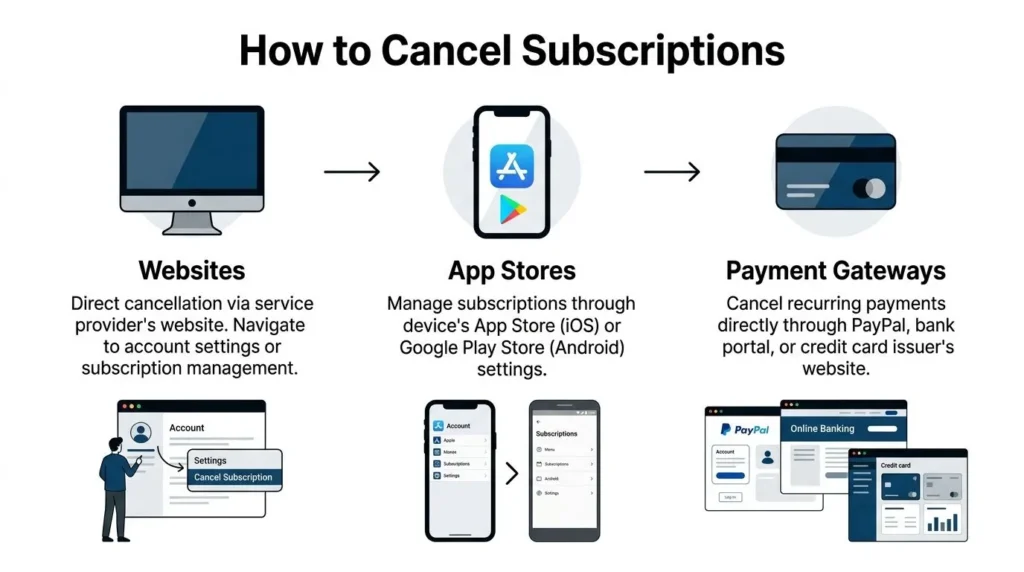
Cancel direct on the company website
Website billing is usually the simplest path, but plenty of companies bury the controls. The account menu may sit in one area while payment settings live somewhere else entirely.
Check these places after logging in:
- Account settings
- Billing
- Subscription
- Membership
- Plans
- Manage account
- Privacy or account controls
- Help center article linked from billing page
Some companies also hide subscription controls inside legal or account-management pages. If you hit a dead end, scan the company’s account and privacy policy examples to spot the terms it uses for billing permissions, account closure, and renewal settings.
Use this sequence:
- Open the billing page first. Support comes later if needed.
- Check the renewal status. Look for “active,” “renews on,” “auto-renew on,” or “next billing date.”
- Choose cancel, end membership, or turn off auto-renew.
- Skip downgrade offers if your goal is to stop charges.
- Reach the final confirmation screen.
- Save proof right away. Keep screenshots and the confirmation email.
Watch for false exits. Deleting the app, deleting your profile, or clearing saved payment details often leaves the subscription active. A real cancellation ends with plain language stating that renewal has stopped and showing the date access will end.
Some companies still force chat or phone cancellations. Use the channel they require, but keep records. Take screenshots, note the time, and save transcripts.
A short video walkthrough can help if you’re dealing with a stubborn interface:
Cancel through Apple App Store or Google Play
App store subscriptions trip people up because the service website may show nothing useful at all. If Apple or Google processes the payment, the company often cannot cancel it from its side.
A significant share of subscribers report trouble with app store cancellations, especially when the app redirects them away from billing controls and into device-level account menus. Start with the store account tied to the purchase, not the app itself.
Apple subscriptions
If the receipt came from Apple, cancel inside your Apple account.
Typical route:
- Settings
- Your name / Apple ID
- Subscriptions
- Select the app
- Cancel Subscription
Check three things before you stop:
- the correct Apple ID is signed in
- the subscription is still active rather than already expired
- the access period end date matches what Apple shows after cancellation
Removing the app from your iPhone does nothing to the billing.
Google Play subscriptions
If the charge came through Google Play, use the Google account that made the purchase.
Typical route:
- Profile icon
- Payments & subscriptions
- Subscriptions
- Choose the app
- Cancel subscription
If the subscription does not appear, check:
- whether you are in the right Google account
- whether the purchase was made on another email
- whether the merchant billed you directly on its website instead
What works best in app store cancellations
- Use the store account, not the app menu
- Check active subscriptions and purchase history together
- Save the cancellation screen
- Keep the original receipt email
- Confirm whether access continues until period end
Cancel recurring billing through PayPal and similar gateways
Payment processors create a separate problem. The merchant may say your account is closed while the billing authorization inside PayPal is still active. That leaves room for another charge or a dispute over whether cancellation was completed.
Look for terms such as:
- Automatic payments
- Preapproved payments
- Manage automatic payments
- Recurring billing
- Payment authorizations
Then do the processor-side cancellation:
- Open your PayPal settings
- Find automatic or recurring payments
- Select the merchant
- Review the payment status
- Cancel the authorization for future charges
- Save the confirmation page
After that, return to the merchant account and cancel there too if the option exists. Two records are better than one. One shows you ended the service. The other shows you revoked billing permission.
Which route should you use first
Use the receipt, not your memory. The sender of the billing email usually tells you exactly where cancellation has to happen.
| What you found | Best first move | What to save |
|---|---|---|
| Website receipt from the company | Cancel on the company site | Confirmation page and email |
| Apple receipt | Cancel in Apple subscriptions | Screenshot of Apple status |
| Google Play receipt | Cancel in Google Play subscriptions | Screenshot and receipt |
| PayPal recurring payment | Cancel authorization in PayPal, then merchant account | PayPal confirmation and merchant message |
| Unknown billing origin | Check statements, inbox, then app stores | Full record of each check |
The safest outcome is cancellation in the correct billing environment plus written proof. That combination gives you the best position if the charge comes back and you need support, a refund request, or a card dispute later.
The Art of the Cancellation Request and Securing Refunds
Friday night, you finally decide to stop the charge. You log in, click around, and instead of a clean cancel option you get a chat bot, a contact form, or a support page that keeps steering you toward “pausing” instead of ending billing.
A written request fixes two problems at once. It gives the company clear instructions, and it creates a record you can use later if the charge posts again or you need a refund.
What a strong cancellation message does
Support teams respond better to a request that is specific and narrow. Ask for the cancellation, ask for auto-renew to be turned off, and ask for written confirmation. Do not bury the request inside a long complaint or your life story.
Include these details:
- your full name
- account email
- service name
- request to cancel immediately or at the end of the current billing period
- request for written confirmation
- date sent
One more detail matters. Name the billing route if you know it. If the subscription was billed through Apple, Google Play, PayPal, or the company directly, say so. That reduces the chances of support bouncing you to the wrong place.
Keep the first message short enough that support cannot plausibly misunderstand it.
Copy and paste template for cancellation
Use this for email, contact forms, or chat:
Hello,
I am requesting cancellation of my subscription for [service name] associated with [email address]. Please turn off auto-renew and confirm in writing that no future charges will be made.If access will remain active until the end of the current billing period, please confirm the exact end date.
If this subscription is billed through [Apple / Google Play / PayPal / direct website billing], please confirm that as well.
Thank you.
If the account is shared, add the account holder’s name and the billing email. Shared plans create avoidable delays because support often claims they cannot find the subscription from a secondary user profile alone.
Copy and paste template for a refund request
Send this when a renewal hits after you tried to cancel, or when the company made cancellation harder than it needed to be:
Hello,
I am requesting a refund for the charge posted on [date] for [service name]. I attempted to cancel before renewal, or I canceled and was still charged.Please review the account, stop all future renewals, and confirm in writing whether this charge will be refunded. I have screenshots and account records showing my cancellation attempt.
Please reply in writing.
Thank you.
That wording works because it is firm without sounding reckless. It also signals that you kept evidence, which tends to improve the quality of the response.
What to document every time
If I expect a company to be difficult, I document the process before I click anything. That habit saves hours later.
Use this checklist:
- Screenshot the active subscription before canceling
- Screenshot each cancellation step
- Save confirmation emails
- Download chat transcripts if offered
- Take screenshots of live chat if downloads aren’t available
- Write down the date, time, and agent name
- Keep bank or card entries that show the charge
If you want an example of how clear companies spell out consent, billing terms, and account handling, these website privacy policy examples are useful for comparison. They will not cancel anything for you, but they help you spot vague language that companies later use to dodge refund requests.
Refund expectations that are realistic
Refunds are rarely automatic. They depend on timing, usage, policy, and where the payment was processed.
Your position is stronger when you ask soon after the charge, show that you tried to cancel, and have little or no use after renewal. It also helps when the cancellation path failed, sent you in circles, or never produced a confirmation.
Your position is weaker when you wait weeks, use most of the billing period, or cannot show any cancellation attempt. Annual plans are often harder to unwind for the same reason. Support can point to the renewal terms and say the charge was authorized.
Ask anyway.
A clean request, sent fast, with receipts and screenshots attached, gives you the best shot at a refund and puts you in a much better position if you later need to escalate.
When Cancel Does Not Work A Troubleshooting Guide
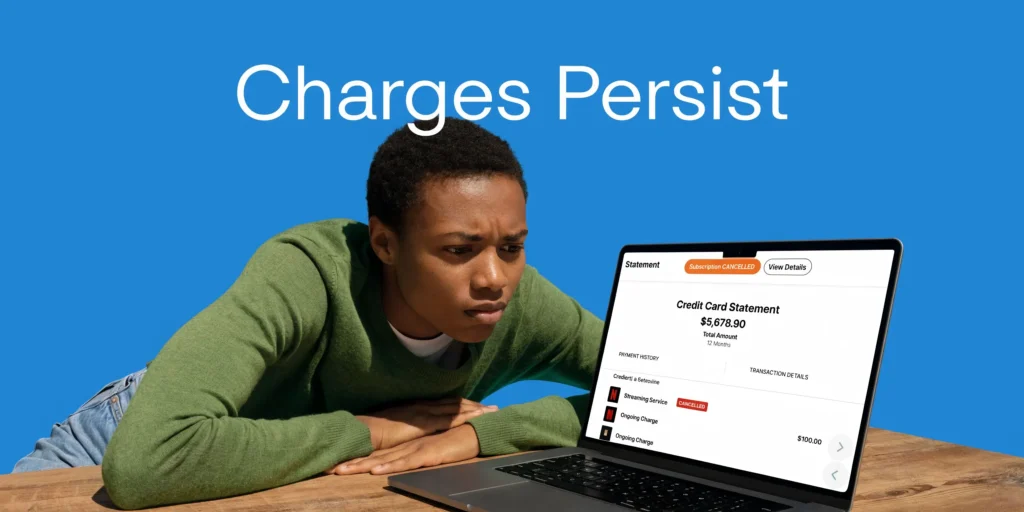
This is the part that sends people over the edge. You canceled. You saved the email. You thought it was done. Then another charge appears.
That’s not rare. In the US, FTC complaints over subscription traps rose 15% year over year in 2025, and a PWC survey found 25% of consumers report failed cancellations leading to over $200 in annual losses, according to this video summary discussing subscription trap complaints and dispute strategy.
Problem one the zombie charge
This is the charge that shows up after you already canceled.
Start with diagnosis. Usually one of these happened:
- the cancellation was never completed to the final confirmation page
- you canceled the account but not the billing authorization
- you used the wrong Apple, Google, or email account
- the company processed a renewal before your request was logged
- support said “we received your request” but never finished the action
Use this escalation path:
- Return to your evidence
- Find screenshots, emails, and timestamps.
- Contact the merchant again
- Use one firm message with proof attached.
- Request reversal and written confirmation
- Ask for both in the same message.
- Check the billing source
- Website, app store, or PayPal.
- If unresolved, dispute the charge with the payment provider
- Card issuer, PayPal, or bank.
Problem two endless retention loops
Some services cycle you through surveys, special offers, pause options, or chat agents who keep trying to save the account. Retention isn’t wrong. Refusing to honor a direct cancellation request is.
If you hit an endless loop:
- Stop answering optional survey questions
- Select the final cancellation option, not pause
- Use direct language in chat
- Repeat one sentence if needed
A useful line is:
I am not requesting a pause, downgrade, or offer review. I am requesting cancellation of future billing.
That sentence closes a lot of side doors.
Problem three support says there is no account
This usually means one of three things. Wrong email, wrong platform, or wrong payment path.
Check these before arguing:
| Symptom | Likely cause | Fix |
|---|---|---|
| Merchant says no active account | You subscribed with another email | Search inboxes and receipts again |
| Website shows no plan | Subscription is through Apple or Google | Check app store subscriptions |
| Merchant can’t find billing | PayPal or another processor handles renewals | Revoke recurring payment there |
| Charge label looks unfamiliar | Parent company or processor name | Match statement date to receipt date |
Problem four you canceled too close to renewal
Sometimes a charge posts while your cancellation is still being processed, or because the billing cycle already rolled over. That’s why timestamps matter.
When that happens, ask for:
- cancellation confirmation
- the exact date and time they received your request
- a courtesy refund or prorated review if applicable
- assurance that no future renewals remain active
The key is staying specific. “Please fix this” invites a vague reply. “Please refund the charge from [date] and confirm that auto-renew is off” is much harder to dodge.
When to file a dispute
If the merchant stops responding, denies a documented cancellation, or keeps charging after you revoked permission, move to the payment layer.
Credit card dispute or chargeback
Prepare:
- cancellation confirmation
- screenshots of account status
- copy of your support messages
- transaction dates and amounts
- any proof that the merchant promised cancellation
Describe the issue plainly. Say you canceled recurring billing, kept documentation, and were charged again.
PayPal dispute
If PayPal was the billing route, open the relevant transaction or recurring payment area and submit the dispute with the same evidence set. Include both the merchant communication and the canceled authorization if you have it.
Bank intervention
For debit card charges, your bank may be able to block a merchant or issue a new card, but use that carefully. A replacement card doesn’t always stop every recurring tokenized payment. Ask specifically about stopping recurring merchant billing, not only replacing the card.
The fastest path is usually merchant first, payment provider second, regulator third.
When consumer complaints make sense
If a company ignores evidence or uses misleading cancellation flows, filing a complaint can help create pressure and a record. Depending on where you live, that may include consumer protection agencies or business complaint platforms.
This won’t always get your money back quickly. It can still be worth doing when a company’s conduct looks systematic rather than accidental.
The practical rule is simple. Escalate in layers. Merchant. Payment provider. Complaint channel. Don’t jump straight to the last step unless fraud is obvious.
How to Prevent Unwanted Subscriptions in 2026
You sign up for a free trial during lunch, tell yourself you will deal with it later, and three months from now it is still billing your card. That pattern is predictable. The fix is to make every subscription prove itself before it gets access to your money.
Prevention starts at signup, not at cancellation. The key question is simple: if this turns into a hassle, where will you have to cancel it? There are three common setups, and each creates a different kind of risk. A direct website subscription may hide the cancel button in account settings. An Apple or Google purchase may be controlled inside the app store, not the app itself. A PayPal billing agreement or similar payment processor setup can keep charging even after you stop using the service if you do not shut off the recurring payment at the billing source.
Buy with an exit plan
Before you subscribe, check four things in under a minute:
- Who controls the billing
- The company website, Apple, Google, PayPal, or another payment provider
- Where the cancel path lives
- Account settings, app store subscriptions, billing portal, chat, email, or phone
- When renewal happens
- Monthly is easier to recover from than annual
- Whether the renewal terms are clear
- Price after trial, renewal date, and refund policy
If any of that is vague, hidden, or scattered across multiple pages, treat it as a warning sign.
Set the trap before they do
The best reminder is the one you create the moment the receipt hits your inbox.
Use whatever you already trust: a phone calendar, task app, email snooze, or budgeting reminder. Set two alerts. One should land a few days before renewal. The second should land on the renewal date.
That second alert catches the common problem. People dismiss the first reminder, get busy, and miss the charge window anyway.
Use payment methods that limit the damage
A dedicated card for subscriptions makes cleanup easier. So does a separate email address or alias for trials and recurring services. You want all billing notices in one place, not mixed into everyday clutter.
If your bank offers virtual cards, merchant locks, spending caps, or recurring charge controls, use them for free trials and unfamiliar brands. Those tools will not replace proper cancellation, but they reduce the fallout when a company makes the process harder than it should be.
For digital buyers and online sellers alike, these habits line up with broader ecommerce billing and transparency best practices.
Review subscriptions like a bill, not a habit
A subscription is not a one-time decision. It is a recurring charge that needs a recurring review.
Once a month, spend ten minutes checking active subscriptions and asking:
- Did I use this in the last 30 days?
- Would I sign up again today at this price?
- Is there a cheaper replacement or free version meeting the same need?
- Am I keeping this because it helps me, or because canceling sounds annoying?
That last question exposes a lot of waste.
The goal is not a perfect system. The goal is to stop unwanted charges before they turn into a refund fight across a website, an app store, or a payment processor. A small monthly review does more for your finances than memorizing cancellation steps after the money is already gone.
Discover more from Maxi Journal
Subscribe to get the latest posts sent to your email.