An effective FAQ page isn’t just a list of random questions and answers. It’s a carefully curated resource built on understanding what your audience really wants to know and why. The trick is to structure that information so it’s not only helpful but also incredibly easy to find. Get this right, and you transform a simple page into a powerhouse for building trust and saving everyone time.
The Hidden Power of a Strategic FAQ Page

Think an FAQ page is just a boring, obligatory part of a website? Think again. A well-crafted FAQ page is one of the most underrated assets you can have. It builds trust, saves precious time, and can even give your SEO a nice boost. It essentially acts as your silent, 24/7 support agent, guiding readers and solving their problems before they even have to ask.
For a content-heavy site like an online magazine, the impact is huge. Imagine your team no longer having to spend hours answering the same emails about submission guidelines, subscription quirks, or content usage rights. A good FAQ page handles all of that on autopilot.
More Than Just a Q&A
This frees up your editors and writers to do what they do best: create incredible content. The data really drives this home. We’ve seen that a solid FAQ page can slash repetitive support queries by up to 50%. For an independent magazine like maxijournal.com—which juggles daily posts on everything from gaming to fashion—deflecting half of all routine inquiries is a massive win.
But the benefits go far beyond just lightening the support load. A smart FAQ page is a multi-purpose tool that delivers on several fronts.
The table below breaks down the key advantages, showing how a thoughtfully designed FAQ page can become one of your most valuable assets.
Core Benefits of a Strategic FAQ Page
| Benefit Area | Impact for Your Website | Example for maxijournal.com |
|---|---|---|
| Builds Reader Trust | Proactively answering questions shows you understand your audience, building credibility. | A clear answer on how maxijournal.com handles sponsored content builds trust with readers who value editorial integrity. |
| Improves User Experience (UX) | A central hub for information prevents frustration and keeps users from bouncing. | A user wondering about writer submission guidelines finds a direct answer instead of getting lost in the site menu. |
| Boosts SEO | Directly targets long-tail keywords—the very questions people type into search engines. | An FAQ entry like “How do I pitch a travel story to maxijournal.com?” can rank for that exact search query. |
| Creates Internal Linking | Guides users to deeper content, like detailed articles, tutorials, or policy pages. | An answer about a specific gaming review could link directly to the full article, increasing page views and time on site. |
When you really dig in, it’s clear that an FAQ page isn’t just a static list; it’s a dynamic tool that strengthens your entire operation and improves your relationship with your readers.
A great FAQ page is a sign of respect for your user’s time. It signals that you’ve listened to their common hurdles and have invested in creating a direct path to the solution.
Ultimately, learning how to create an FAQ page is about much more than just ticking a box on your website checklist. It’s a core part of your customer service best practices, demonstrating a commitment to clarity, support, and a genuinely helpful user experience.
Finding the Questions Your Audience Actually Asks

The best FAQ pages aren’t built on guesswork. They’re built on real, recurring questions from your actual audience. Your job isn’t to invent questions you think people have, but to become a detective and uncover what they’re already asking.
Forget brainstorming in a conference room. The most valuable information is already flowing through your existing channels. You just need to know where to look.
Start With Your Inbox and DMs
Your first stop should always be the places where people directly contact you. This is where you’ll find the unfiltered, unvarnished truth about what confuses or frustrates your readers. For a web magazine like maxijournal.com, your inbox is probably a goldmine of questions about content usage, submission guidelines, or subscription problems.
Get in touch with whoever handles your main contact email or customer service. Ask them a simple question: “What are the top five questions you have to answer over and over again?” They’re on the front lines and will know exactly what topics are causing the most friction.
Here are the best places to start digging:
- Support Inboxes: Sift through emails and contact form submissions. Are you seeing constant questions about writer guidelines, image permissions, or account access? Those are your first FAQ candidates.
- On-Site Search Data: Look at what people are typing into your website’s search bar. If you see repeated searches for “guest post,” “contact editor,” or “cancel subscription,” you have a clear signal of what information is hard to find.
- Social Media: Don’t ignore the comments and DMs on your social profiles. People often turn to social media for quick answers, and their questions are usually direct and to the point.
Collecting questions this way takes the guesswork out of the process. You’re no longer assuming; you’re using actual data to build a page that genuinely helps people.
Use SEO Tools to Read Your Audience’s Mind
Beyond your own website, you can get incredible insights from search engine data. Tools like Google Search Console are perfect for this, showing you the exact queries people use on Google to land on your site.
Inside the “Performance” report, you can filter your queries for question-based keywords—think terms that include “how,” “what,” or “can I.” This is how you find specific user needs you might have otherwise missed.
For a web magazine, you might discover search queries like, “can I reuse maxijournal images” or “how to submit music for review.” These aren’t just random questions; they’re high-intent queries from people trying to engage with you. Answering them clearly on an FAQ page is a massive win for both your user experience and your SEO.
Answering a question before it’s asked is the highest form of customer service. Your data tells you exactly what those questions are.
Finally, try a little hands-on empathy. Put yourself in a new reader’s shoes and try to navigate your own site. See if you can figure out how to submit an article, find the right contact person, or understand your content rights. Any spot where you get stuck or feel confused is a prime opportunity for an FAQ.
Writing Answers That Are Genuinely Helpful
Once you’ve got your list of questions, the real challenge begins: writing answers that actually help. This is where you move from just providing information to solving problems, building trust, and showing readers you’ve got their back.
The best way to do this is to get out of your own head and into your reader’s. Use their language. If people are asking, “How do I pitch a story?” your answer should reflect that exact phrase. Don’t reframe it with corporate jargon like “Submission Process for Contributed Content.” It’s a small change that makes a huge difference in how relatable and findable your content is.
Write for Scanners, Not Readers
Let’s be honest—people don’t read websites; they scan them. Research from the Nielsen Norman Group has shown that 79% of users will scan a new page, looking for keywords and quick takeaways. Walls of text are the fastest way to make them click away.
Your job is to make your answers incredibly easy to digest. Aim for short, direct answers—two or three sentences is usually plenty. Think of it as a conversation: give the straightforward answer first, then provide a path to more detail if it’s needed.
Here are a few tips I always follow for scannable answers:
- If a question can be answered with a simple “yes” or “no,” start with that.
- Use bold text to make the most critical information pop.
- If you’re explaining a process, break it down into a bulleted or numbered list.
- Keep your sentences and paragraphs short. White space is your friend.
This isn’t about dumbing down your content. It’s about respecting your reader’s time and helping them find what they need without a struggle.
Maintain a Positive Tone, Even with Bad News
At some point, you’ll have to tackle tough topics. Maybe it’s a strict “no refunds” policy or restrictions on using your content. The trick is to deliver this news without sounding negative or accusatory.
Instead of a blunt “You cannot use our images without permission,” which immediately puts people on the defensive, try reframing it.
Good Example: “We’re thrilled you love our visuals! To ensure our photographers are properly credited, all images on maxijournal.com are protected by copyright. If you’re interested in using an image, please reach out to our permissions team for licensing options.”
See the difference? The policy is just as firm, but the tone is completely different. It explains the “why” behind the rule (respecting creators) and offers a helpful next step. This turns a potential conflict into a positive interaction, reinforcing that your brand is helpful and approachable.
Use Internal Links to Guide the User Journey
An FAQ answer should never be a dead end. Think of your FAQ page as a hub that connects users to deeper, more detailed information elsewhere on your site.
If a question really needs a longer explanation, just provide a brief summary in the FAQ answer and then link out to a full blog post or guide. This keeps your FAQ page clean and easy to scan, but still gives power users a path to more content.
For example, a question about contributing could be handled like this:
Question: How do I become a contributor for maxijournal.com?
Answer: We’re always looking for fresh voices! We accept pitches for original articles on science, tech, travel, and more. For the full breakdown of what we look for and how to format your pitch, please visit our official Writer’s Guidelines page.
This approach is a huge win. Your reader gets a quick answer, and you get to drive traffic to other key pages on your site. We use this technique to link writers to helpful resources, like our detailed guide on travel blog writing. It turns a simple Q&A list into a powerful tool for site navigation and user engagement.
You’ve put in the work to write fantastic, clear answers to your audience’s most pressing questions. But all that effort goes to waste if the page itself is a cluttered, confusing mess. The truth is, how you present your FAQs is just as important as the answers themselves.
A great FAQ experience is all about usability. It should feel intuitive, clean, and above all, respectful of your visitor’s time. The single most important design principle to remember is findability. If someone can’t find their answer fast, they’re gone.
Group Questions into Logical Categories
First things first: don’t just dump a massive list of questions on your visitors. That’s a surefire way to overwhelm them. Instead, take a step back and sort your questions into logical, thematic buckets.
Think about the natural groupings for your content. For a web magazine like maxijournal.com, this could look something like this:
- Author & Submission Guidelines: Everything related to pitching, payments, and editorial standards.
- Subscription & Account Management: Queries about billing, plan changes, or accessing paid content.
- Content Usage & Permissions: Info on image rights, article sharing, and copyright.
- General Site Information: Answers about the magazine’s mission, advertising, or how to get in touch.
By organizing your page this way, you immediately make it more approachable. A visitor can scan the headings and jump straight to the section that matters, completely skipping the rest. It’s a simple change that transforms a wall of text into a genuinely useful, structured resource.
Implement a Powerful Search Function
While categories are a great starting point, a prominent search bar is an absolute must-have. Many people will land on your FAQ page with a very specific problem they need to solve, and their first instinct will be to type it out. A search bar at the top of the page empowers them to do exactly that.
Just make sure your search tool is smart. It needs to be robust enough to understand variations in how people ask questions. For example, if a user searches for “cancel my plan,” the search should be clever enough to show the result for “How do I cancel my subscription?” This kind of functionality makes a huge difference in whether a user finds their answer or just gives up.
The real goal of FAQ design isn’t just to have answers on a page. It’s to create the fastest possible path to the right answer. Every single design choice should support that mission.
The best FAQ pages anticipate how different people look for information. Some will browse categories, while others will go straight to the search bar. Your job is to cater to both.
This simple framework below shows how to think about crafting the answers that will fill your well-designed page.
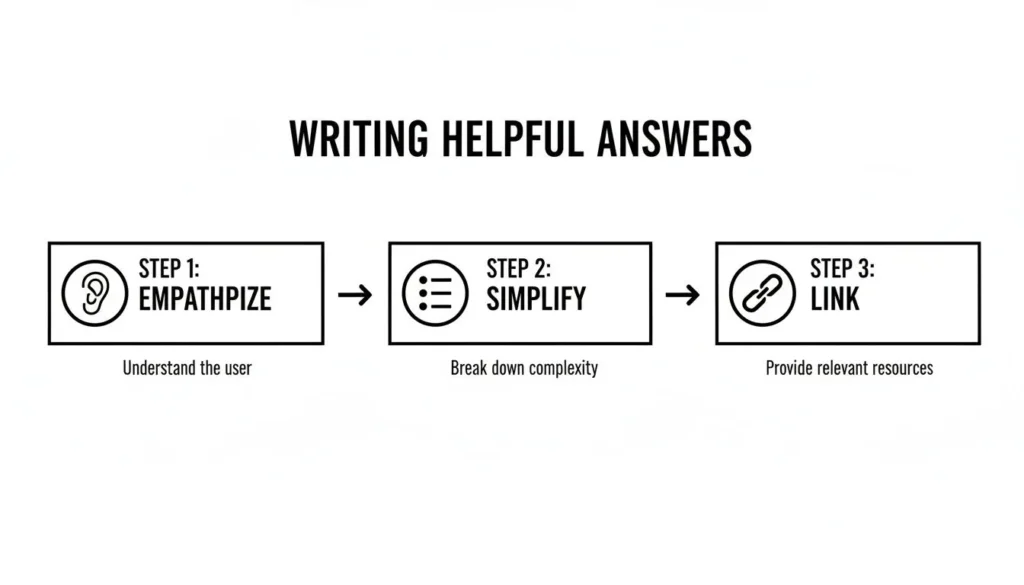
This process—empathize, simplify, link—is the perfect content complement to an intuitive design. It ensures your answers are as clear as your layout.
Create a Clean Interface with Accordions
One of the biggest design traps is visual overload. A long, scrolling list of open questions and answers quickly becomes a daunting wall of text. The best way I’ve found to solve this is by using accordions (also called toggles).
An accordion menu shows only the questions at first glance. When a user clicks a question, the answer neatly expands right below it. This is a game-changer for a few reasons:
- It cuts the clutter. The page instantly looks cleaner, letting users scan the list of questions without being overwhelmed.
- It sharpens focus. By revealing only one answer at a time, you help the user concentrate on the information they actually need.
- It makes scanning easy. Visitors can quickly read through the questions to find the one that matches their problem.
This interactive approach makes the page feel more dynamic and less like a static document. It’s a simple move that has a huge impact on usability, especially for any FAQ page with more than 10-15 questions.
Prioritize Web Accessibility
Finally, a truly user-friendly design is an accessible one. This isn’t an optional add-on; it’s a fundamental part of good design. Your FAQ page has to be usable by everyone, including people who rely on screen readers or other assistive technologies.
Make sure your design and code follow key accessibility practices:
- Proper Heading Structure: Use your HTML heading tags (H1, H2, H3) correctly to give the page a logical structure that screen readers can easily navigate.
- Keyboard Navigability: Every interactive element—from links to accordion toggles—must be fully functional using only a keyboard.
- Sufficient Color Contrast: Your text and background colors need enough contrast to be readable for users with low vision.
- Descriptive Link Text: Ditch generic links like “click here.” Use clear, descriptive text like “Read our full subscription policy” so users know exactly where they’re going.
By building your FAQ page around these core principles—categorization, search, accordions, and accessibility—you’ll create an experience that doesn’t just look good, but one that is genuinely helpful and inclusive for every visitor.
Using FAQ Schema to Win at SEO
Okay, you’ve put in the work to create a genuinely helpful FAQ page. That’s a huge win for your audience. The next step is making sure search engines like Google understand just how valuable that content is. This is where FAQPage schema becomes your secret weapon for SEO.
Think of schema markup as a specific vocabulary you add to your website’s code. It doesn’t change how your page looks to a human visitor, but behind the scenes, it’s giving search engines crystal-clear instructions. You’re essentially telling Google, “Hey, this page isn’t just a block of text—it’s a dedicated list of questions and their corresponding answers.”
When Google gets this signal, it can reward you with a rich result. You’ve definitely seen these. It’s when your answer appears in an expandable dropdown directly in the search results, right under your page link. This is a game-changer. Your standard blue link suddenly becomes an interactive, attention-grabbing feature that can dramatically boost your click-through rate.
How to Implement FAQ Schema Markup
Adding schema might sound like a job for a developer, but it’s gotten much more accessible. You don’t need to be a coding wizard to get it done. The most common method today uses JSON-LD, a script that you simply place in the <head> section of your page’s HTML. The easiest way to create this is with a free online tool.
Here’s how it usually works:
- Find a Generator: A quick search for “FAQ schema generator” will give you plenty of great, free options.
- Plug in Your Content: These tools have a simple form. Just copy and paste your exact questions and answers from your FAQ page into the fields provided.
- Generate the Script: With a single click, the generator will spit out the complete JSON-LD code you need.
- Add It to Your Page: Copy that code and paste it into the
<head>of your FAQ page’s HTML. If you’re using a CMS like WordPress, plugins such as Yoast SEO or Rank Math often have a dedicated block or section for adding schema, making it even easier.
For a web magazine like maxijournal.com, a question about submitting a guest post would be neatly packaged in the code, making it instantly understandable for search engine crawlers.
Following Google’s Guidelines
While FAQ schema is powerful, it comes with a few strict rules. Google is very protective of its search results, so you have to play by their guidelines to avoid being ignored or, worse, penalized.
Key Takeaway: The number one rule is that everything in your schema code must also be visible to the user on the page. You can’t use schema to stuff hidden keywords or questions—the content must match 100%.
Stick to these simple do’s and don’ts:
- Do use it for pages where the main focus is a list of questions and answers that you’ve written.
- Don’t use it for marketing or advertising. The answers must be informational, not a sales pitch.
- Do make sure the full text of every single question and answer in your schema is present on the page.
- Don’t apply it to forums or any page where users can submit their own answers. This schema is for authored content only.
To help you get familiar with the code you’ll be generating, here’s a quick breakdown of the essential properties you’ll encounter in the JSON-LD script.
FAQ Schema Markup Key Properties
This table provides an overview of the essential properties required for valid FAQPage schema markup, helping you structure your code correctly.
| Property | Description | Example |
|---|---|---|
| @type | Defines the schema type. For an FAQ page, this must be "FAQPage". | "@type": "FAQPage" |
| mainEntity | An array that holds all your individual question-and-answer pairs. | "mainEntity": [{...}, {...}] |
| name | The full text of the question being asked. | "name": "How do I submit an article?" |
| acceptedAnswer | An object that contains the answer for the corresponding question. | "acceptedAnswer": {...} |
| text | The full text of the answer to the question. | "text": "You can pitch your idea by..." |
Understanding these basic components will help you troubleshoot if anything looks off.
By taking the time to implement FAQ schema correctly, you’re not just organizing content—you’re turning a helpful page into a high-performance SEO asset. You’ll stand out on the results page, pull in more relevant traffic, and solidify your site’s reputation as an authority.
Making Sure Your FAQ Page Gets Seen
So you’ve hit “publish” on your shiny new FAQ page. That’s a huge step, but don’t close the tab just yet. An incredible FAQ page is useless if nobody can find it. Your next job is to make sure it gets seen, turning all that hard work into a resource people actually use.
Think of it like building a new landmark. Now you need to build the roads that lead people straight to it.
Weave It into Your Website’s Fabric
You need to place links to your FAQ page where people naturally look for help. It’s all about anticipating their next move.
The most obvious spots are your site’s header and footer. A footer link is pretty much standard practice, but don’t stop there. Pop a link into your main navigation menu, maybe under a “Help” or “Resources” section. This makes it impossible to miss.
Another fantastic, often overlooked spot is your contact page. Right before someone gives up and decides to email you, offer them a faster solution. A simple line like, “Looking for a quick answer? Check our FAQ page first!” can dramatically cut down on repetitive support emails. It saves your time and theirs.
Don’t make people dig for information. Put the link to your FAQ page in their direct line of sight—header, footer, and contact page. You’ll solve their problems before they even have to ask.
This isn’t just about reducing your workload; it’s about creating a fantastic user experience by providing instant answers.
Turn Your Support Team into FAQ Champions
Your support team is on the front lines every day. They know the common questions better than anyone, and they can become your FAQ page’s biggest promoters.
Get them into the habit of using the FAQ page as a tool. Instead of typing out the same answer for the tenth time, they can send a friendly, personal reply that includes a direct link to the specific question on the page.
This strategy is a double-win:
- The customer gets a fast, detailed answer to their question.
- You’re actively teaching them where to find information on their own next time.
Over time, this simple practice trains your audience to become more self-sufficient and transforms your FAQ page from a static document into a dynamic support tool.
Monitor, Measure, and Maintain
An FAQ page should be a living document, not something you create once and forget about. It needs regular care to stay useful.
Start by looking at your website analytics. Which questions get the most clicks? This data is pure gold—it tells you exactly what your audience’s biggest pain points are.
Set a recurring calendar reminder—maybe once a quarter—to review the entire page. Are the answers still correct? Have new products or features created new questions? Are there recurring themes in your support tickets that aren’t addressed yet? Keeping the content fresh and accurate is crucial for building and maintaining trust.
If you’re new to this, getting a handle on the basics of getting seen by search engines is a great place to start. You can dive deeper with our guide on SEO tips for beginners. An up-to-date and well-promoted FAQ page really is one of the most valuable assets for any website.
Common Questions About Creating FAQ Pages
Even after you’ve done your research and have a solid list of questions, a few tricky details always seem to pop up during the build. I’ve seen these same issues trip people up time and time again, so let’s get ahead of them.
People always ask me, “How many questions should I actually put on the page?” It’s a fair question, but there’s no magic number. The real goal is clarity, not volume.
If you only have 5-10 truly common questions, that’s perfectly fine. Resist the urge to pad it out with minor issues. A short, focused FAQ page that solves real problems is far more valuable than a bloated one nobody bothers to read.
I’ll say it again: quality beats quantity every single time. A focused page that solves a user’s problem instantly is always the goal.
Another big question I get is about the structure—specifically, whether to use a single page or break it up into multiple pages.
Should I Use One Page or Multiple Pages?
For the vast majority of sites, a single, well-organized page is the way to go. You can use design elements like accordions or toggles to keep the page clean and easy to scan, even if you have 20+ questions. This approach also consolidates all your SEO value into one authoritative URL, which Google tends to favor.
The exception? When you have a really complex service or a massive product line. If you’re looking at more than 50 questions that fall into very different categories—like “Student Accounts” versus “Educator Accounts”—then dedicated FAQ pages for each user group will create a much better experience.
Finally, don’t forget that an FAQ page is never “done.” It’s a living document that needs regular care. I always tell my clients to schedule a quick review every quarter to catch anything obvious. Then, plan a deeper dive twice a year, digging into support tickets and site search data to find new questions that have started popping up. This is how you keep your page genuinely helpful.
At maxijournal.com, we’re passionate about making information clear and accessible. You can see these principles at work in our daily articles covering a huge range of topics. Check us out at https://maxijournal.com.
Discover more from Maxi Journal
Subscribe to get the latest posts sent to your email.