The box says “educational.” Your child starts the game, skips the instructions, and spends the next session pressing every button at random. You’re left wondering whether you bought a learning tool or a colorful distraction.
That question matters more than a ranked list. The best educational games for Nintendo Switch give children repeated practice with a clear skill, useful feedback, and enough motivation to try again. Some teach reading, arithmetic, coding, or science directly. Others strengthen planning, spatial reasoning, communication, creativity, or persistence without looking like schoolwork.
This guide treats the Switch as a learning environment rather than a shelf of “educational” labels. You’ll see how to evaluate a title, match it to a child and a goal, use it at home or in a classroom, and tell whether learning is happening.
What Makes a Switch Game Educational
A parent often discovers the difference during the first ten minutes. The game promises numbers, letters, or science, but the child learns that rapidly tapping the same button produces rewards. The theme looks academic, yet the activity doesn’t require the child to read, reason, compare, remember, or make a meaningful decision.
An educational game creates a connection between the child’s action and the skill you want to develop. In a literacy activity, the child might match sounds to letters, trace symbols, or read instructions to move forward. In a mathematics game, the child may estimate quantities, recognize patterns, or choose an operation because the decision changes the outcome. The learning task sits inside the play loop, rather than appearing only in a title screen or marketing description.
Direct instruction and indirect learning
Direct instruction is easy to spot. A game teaches phonics, asks children to solve equations, introduces sequencing commands, or presents scientific systems that require explanation. These games can be useful when the content is accurate, the difficulty fits the child, and mistakes receive helpful guidance.
Indirect learning is less obvious but still valuable. A child who plans a farm, rotates a shape to fit a space, manages limited resources, or coordinates with a sibling practices skills that may support school and daily life. The game doesn’t need to display a worksheet for that practice to count. It does need to make the child think, choose, adjust, and try again.
The important distinction is between practice and exposure. A game may contain planets, words, or numbers without asking the player to understand them. Conversely, a puzzle game with no school subject may build reasoning through careful experimentation. Ask what the child must do repeatedly, not what the game happens to show.
Practical rule: If you can’t describe the child’s repeated action in a sentence, you probably can’t judge the game’s educational value yet.
Research supports a measured, rather than magical, view of game-based learning. A meta-analysis of 33 digital game-based STEM studies involving 3,894 participants found a statistically significant moderate positive effect compared with other instructional methods, with an overall effect size of 0.667, a 95% confidence interval of 0.520 to 0.814, and p < 0.001 in the published synthesis. That finding doesn’t prove that every Switch title teaches effectively. It does justify taking well-designed digital games seriously, especially when adults connect play to a specific learning goal.
For families comparing games with other learning resources, Tutorbase features can help organize broader tutoring and practice needs around the game rather than expecting one title to do everything. A Switch game may provide repetition and motivation, while conversation, books, hands-on materials, or guided lessons help children transfer the skill.
How the Switch Hardware Supports Learning
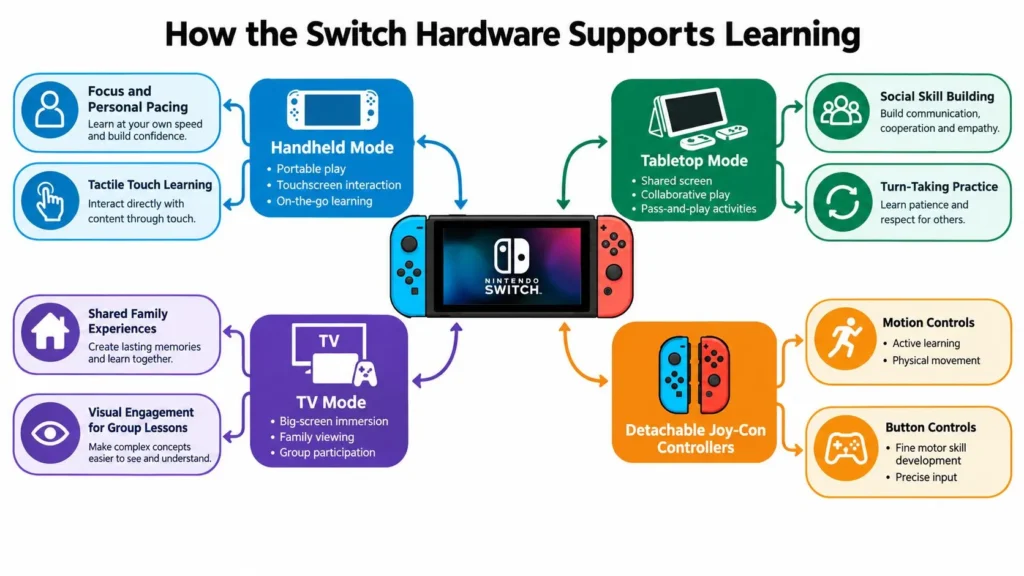
The Switch supports learning because it gives children more than one way to interact. A child can use a touchscreen in handheld mode, share a screen in tabletop mode, or play on a television with detachable Joy-Con controllers. Those choices affect who can participate and what kind of practice feels natural.
Match the input to the objective
For early literacy, a touchscreen can make tracing, symbol selection, and simple matching more immediate. A young child can touch a letter or image instead of managing several buttons. That doesn’t automatically make the activity educational, but direct touch can reduce unnecessary motor demands while the child focuses on the target skill.
For spatial learning, motion controls can connect physical movement with an on-screen result. Tilting, turning, or aiming may help a child reason about direction and position. Motion play can also support active participation, although families should check whether the game offers button alternatives for children who find movement controls difficult.
For problem-solving, physical buttons and sticks provide precise input. A child may need to choose a sequence, control timing, or adjust a plan after an unsuccessful attempt. The controller becomes part of the reasoning process, rather than a barrier between the child and the puzzle.
Nintendo lists the standard Switch handheld display at 1280×720, with TV output up to 1920×1080 at 60 frames per second. The OLED model keeps the 720p handheld resolution but uses a 7-inch OLED panel, according to Nintendo’s official technical specifications. A larger, higher-contrast screen can make small text, diagrams, and color-coded feedback easier to separate, particularly for a child who struggles with visual detail.
Choose for the hardware you own
Educational developers should design for the standard 6.2-inch, 720p LCD display, not only the OLED model. Families should apply the same test. Can your child read the instructions in handheld mode? Are symbols distinct enough? Does the game remain usable when played without a dock?
Offline play also has practical value. A cartridge or downloaded title that works without continuous network access can fit travel, classrooms, and homes with unreliable connectivity. Before buying, check whether the core activity is available offline or whether important lessons, updates, multiplayer features, or progress systems depend on an internet connection.
A Framework for Evaluating Educational Value
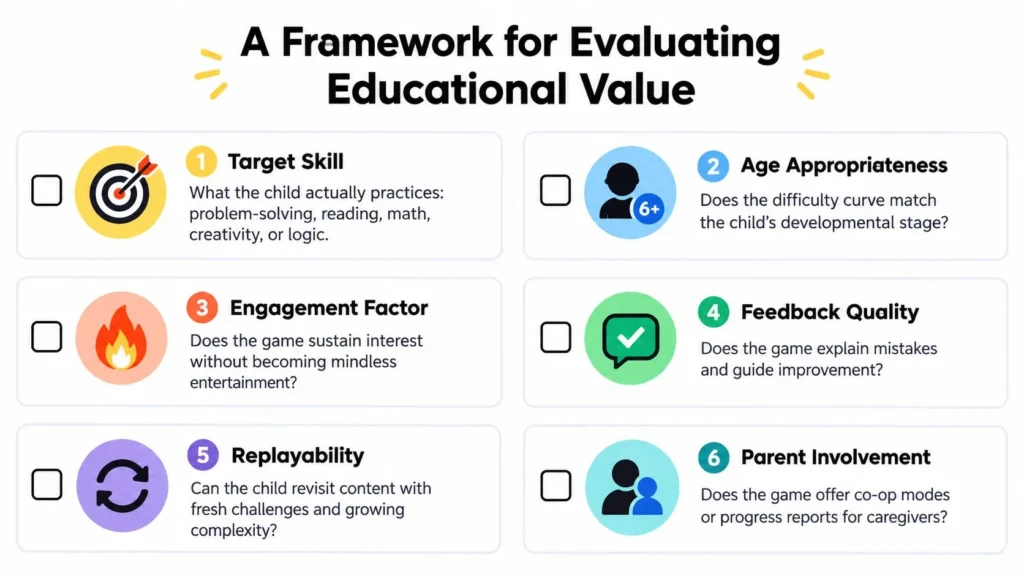
Subject labels make shopping quick, but they don’t answer the parent’s most useful question: What will my child practice? Use the following lenses before trusting a title’s description.
Start with the target skill
Name one primary skill in plain language. “Improve math” is too broad. “Compare quantities,” “choose the correct operation,” or “follow a multi-step sequence” gives you something observable.
Then check whether the game requires that behavior repeatedly. If a child can win by guessing, the title may provide weak practice even if it uses academic vocabulary. If the child must explain a choice, test a pattern, or change a strategy, the game has a stronger learning mechanism.
Check fit and independence
A good game can still fail when it’s too easy, too difficult, or too dependent on adult translation. Consider reading ability, fine-motor control, attention, and tolerance for frustration. Ask whether the child can understand the next goal independently or needs you to read every instruction.
Independence isn’t a virtue in every session. Co-play can be the right choice, especially when discussion helps a child explain reasoning. The useful question is whether the game supports the kind of help your household can realistically provide.
Inspect feedback, offline use, and transfer
Feedback quality separates practice from repetition. When a child makes a mistake, does the game show why the answer failed, offer a hint, or just remove a life? Helpful feedback lets the child revise a method rather than guess until something works.
Offline value matters when the console travels or serves several children. A game that remains playable without a connection is easier to use in short, predictable sessions.
Transfer is the hardest lens. After playing, can the child use the skill away from the screen? A child might apply sequencing language while describing a recipe, use estimation while shopping, or recognize a pattern in homework. Transfer won’t happen automatically, so ask the child to explain the connection.
Use this short observation checklist after a session:
- Target behavior: What did my child do repeatedly?
- Reasoning: Could my child explain one choice or strategy?
- Feedback: What happened after a mistake?
- Independence: Which part required adult help?
- Transfer: Where might this skill appear away from the game?
A title doesn’t need a perfect score on every lens. A creative game may offer excellent collaboration but little direct instruction. A phonics game may teach a narrow skill with limited replay value. The framework helps you buy for the outcome you want, not for the word “learning” on the box.
Recommended Titles by Age and Learning Goal
The strongest starting point is usually a child and a purpose, not a genre. A preschooler who needs confidence with letters needs a different experience from an older child who enjoys building systems or solving complex puzzles.
Treat the examples below as categories to investigate rather than guarantees. Availability, language support, control schemes, and offline features can vary by title and version, so test the actual game before building a lesson around it.
Early literacy and reading confidence
For young children, look for titles that require symbol recognition, sound matching, tracing, or following short instructions. The game should make words part of progress, not merely display decorative letters. If a child can’t read independently yet, choose a title where an adult can participate without taking over.
Reading-heavy simulation games can suit older children who enjoy stories and managing characters, but they may frustrate early readers if instructions arrive too quickly. Check whether text can be read aloud, whether the language can be changed, and whether the child can pause to process a goal.
Math, logic, and coding
Math-focused games are useful when children must reason about quantity or relationships rather than tap answers rapidly. Puzzle titles can also strengthen logic through sorting, sequencing, spatial rotation, and cause-and-effect experimentation.
Coding games should make commands visible and editable. A child learns more from arranging a sequence, running it, finding the error, and revising it than from watching a character perform a scripted action. Start with short challenges so the child can describe what changed.
Science, exploration, creativity, and life skills
Exploration games can prompt questions about nature, systems, resources, and consequences. Creative music and art titles may develop rhythm, composition, visual choices, and confidence, although their learning is often indirect.
Life-simulation games can provide practice with planning, routines, resource use, and collaboration. Farming and town-building titles are especially useful conversation starters because children can explain priorities, predict outcomes, and compare short-term rewards with longer-term plans. For more ideas beyond the console, this guide to best educational toys from Playz offers a broader way to combine digital play with physical activities. Families interested in management and farming themes can also browse farming video games for related options.
| Age Band | Learning Goal | Pick Example | Plays Solo or Co-op | Offline Friendly |
|---|---|---|---|---|
| Early readers | Letter recognition, listening, reading confidence | A literacy-focused tracing or phonics title | Usually solo, with adult support | Check the individual listing |
| Primary-school learners | Number sense, patterns, logic | A puzzle or arithmetic title with adjustable challenge | Often solo, some local co-op | Often, but verify before purchase |
| Older children | Sequencing, systems thinking, problem-solving | A coding, automation, or construction title | Solo or co-op depending on the game | Varies by title |
| Mixed-age families | Planning, communication, collaboration | A cooperative cooking, building, or farming simulation | Local co-op is common | Check whether online features are optional |
| Creative learners | Rhythm, composition, drawing, experimentation | A music, art, or creation-focused title | Solo, pass-and-play, or co-op | Usually depends on the specific software |
The fastest choice is simple: pick one skill, one child, and one short test session. Don’t buy a game because it covers six subjects if your child needs practice with one.
Classroom, Homeschool, and Family Play Ideas
A title rarely teaches on its own. The adult’s questions, timing, and follow-up determine whether the session becomes practice or passive screen time.
For a classroom, use the Switch as a station rather than the whole lesson. A teacher can demonstrate a puzzle on a larger screen, then let small groups rotate through short turns. Pair a direct-instruction activity with an indirect-skill game so students practice content and explain strategies.
A workable classroom routine
Keep each station focused on one question:
- Prediction: What do you think will happen before you choose?
- Explanation: Why did that move or answer seem best?
- Revision: What changed after the attempt failed?
- Vocabulary: Which words describe the strategy?
- Reflection: What could you try differently next time?
For homeschool, connect the game to a wider morning routine. A coding activity can lead into writing clear instructions. A farming simulation can prompt a simple planning exercise about seasons, resources, and priorities. A rhythm game can support counting, pattern recognition, or a conversation about tempo.
Families who are organizing several subjects may find planning homeschool lessons useful as a way to place game sessions alongside reading, practical work, and offline practice. The Switch should anchor a task, not replace the rest of the learning block.
Use co-play deliberately
Family play works best when adults avoid becoming either a coach who gives every answer or a spectator who says nothing. Ask the child to make the decision, then invite an explanation. An older sibling can model a strategy, but should leave enough space for the younger player to act.
The Switch reached a broad household audience quickly after its worldwide launch on March 3, 2017. Nintendo reported worldwide sell-through of more than 10 million units by December 10, 2017, as documented in this educational-games overview. That wide availability helps explain why teachers and families can use the same platform across different settings, but access alone doesn’t create a lesson.
Keep a short record after each session: the game, the task attempted, the child’s strategy, the help provided, and one next step. Families exploring broader technology choices can also compare these ideas with discussions of education technology trends.
Accessibility, Settings, and Parental Controls
A strong educational title becomes a poor choice if the child can’t read its text, control its movement, or recover from mistakes without unnecessary frustration. Start with the child’s needs, then adjust the game and console rather than expecting the child to adapt to default settings.
Look for button-based alternatives when motion controls create difficulty. Check whether a game supports touch input, adjustable difficulty, language changes, larger text, subtitles, or color settings. These features differ by title, so read the game’s documentation and test it with the child rather than assuming the console provides every option globally.
Nintendo’s parental-control system covers daily play limits, play-activity summaries, age-rating filters, and separate restrictions for communication and social features, according to Nintendo’s parental-control information. Those controls help families manage access and routines, but they don’t certify that a game aligns with a curriculum or produces a learning outcome.
Age ratings are safety classifications, not educational endorsements. A game suitable for a child’s age may still be too difficult, too text-heavy, or too shallow for the learning goal you have chosen.
A five-minute setup routine
- Open the game first. Check the first instructions, reading load, and control scheme.
- Set the child’s profile. Keep progress separate when siblings have different needs.
- Choose the input method. Turn off motion control or use button alternatives when appropriate.
- Set household limits. Apply a daily play limit and decide whether communication or social features are needed.
- Write the learning target. Use one sentence, such as “Today we’ll notice how the game gives feedback after an incorrect choice.”
That small preparation makes the console more predictable. It also gives you a basis for judging whether the child is learning, rather than relying on how quiet the room becomes.
Smart Buying and Demo Tips
Test before spending whenever a demo or trial is available. Let the child play for one short session on the actual Switch you own, using the controller, display, language, and reading conditions that will apply at home.
During the session, use the checklist from the evaluation framework and write a one-sentence verdict: “This game is worth keeping because my child repeatedly practices…” If you can’t finish that sentence with a specific behavior, keep looking.
Physical and digital purchases suit different households. A physical copy may be easier to share or pass on, while a digital copy is convenient for a family that changes games often. Storage, downloadable content, subscriptions, and online requirements can affect the experience, so check those details before assuming the base game includes everything.
A single title that a child revisits with growing independence can be more useful than several inexpensive games that receive one brief session. Choose the game that matches the target skill, test its feedback, adjust the controls, and observe what transfers beyond the screen.
Maxijournal.com publishes approachable writing across education, technology, games, science, health, arts, and other everyday interests. Visit maxijournal.com for fresh commentary and practical guides that help you make sense of the tools and ideas shaping family life.
Discover more from Maxi Journal
Subscribe to get the latest posts sent to your email.