A team gets a customer request by email. Someone copies details into a spreadsheet. Another person checks a policy document. A manager approves the next step. Then someone updates the CRM, sends a reply, and files the record. Nothing in that chain is unusual. It’s also where delays, mistakes, and missed handoffs pile up.
That’s why AI workflow automation matters now. The broader workflow automation market is valued at $26.01 billion by 2026, and AI-driven segments are projected to grow at a 47% CAGR compared with 9.52% for traditional workflows, according to ZipDo’s AI workflow automation statistics. The headline isn’t just market size. It’s the shift in what businesses expect automation to do.
Teams don’t need another dashboard. They need work to move without constant babysitting. If you’re exploring optimizing workflows with AI, the question isn’t “Where can we add AI?” It’s “Which work should be redesigned so AI can handle it safely and consistently?”
Introduction to AI Workflow Automation
AI workflow automation is the practice of using AI inside a sequence of business steps so work can be routed, interpreted, decided, and completed with less manual intervention. The key word is workflow. A single AI prompt isn’t a workflow. A workflow has inputs, rules, handoffs, checks, outputs, and accountability.
It’s an upgrade from a paper-heavy office process to a coordinated production line. Traditional automation is good at predictable moves such as “when form arrives, send notification.” AI workflow automation goes further. It can read messy text, classify requests, draft responses, extract details, summarize records, and decide which path to take next.
That sounds simple until people try to bolt AI onto a clunky process. Then the process often gets slower because teams add extra approvals to “be safe.” The result is what many leaders miss: automation only works well when the workflow itself is redesigned for more autonomous execution.
AI can remove handoffs, but only if you stop designing the process around handoffs.
Understanding the Key Concepts
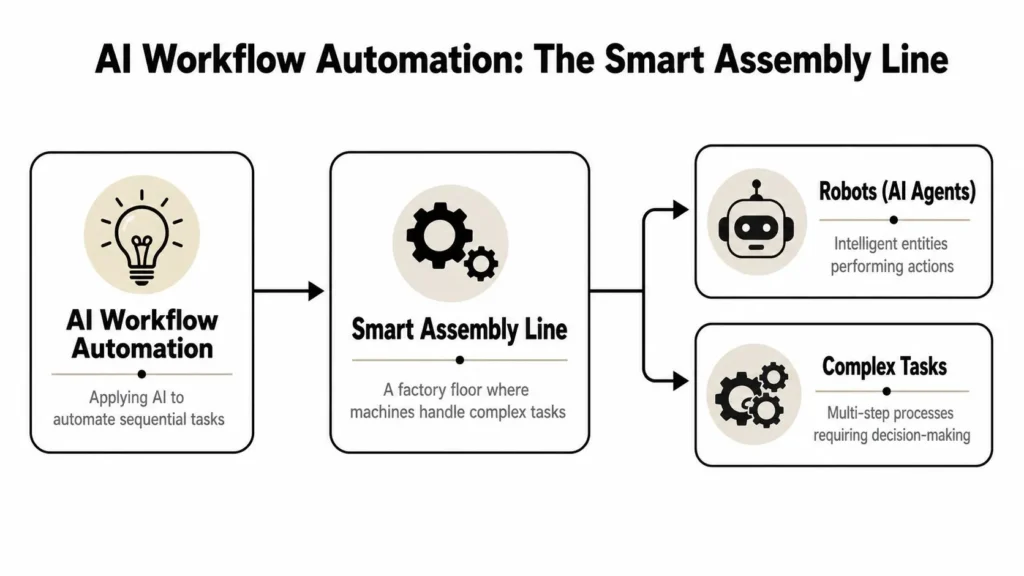
A useful way to understand AI workflow automation is to picture a smart assembly line. On an old assembly line, each station performs one fixed move. Tighten this screw. Apply this label. Push the item forward. That’s traditional workflow automation.
On a smart assembly line, some stations can inspect, interpret, and choose. They don’t just follow a script. They look at the item, recognize what kind of issue it has, and decide whether to route it left, right, or to a human specialist. That’s where AI enters the line.
What makes an AI step different
A rule-based step is rigid. If the invoice total is above a threshold, send it for review. If the customer selects option B, trigger path B. These are useful, but they break down when the input is messy or ambiguous.
An AI step handles fuzzier work, such as:
- Reading unstructured text like emails, support tickets, contracts, or notes
- Classifying intent when people describe the same problem in different ways
- Extracting fields from documents that don’t all follow the same format
- Generating drafts for replies, summaries, or internal handoff notes
If you’re new to the AI side of this, a plain-language primer on what machine learning is helps because many workflow systems rely on models that detect patterns rather than fixed rules alone.
Why structured output matters
Many individuals find this aspect confusing. They assume the hard part is getting the model to answer. It isn’t. The hard part is making that answer safe for the next system in line.
Best-practice architectures define the AI step as a strict JSON contract with required keys, enums, and limits, and they validate that output before any write-back or side effect. Thinkbot notes that these architectures also set explicit parameters such as temperature and timeouts, and that this pattern can reduce workflow failures by up to 60% in high-volume environments in its AI workflow automation playbook.
Here’s the workshop version of that idea:
| Workflow element | Plain-language meaning | Why it matters |
|---|---|---|
| JSON schema | A required answer format | Prevents vague or unusable output |
| Required keys | Fields that must exist | Stops downstream systems from guessing |
| Enums | Allowed values only | Reduces category drift |
| Max lengths | Limits on output size | Keeps payloads manageable |
| Validation gate | Check before action | Prevents bad writes and bad routing |
Reactive automation versus agentic flow
Traditional automation reacts. An event occurs, then a sequence runs. Agentic flow works more like a trained coordinator. It can gather context, make a bounded decision, trigger follow-up steps, and ask for help only when confidence is low or permissions don’t allow the next action.
That’s the leap people often underestimate. The jump isn’t from “manual” to “faster.” It’s from fixed scripts to bounded autonomy.
Practical rule: Never let an AI step write to a system of record unless its output has been validated against a defined contract.
Core Components and Architecture
When teams say, “We want AI workflow automation,” they often mean five different things at once. A sound system separates them into components so each part has a clear role. That separation is what makes the workflow understandable, testable, and governable.
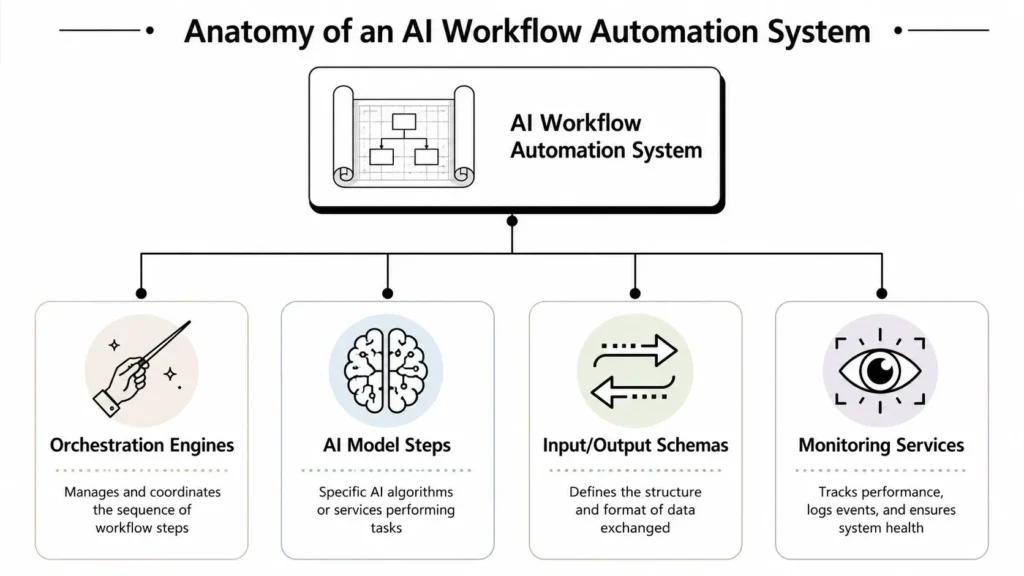
The main modules
At the center sits the orchestration engine. This is the conductor. It decides which step runs next, what data gets passed forward, when to retry, and when to escalate.
Around it, you usually have:
- AI model steps that classify, summarize, extract, or generate
- Input and output schemas that define the data contract for each step
- Monitoring services that log latency, failures, drift, and odd behavior
- Integration layers that connect email, CRM, ticketing, databases, and human queues
A simple way to picture it is this: the orchestration engine manages motion, the AI provides judgment, the schemas enforce discipline, and the monitoring catches trouble before users do.
Why orchestration choices matter
Different orchestration engines fit different teams. Python-heavy teams may prefer a code-first tool. Other teams may move faster with a more configuration-driven setup. The choice affects more than developer comfort.
Benchmark data summarized by ONES shows that selecting orchestration engines based on team skills and ecosystem compatibility can produce 2–5x differences in inference latency, and integrated CI/CD plus drift monitoring can cut post-deployment errors by 55% in its AI workflow automation overview.
That matters because latency isn’t just a technical footnote. If your workflow waits too long for an AI step, users create side channels. They email a coworker. They re-enter the data manually. They bypass the system.
The safety layers people skip
Good architecture includes friction in the right places. Not everywhere. Only where damage could spread.
A practical production pattern looks like this:
- Receive input from a trigger such as an email, form, or event.
- Normalize the data so the AI gets clean context.
- Run the AI step with explicit settings for output behavior and timeout.
- Validate the output against a schema before any update occurs.
- Classify errors into retryable and non-retryable cases.
- Send fallback cases to a smaller model, cache, or human review queue.
- Write approved output to systems of record.
- Emit monitoring signals for latency, failures, and drift.
If a workflow can’t explain why it took an action, it isn’t ready for broad autonomy.
CI/CD gates belong here too. A lot of teams think CI/CD is for software engineers only. In AI workflows, it becomes the checkpoint that says, “This model version passed evaluation, so it can go live.” That’s how you avoid swapping one silent failure mode for another.
Common Patterns and Use Cases Across Industries
AI workflow automation looks different in finance, healthcare, and e-commerce, but the winning patterns share one trait. They redesign the work around decision points instead of sprinkling AI onto every old task.
The warning sign is clear. 60% of enterprise AI deployments stall because leaders bolt AI onto legacy processes instead of redesigning workflows for autonomous agents, a problem described as the supervised autonomy trap in this discussion of stalled enterprise AI deployments.
Finance and invoice triage
A finance team often starts with incoming invoices. In a manual process, staff open attachments, identify vendors, code categories, check exceptions, and route approvals. AI can handle the early interpretation work well.
A redesigned flow might:
- Read invoice text and attachment metadata
- Extract structured fields into a validated format
- Classify the invoice type
- Route only exception cases to a specialist
- Hold uncertain outputs for review instead of forcing approval on every item
The trap is adding AI as one more review layer while keeping all old approvals. Then nobody trusts the output, and the queue grows.
Healthcare and patient intake summaries
Healthcare workflows need careful handoffs because mistakes carry higher stakes. A useful pattern is intake summarization. Patients submit forms, messages, and history. Staff then spend time consolidating that information into a concise summary for the next clinician or administrator.
For readers tracking broader healthcare technology innovations, the critical factor is workflow design, rather than model novelty. The best setup doesn’t let the AI “decide care.” It prepares a structured, reviewable summary and clearly marks uncertainty or missing information.
A side-by-side view helps:
| Industry | Common input | AI role | Human role |
|---|---|---|---|
| Finance | Invoices and payment data | Extract, classify, route | Review exceptions |
| Healthcare | Intake forms and messages | Summarize, organize, flag gaps | Confirm and act |
| E-commerce | Orders, inventory, customer messages | Prioritize, route, recommend next action | Handle edge cases |
E-commerce and order fulfillment
In e-commerce, speed matters. So does context. One order may need standard packing, another may need split shipment, fraud review, or customer outreach.
A strong AI workflow doesn’t try to automate “everything in fulfillment.” It focuses on a narrow set of judgment calls. Which orders are routine? Which need exception handling? Which customer message should trigger refund review versus shipping support? Those are good fits for bounded autonomy.
The pattern across all three industries is the same. Start where the work is repetitive but not perfectly structured. Then redesign the route so humans handle the exceptions, not every single item.
Benefits and Risks of AI Workflow Automation
The appeal of AI workflow automation is easy to understand when the process fits the tool. Organizations report saving 10–15 hours per employee per week, achieving an average 400% ROI in the first year, and cutting error rates by 40–75%, according to This and That’s AI workflow automation statistics.
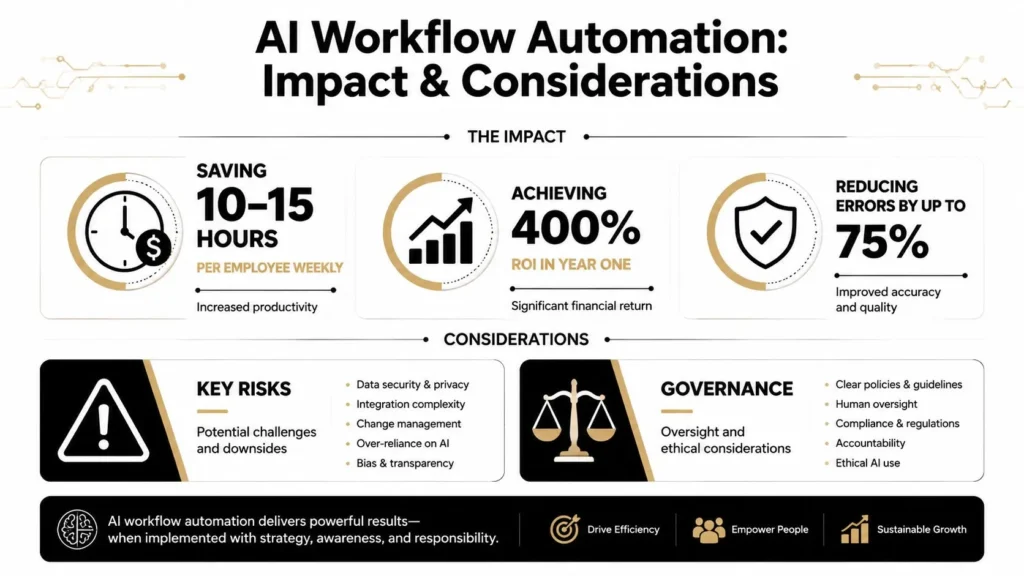
Those numbers are compelling because they map to everyday pain. Less manual copying. Fewer status checks. Fewer preventable mistakes. Faster throughput. More staff time for work that requires judgment.
What the upside looks like in practice
Benefits usually show up in three places first:
- Operational relief because people stop doing repetitive sorting, routing, and summarizing
- Quality gains because validation and structured output reduce avoidable errors
- Financial impact because teams process more work with fewer interruptions and rework cycles
If you’re trying to prove value internally, it helps to track workflow-level signals rather than just “AI usage.” A practical example is learning how teams monitor n8n workflow ROI so they can compare manual effort, exception rates, and downstream outcomes over time.
A short video can help frame the operational side of these tradeoffs:
Where things go wrong
The risks are just as real. Not because AI is uniquely chaotic, but because a workflow can amplify small mistakes quickly.
Common failure modes include:
- Hallucinated output that looks polished but doesn’t fit the task
- Data drift where live inputs slowly stop resembling the data the system handled well before
- Security gaps when sensitive data moves across systems without proper boundaries
- Governance failures when nobody owns approval rules, auditability, or exception handling
The biggest risk isn’t that the model says something strange once. It’s that the workflow treats that output as trustworthy and acts on it automatically.
How to reduce the blast radius
Mitigation works best when it’s built into the workflow itself.
- Schema validation first: Make sure outputs are machine-checkable before any write-back happens.
- Human fallback paths: Route uncertain or policy-sensitive cases to people instead of forcing an answer.
- Monitoring with intent: Watch latency, error patterns, and changing input quality, not just uptime.
- Tight permissions: Let the workflow do only what it’s explicitly allowed to do.
The practical lesson is straightforward. AI workflow automation creates value when the workflow is engineered for reliability, not when a model is dropped into the middle and left to improvise.
Implementation Considerations and Governance
Many pilot projects look impressive in a demo and collapse in production. The gap usually isn’t model quality alone. It’s missing governance. Teams need a method for deciding what the AI may do, what it must prove before acting, and when a human has to step in.
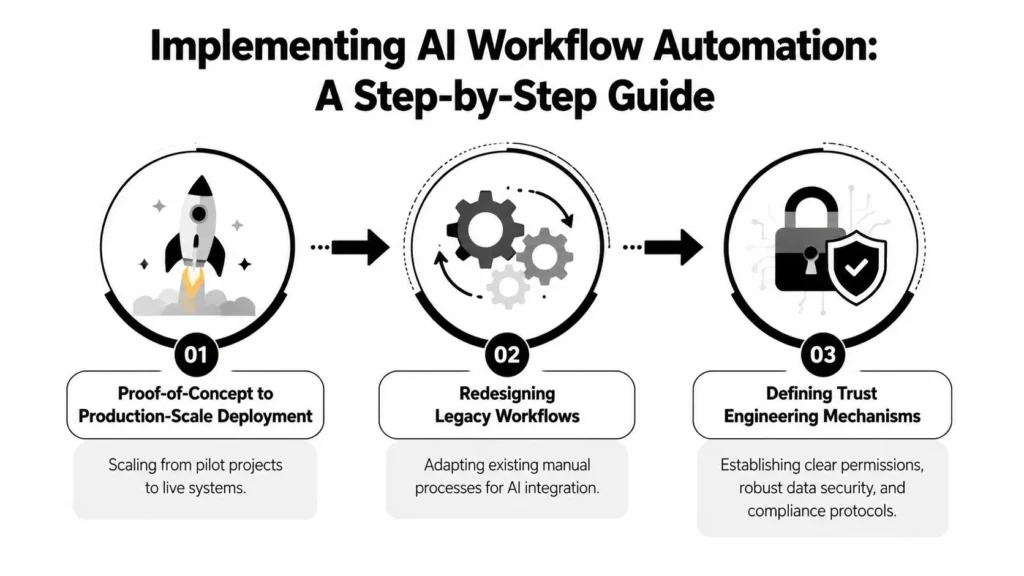
Start with redesign, not insertion
If a workflow already has too many approvals, adding AI to each step usually makes the process worse. Redesign means asking different questions:
- Which decisions are routine enough for bounded autonomy?
- Which actions should never happen without validation?
- Where does a human add actual value instead of acting as a ceremonial approver?
Here, trust engineering belongs. Trust engineering means designing permissions, audit trails, and confidence-based routing into the workflow from day one. It isn’t a legal afterthought. It’s part of the architecture.
Build a governance stack
A workable governance model often includes these layers:
Business owner
Owns the workflow outcome and decides what “good” looks like.Technical owner
Maintains orchestration, integrations, and deployment controls.Risk or compliance reviewer
Defines boundaries for sensitive actions and audit needs.Operations team
Watches live performance, handles escalations, and tunes thresholds.
If your organization is formalizing these controls, a broader look at AI governance and compliance can help frame responsibilities beyond the workflow itself.
Production controls that matter
ONES reports that choosing orchestration engines based on team skills and ecosystem fit can create 2–5x differences in inference latency, while integrated CI/CD and drift monitoring cut post-deployment errors by 55% in its overview of AI workflow automation systems and controls. In practice, that means your governance choices shape technical outcomes.
Here are the controls I’d treat as essential:
- Silent validation before rollout: Let the workflow observe and score outputs before it takes real actions.
- Retry policy by error type: Timeouts and transient service issues should behave differently from invalid output.
- Fallback routes: Smaller models, cached responses, or human queues keep work moving.
- Audit logging: Record what input was used, what action was proposed, and why it was accepted or rejected.
Design principle: Give autonomous agents narrow authority, rich context, and visible audit trails.
The teams that scale well don’t chase broad autonomy first. They earn it, one well-governed workflow at a time.
Practical Examples and Mini Case Studies
Real understanding clicks when you can picture the workflow in action. Here are three compact scenarios that show how redesign beats “AI added on top.”
A financial services reporting workflow
A compliance team had analysts collecting data from emails, spreadsheets, and internal records to prepare recurring reports. The work wasn’t conceptually hard. It was tedious, easy to misroute, and full of version confusion.
The redesigned workflow used AI to read incoming materials, classify document type, extract required fields into a structured format, and draft a report packet for analyst review. The critical decision was not “let AI file the final report.” It was “let AI prepare a complete, auditable draft and route exceptions.”
The lesson: use AI to compress the preparation layer, then keep sign-off where accountability already exists.
A hospital intake workflow
A hospital operations team struggled with intake materials arriving in mixed formats. Patients submitted forms, free-text descriptions, prior notes, and scheduling context. Staff spent too much time stitching those pieces together before the next handoff.
The improved workflow treated AI as an organizer. It summarized the intake packet into a structured record, flagged missing information, and sent unclear cases to a review queue. The output wasn’t a freeform paragraph buried in a chat window. It was a predictable object the next team could scan and verify quickly.
That design choice matters. In higher-stakes settings, the safest AI output is often a structured brief, not a persuasive answer.
An online retail pricing and routing workflow
An online retailer wanted faster reaction to changing order conditions, but manual triage slowed everything down. The initial instinct was to add AI suggestions to existing staff dashboards. That only increased cognitive load because staff still had to inspect every case.
The stronger design split the workflow into two lanes:
- Routine orders moved automatically through predefined steps.
- Unusual combinations, such as conflicting signals or unclear customer intent, went to a human queue with AI-generated context.
This kind of workflow makes people more effective because it doesn’t ask them to supervise every machine action. It asks them to handle the cases where machine confidence or business policy says, “pause here.”
What these examples have in common
Each example follows the same pattern:
| Workflow challenge | Better AI role | Bad AI role |
|---|---|---|
| Repetitive interpretation | Summarize, classify, extract | Replace final accountability |
| High exception volume | Route uncertain cases clearly | Force a decision every time |
| Slow handoffs | Prepare structured context | Add one more review layer |
The common thread is narrow, trusted autonomy. That’s the difference between a useful system and a fancy bottleneck.
Recommended Next Steps for Readers
Start with one workflow that already hurts. Pick something with frequent handoffs, repetitive interpretation, and clear business ownership. Don’t begin with the most politically sensitive process in the company.
Then work through a short checklist:
- Map the current workflow: Identify where people read, classify, summarize, route, or copy information.
- Measure the true time sink: Focus on repetitive effort and exception volume, not just total process duration.
- Choose a pilot pattern: Inbox triage, intake summarization, document extraction, and contract drafting are often easier to scope than broad end-to-end autonomy.
- Define the data contract: Decide exactly what structured output the AI step must produce.
- Add silent validation: Let the workflow run in observation mode before it takes actions.
- Set confidence thresholds and fallback paths: Decide what gets automated, what gets retried, and what gets handed to humans.
- Create governance early: Assign ownership for permissions, audits, and live monitoring before rollout.
The teams that succeed with AI workflow automation usually move in a disciplined way. They go deep on a narrow workflow, tighten the controls, learn from exceptions, and expand only after trust is earned.
If you want more approachable analysis on technology, business, health, science, and digital trends, explore maxijournal.com. It’s a useful place to keep learning, spot emerging ideas early, and find clear commentary that doesn’t bury the point in jargon.
Discover more from Maxi Journal
Subscribe to get the latest posts sent to your email.