54% of workers globally said they had used AI for their jobs in the previous year, and 14% said they use generative AI daily, according to PwC’s Global Workforce Hopes and Fears Survey 2025. In the United States, generative-AI use at work rose from 33.3% to 37.4% over the preceding twelve months, per the Federal Reserve Bank of St. Louis.
Those numbers moved faster than most training programs did. People learned from a colleague, a video, or an afternoon of trial and error, and then folded AI into work that other people depend on. So the useful question isn’t how to use AI at work in the abstract. It’s which of your tasks fit, what a wrong answer costs, and who ends up holding the harder work once the easy part gets faster.
Sort Your Tasks Before You Pick a Tool
The first decision isn’t which assistant to open. It’s which task you’re handing over, and how quickly a person can catch a bad answer.
| Task type | AI fit | Human check needed | Example |
|---|---|---|---|
| Drafting first versions | High | Tone, facts and final approval | Email replies, meeting agendas |
| Summarizing long documents | High | Spot-check key figures and omissions | Customer call notes, report digests |
| Classifying or tagging items | High | Weekly sample audit | Support ticket routing |
| First-pass data analysis | Medium | Recheck calculations and sources | Sales trend notes |
| Contract, medical or HR decisions | Low | Full expert review, often keep with people | Contract terms, disciplinary notes |
| Confidential client or employee data | Policy-bound | Approved tool only, data removed first | Salary records, patient details |
Read the table with one question in mind: how fast can a person check the output? High-fit work can be verified in minutes, because you’re reading a draft you already know how to judge. Medium-fit work needs the numbers recalculated against the source system, not against the model’s confidence. Low-fit work needs expert judgement that the tool can’t supply and can’t be audited for at speed.
Three questions before you touch a tool
- What happens if this is wrong? If the answer is “a client gets a bad number” or “someone’s pay is miscalculated”, the task stays with a person.
- Can you verify it in five minutes? If checking takes longer than doing, the tool isn’t saving anything.
- Does it involve sensitive data? Names, health details, salaries, contract terms and unreleased financials belong in an approved tool only, or nowhere.
A realistic starting point
A marketing coordinator doesn’t begin with campaign strategy. She begins with the weekly performance summary and the routine replies to the sales team, because those are tasks where a bad draft is caught in one read. Two weeks of that builds the judgement she needs before she touches anything that carries a budget.
Before you install anything, check three things about the tool. Your employer approves it. It keeps company data out of model training. You can export or delete what you put in.
The organizational picture explains why this matters now. The share of firms using AI rose from 8.7% in 2023 to 20.2% in 2025, more than doubling in two years, according to the OECD. The same body of work, drawing on International Labour Organization estimates, puts about one in four workers in occupations with some exposure to generative AI, but only 3.3% of global employment in the highest exposure category. Task-level change is common. Whole-job replacement is not.
Tonight, mark every item on your weekly list high, medium or low. Anything you can’t classify goes in low until someone senior says otherwise.
Disclosure, Data and Rules to Follow
Three rules cover most of the risk, and you don’t need a policy document to start applying them. Use only tools your employer has approved for confidential material. Strip names, client details, salary figures and health information before anything gets pasted. And never let output leave your desk without a named person who has read it and will answer for it.
Practical rule: if you can’t name the human who approved the output, it isn’t ready to send.
The pre-submission checklist
- Source checked. Every fact, figure and citation is confirmed against the original document. An unverified citation is how a fabricated reference ends up in a client deck with your name on it.
- Data removed. No personal, client or confidential details remain in the text. A pasted salary table is a privacy incident you can’t recall.
- Reviewer named. One person has read the output and approved it. Shared ownership means nobody checks.
- Disclosure added where the audience needs it. A slide someone will forward to a regulator is exactly the place to say how it was made.
On disclosure, be plain rather than apologetic. A line like “First draft generated with AI, checked and revised by [name]” does the job in one sentence and tells the reader where accountability sits. Our own editorial policy at maxijournal.com requires all AI-generated imagery to be clearly disclosed as AI-generated, and the same logic applies to a chart, a mock-up or a headshot that lands in front of people who weren’t in the room when it was made.
When nobody has written the rule yet
Many workers are figuring this out alone. A survey of workers on AI training and support found people struggling to find high-quality instruction, leaning on personal experimentation, and getting little employer training or consultation. In a separate European Central Bank analysis reported alongside it, about one-third of respondents said AI was irrelevant to their current tasks, while roughly half said better training and a clearer understanding of AI’s usefulness would encourage them to adopt it.
If no written policy exists, ask your manager for one and keep working in the meantime. When a rule is unclear, stop, write the question down, and pick the lower-risk option, which usually means keeping that task off AI until you get an answer. A governance checklist from AmasaTech is a useful reference for what a real policy covers: tool approval, logging, review and named accountability. Pair it with a working knowledge of AI governance and compliance so you can tell the difference between a rule that protects people and one that just slows them down.
How to Run Your First AI Pilot Step by Step
Pick one recurring task, run it like a controlled trial, and keep the quality bar where it already is. That’s the whole method, and it beats any prompt library because it produces a result you can defend to your manager.
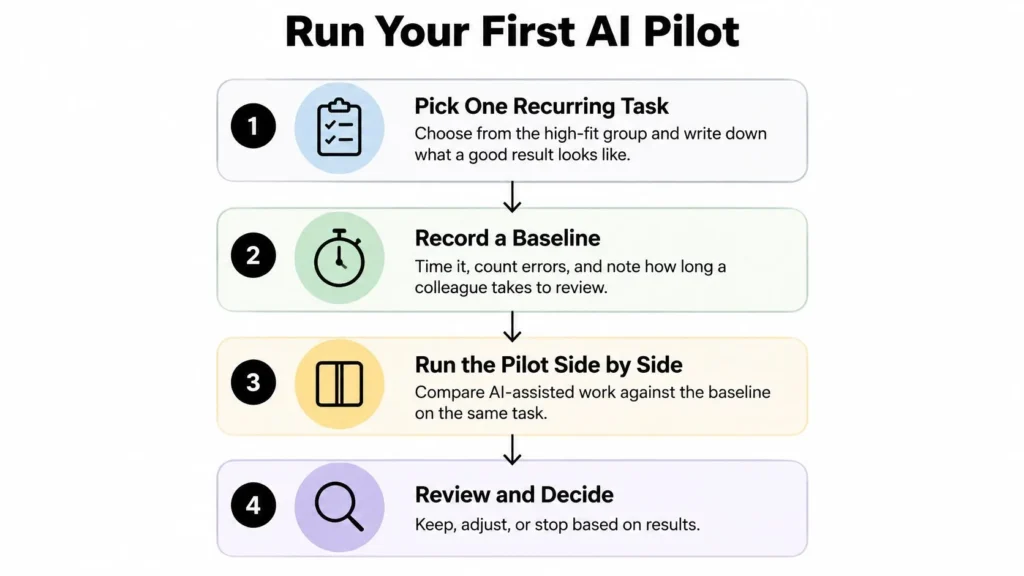
- Pick one task and define a good result. Write the acceptance criteria first: length, tone, the three facts that must appear. The usual slip is choosing something you do twice a year, where you’ll never collect a second data point.
- Record a baseline without AI. Time the task, count the errors, and note how long a colleague takes to review your work. Skip this and you have no way to prove anything improved.
- Give yourself a short onboarding. Two or three example prompts and one finished output you’d be happy to send. Copying prompts from a social feed built for a different job is the most common waste of the first week.
- Run it for two weeks at the same quality bar. Same deadline, same reviewer, same standard. The slip here is letting the bar drop because a polished draft feels finished.
- Verify every claim, figure, citation and edge case. Recalculate totals against the source system and check names against the record. Reading for tone and missing a wrong number is how errors get through.
- Compare time, quality and rework against the baseline. Rework is the number people forget, and it’s often the one that decides the outcome.
If a video walkthrough suits you better than a checklist, this covers the same loop end to end.
One boundary matters more than the rest. Controlled research on more than 700 consultants found generative AI raised performance by nearly 40% when used inside its demonstrated capability, and by 42.5% against a control group when the tool came with a task overview. Performance fell by an average of 19 percentage points when participants used AI on tasks outside that boundary, as reported by MIT Sloan. So don’t extend the pilot to new task types until the baseline comparison holds on the first one.
A good pilot ends with time down, errors flat, and a written list of where the tool failed. That list is the most valuable thing you’ll produce, because it’s the map of what to automate next and what to keep with people. Once you have it, deciding what to hand to a wider AI workflow automation setup becomes an evidence question rather than an enthusiasm question.
Metrics That Show Whether AI Helps or Hurts
Faster output can hide accuracy, privacy and compliance failures, so track productivity and risk on the same page. If you only measure speed, you’ll ship errors quickly and confidently.
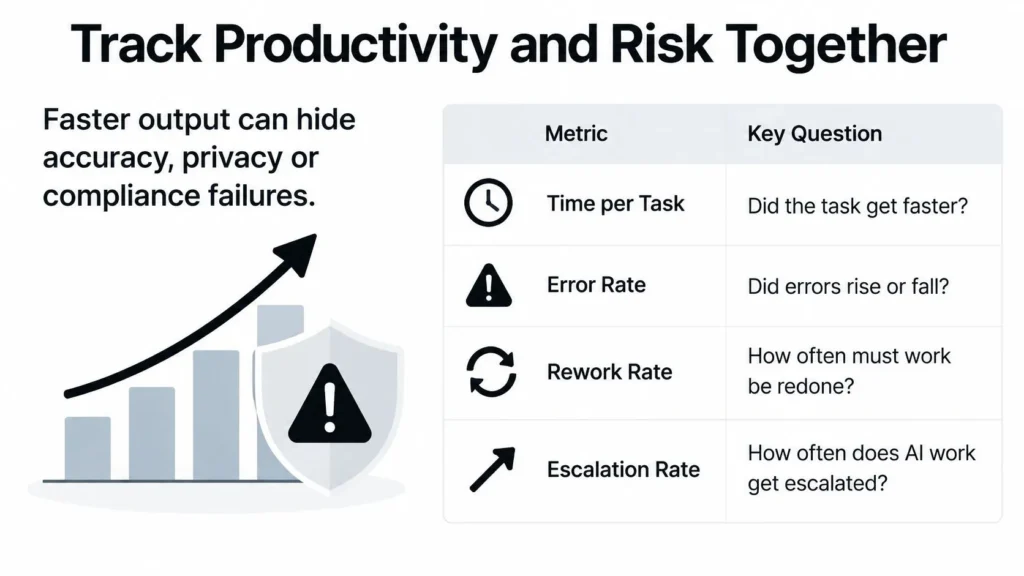
| Metric | How to record it | Stop signal |
|---|---|---|
| Time per task | Median minutes, before and after the pilot | Savings under 10% after two weeks |
| Error rate | Share of sampled outputs with a verified factual error | Any rise over the baseline rate |
| Rework rate | Share of outputs edited by a reviewer | Rework above the baseline |
| Escalation rate | Cases passed to a senior colleague | Rising escalations for the same task |
| Quality score | Reviewer rating on a 1-5 scale | Average drops below baseline |
| Privacy incidents | Count of data-handling breaches | Any incident at all |
A support lead checks the dashboard in week two and sees handling time down across the team. Then the audit sample turns up refunds issued at the wrong rate, because the assistant had been inferring a policy from context. The time gain was real. So was the loss, and only one of them showed up in the first report.
For support work specifically, research covering 5,179 agents found that access to a conversational AI assistant increased issues resolved per hour by 14% on average, as reported in MIT Sloan’s research on AI and worker productivity. I’d treat that figure as a ceiling rather than a promise. What you get depends on how well the pilot task fits the tool, and your own baseline comparison is the only number that settles it.
The visibility problem runs deeper than the dashboard shows. In late 2024, 13% of employees reported using generative AI for more than 30% of their daily work, compared with 4% of C-suite leaders who estimated that employees did so, according to McKinsey’s 2025 workplace report. Shadow usage is already shaping your error rate before anyone approves a tool, and organizational governance is catching up slowly. Your own stop conditions are the first line of control.
Set those conditions before launch, not after the first bad week. Audit a random sample every week and write the results down. Watch who the escalations land on too: if the tool clears the easy cases and routes the hard residue to the same two senior reviewers, the time savings are being paid for out of someone’s workload. A shared approach to benchmarking performance indicators keeps the baseline honest when you compare numbers across teams.
Pick three metrics from the table and write one stop signal for each. Three is enough to start. Six is what you move to once the pilot survives a month.
Where the Time Savings Actually Go
The productivity gain isn’t evenly shared, and that’s the part most guides skip. A 2023 National Bureau of Economic Research study of 5,179 customer-support agents found that novice and lower-skilled workers improved by about 34% after a generative-AI assistant was introduced, while experienced and highly skilled workers saw minimal effects, as the NBER working paper reports. The same study found AI cut time per customer interaction by roughly 9%.

That’s a skills multiplier, and it’s good news for anyone new to a role. It is not a uniform boost, and treating it as one hides the second effect: AI can divide a team’s work so that the easier share goes to the people who already found the work easy. The International Labour Organization’s review of empirical evidence on generative AI and work organization cites a telemarketing case where AI-assisted task division improved outcomes for higher-skilled agents while leaving lower-skilled workers with a larger share of difficult cases.
The scenario that repeats on every team
Say a six-person marketing team adopts AI for first drafts. The strongest writer now produces three posts in the time it used to take for one, and gets praised for it. The newest colleague still can’t judge a bad draft quickly, so the complicated stakeholder complaints, the legal review threads and the messy product claims end up on her desk. Nobody decided this. It fell out of who was fastest.
If saved time only ever converts into a higher output target, you haven’t gained time. You’ve changed the price of your own labour.
Three checks that catch the shift
- After-hours activity. Compare when messages and commits are sent before and after adoption. A rise means the saved time went into the evening.
- Complexity of your caseload. Track how many of your cases are exceptions, escalations or disputes. If that ratio climbs while your total falls, the work got harder, not lighter.
- Where the saved time landed. Ask directly whether the hours returned to you, went into new projects you chose, or were absorbed into a raised target. The third outcome is the one to name out loud.
Refusing automation for a specific high-stakes task is a legitimate professional position, and it’s easier to hold if you arrive with evidence: the error rate on that task type, the review time it adds, and the cost of one bad output. Ask for human review in writing, on the record, with a named reviewer.
At the end of this month, write down where your saved time went. Two lines is enough: hours saved, and what filled them.
Confirm Your First Pilot This Week
Everything above reduces to three moves. Sort your tasks by fit and verification speed. Run one pilot on a single high-fit task with a baseline recorded first. Measure output and risk together, with stop signals written before you start.
Here’s the week. Choose one high-fit task from your list and write its acceptance criteria in two sentences. Write two stop signals next to it. Record today’s time and error count for that task, before any tool touches it. Then run for two weeks without changing the bar.
No headline figure tells you whether AI helps your team. Your own baseline comparison does, and it’s the only evidence your manager can act on. Take the result to them, including the failures, and ask for training on that specific task before you expand to a second one. Teams that skip that conversation tend to get a licence, a launch email and no support.
One question to answer before Friday: which task will you test first, and what result would make you stop?
If you want more grounded, practitioner-level writing on where AI helps and where it costs you, maxijournal.com publishes daily pieces across technology, business, health, science and the arts, with clear editorial standards and no hype. Our coverage of AI at work focuses on task fit, governance and the workload questions most guides leave out, and our site policies spell out exactly how we handle AI-generated material. Start with one article, bring your own task list, and see which parts of it you can test this week.
Discover more from Maxi Journal
Subscribe to get the latest posts sent to your email.