You’re probably looking at a spreadsheet right now, or at least thinking about one. Rows stretch downward, columns drift to the right, and every number seems important until they all blur together. You know the data contains an answer. You just can’t see it yet.
That’s where data visualization techniques earn their keep. A good chart doesn’t decorate information. It helps you notice what matters, explain it to someone else, and make a decision without drowning in detail.
Raw tables are still useful, of course. But academic and institutional writing describes data visualization as the graphical representation of information and data, using charts and graphs to reveal trends, outliers, patterns, and relationships that are harder to detect in tables alone, and notes that this became more important as data-driven decision-making spread because visualization improved interpretation speed and reduced decision risk, as discussed in this review of visual analytics and graphical representation.
From Data to Decisions
A spreadsheet answers the question, “What are the values?” A visualization answers the more practical question, “What should I notice first?”
That sounds simple, but it’s a major shift. When you move from a table to a chart, you’re not just changing the format. You’re changing the reader’s experience. Instead of scanning cell by cell, they can compare, estimate, and spot irregularities almost immediately.
Why charts help people think
Most readers don’t need every number at once. They need structure.
A chart can show:
- Trend: whether something rises, falls, or changes direction
- Difference: whether one category is larger or smaller than another
- Exception: whether one value breaks the pattern
- Relationship: whether two variables move together in a meaningful way
That’s why charts show up everywhere. In business meetings, they help teams compare performance. In science, they help researchers inspect distributions and relationships. In public communication, they help readers grasp a story quickly without reading a dense appendix first.
A useful visual doesn’t just make data easier to look at. It makes judgment easier to form.
Decision-making is the real point
People often treat visualization as the final polish added after analysis. In practice, it’s part of the analysis.
Suppose you’re reviewing campaign results, student outcomes, website behavior, or operational delays. If you can’t quickly see what’s normal, what’s changing, and what deserves follow-up, you’re working harder than you need to. That’s one reason benchmarking matters before you design the chart itself. A framework like benchmarking performance indicators helps clarify what “good” even means before you start plotting values.
Confidence comes from matching the visual to the question. Once you learn that habit, charts stop feeling mysterious. They become practical tools, like choosing the right wrench instead of forcing every job with a hammer.
The Grammar of Graphics
Charts look varied on the surface, but underneath they follow a small set of rules. I like to call this the grammar of graphics because it works much like language. Words alone don’t create meaning. Structure does.
In visualization, your “words” are data values. Your “grammar” is the way you map those values onto position, size, color, shape, line, or area.
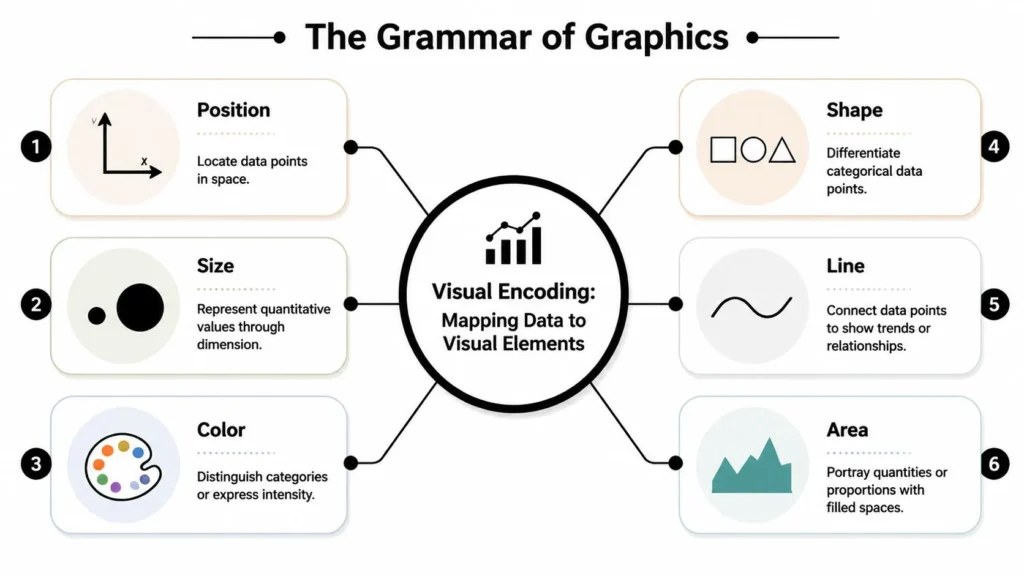
Visual encoding in plain English
If a chart feels confusing, the problem often isn’t the data. It’s the encoding.
Here are the basic building blocks:
- Position: Where a point sits on an axis. This is often the clearest way to show a value.
- Length: The height of a bar, for example. Great for comparing categories.
- Color: Useful for grouping, emphasis, or intensity, but risky if it carries too much meaning alone.
- Shape: Helpful when separating categories in a scatter plot.
- Line: Good for showing continuity, especially across time.
- Area: Useful for proportions, though it’s easier to misread than position or length.
Think of a chart as a sentence. If the sentence says one thing while the punctuation suggests another, readers hesitate. Charts behave the same way.
Why old charts still dominate
Many modern visuals still rely on a vocabulary established surprisingly early. William Playfair’s 1786 publication The Commercial and Political Atlas is widely credited with introducing the line graph and bar chart, and his work helped establish ways of showing trends and comparisons that still shape chart selection today, as summarized in this historical overview of data and information visualization.
That historical detail matters because those forms survived for a reason. They solved recurring communication problems.
- A line chart answers, “How did this change?”
- A bar chart answers, “How do these categories compare?”
- A pie-style part-to-whole visual answers, “How is this split?”
The practical lesson
When beginners ask me which chart is “best,” I usually answer with another question: what relationship in the data deserves the clearest visual encoding?
Practical rule: Put your most important variable in the channel people read most accurately, usually position or length.
If your audience must compare exact category values, bars usually beat bubbles. If they must follow change over months, a line usually beats separate columns. If they must spot clusters, points on axes do more work than shaded decoration.
That’s the grammar. Once you know it, charts stop looking like software presets and start looking like deliberate choices.
Choosing Your Technique A Decision Framework
Most chart mistakes happen before anyone opens Tableau, Excel, Power BI, R, or Python. The mistake is choosing a form before naming the analytical goal.
A better approach is to ask a sequence of plain questions. What am I trying to help the reader do? Compare? Track change? Understand composition? Inspect distribution? Test a relationship?
Start with the question, not the chart
Here’s a simple framework I teach students and teams:
- Am I comparing categories?
Use a bar chart first. - Am I showing change over time?
Use a line chart when continuity matters. - Am I showing parts of a whole?
Use a stacked bar, treemap, or a limited pie chart if the category count is small. - Am I showing distribution?
Use a histogram or box plot. - Am I exploring relationships between variables?
Use a scatter plot. - Am I showing intensity across a matrix or grid?
Use a heatmap. - Am I explaining flow or connection?
Consider a Sankey-style diagram or network graph.
When people get stuck on bar chart vs line graph, the confusion usually comes from mixing category comparison with time-based change. Those chart types can look interchangeable in software menus, but they answer different questions.
Chart Selection by Analytical Goal
| Goal | Description | Primary Chart Types | Secondary Chart Types |
|---|---|---|---|
| Comparison | Show differences across groups or items | Bar chart | Dot plot, grouped bar chart |
| Change over time | Show movement across dates or periods | Line chart | Area chart, column chart |
| Part to whole | Show how categories contribute to a total | Stacked bar, treemap | Pie chart for a small number of slices |
| Distribution | Show spread, concentration, and unusual values | Histogram | Box plot |
| Relationship | Show whether variables move together | Scatter plot | Bubble chart |
| Intensity | Show high and low values across a grid | Heatmap | Highlight table |
| Flow or connection | Show movement, paths, or linked entities | Sankey diagram, network graph | Chord-style connection visual |
A few decision rules that save time
Some choices become easier if you use a small checklist.
- Choose bars when labels matter. If people need to compare named categories, bars are dependable.
- Choose lines when continuity matters. Time has order, and a line helps readers follow that order.
- Choose scatter plots when you suspect a relationship but don’t trust summary numbers alone. A point cloud shows whether the pattern is broad or driven by a few outliers.
- Choose histograms when averages hide too much. A distribution often reveals more than a single summary value.
- Choose heatmaps when the exact pattern matters less than concentration. They’re useful when you want readers to notice hot spots and cold spots quickly.
What readers often get wrong
A common misunderstanding is thinking the chart should show everything. It shouldn’t.
A chart should answer one main question well. If you have three different questions, you may need three different visuals. That’s not inefficiency. That’s clarity.
If the chart type doesn’t match the decision, the audience spends its energy decoding the form instead of understanding the message.
That’s the framework in one sentence: pick the technique that makes the intended judgment easiest.
A Visualizers Toolkit Common Chart Types Explained
Once you have a decision framework, the chart types themselves become easier to remember. They’re not a random gallery. They’re tools with distinct jobs.
Bar charts and line charts
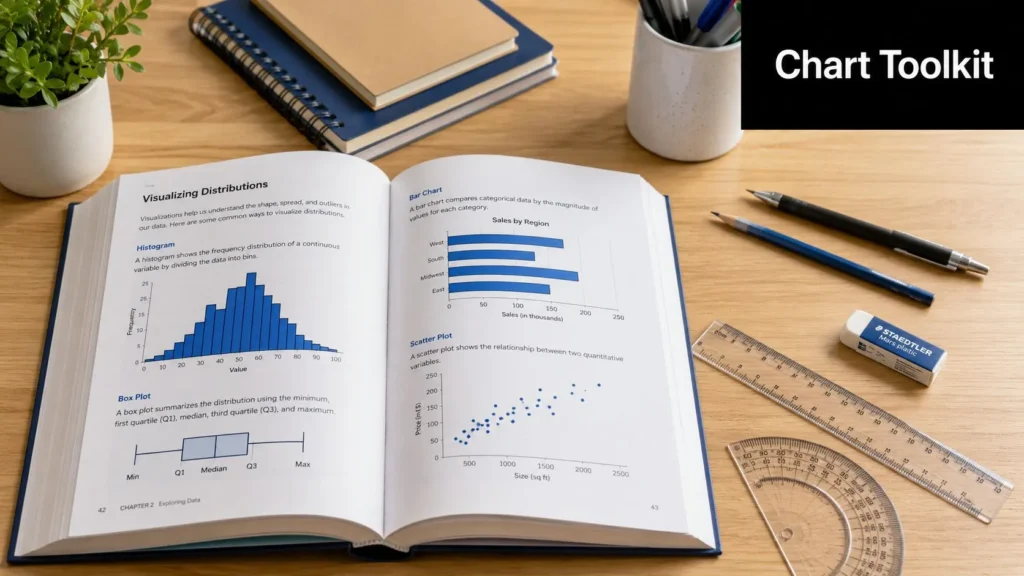
A bar chart compares categories. Sales by product line, survey responses by department, museum visitors by exhibit type. If the categories are discrete, bars work beautifully because length is easy to compare.
A line chart tracks a sequence, usually time. Monthly revenue, temperature across days, student attendance over a semester. The line implies continuity, so it helps the eye move from one period to the next.
A fast rule helps here. If rearranging the categories would change the meaning, you probably have a line-chart problem. If rearranging them wouldn’t, you probably have a bar-chart problem.
Scatter plots and bubble charts
A scatter plot is one of the strongest tools for relationship analysis because it places two quantitative variables on orthogonal axes, making potential correlation, clusters, and outliers visible in a single view, as described in Harvard Business School’s discussion of data visualization techniques.
That matters in ordinary work. If you plot customer acquisition cost against lifetime value, you can see whether the relationship is broad and stable or whether a few unusual accounts are creating the illusion of a trend.
A bubble chart adds a third variable through point size. That can be useful, but it also raises the reading difficulty. If the third variable doesn’t change the decision, don’t add it.
A scatter plot is often the chart that tells you your tidy summary statistic was hiding a messy reality.
Pie charts and treemaps
A pie chart shows part-to-whole composition. It’s most useful when there are only a few categories and the shares are meaningfully distinct. If you give readers too many slices, comparison becomes clumsy.
A treemap also shows part-to-whole structure, but with nested rectangles. It’s handy when you need more categories than a pie can comfortably handle, especially for hierarchical data such as budget areas within departments.
Histograms and box plots
A histogram shows distribution by grouping values into bins. It helps answer questions like: Are most values concentrated in one range? Is the distribution skewed? Are there multiple peaks?
A box plot summarizes spread in a compact way. It’s useful when comparing distributions across several groups and when outliers matter. People sometimes find box plots abstract at first, but once explained, they become efficient summaries.
Here’s a quick visual explainer if you want to see several chart types discussed in motion rather than only in text.
Heatmaps, network graphs, and more complex forms
A heatmap uses color intensity across a grid. Think of class performance by week and topic, or website traffic by hour and day. It’s excellent for spotting concentration patterns quickly.
A network graph shows connections among entities. This could be collaboration among researchers, links among websites, or character relationships in a novel. It can reveal structure, but it can also become a bowl of spaghetti if you include too much at once.
A few quick use cases make the toolkit easier to remember:
- Business: a line chart for monthly sales, a bar chart for product comparison, a scatter plot for cost versus return
- Science: a histogram for measurement distribution, a heatmap for gene-expression style patterns, a box plot for group comparison
- Arts and culture: a treemap for museum collection categories, a network graph for artistic influence, a bar chart for genre counts in an archive
A useful habit
When you test a chart type, ask two plain questions:
- What becomes easier to see?
- What becomes harder to see?
Every technique clarifies one thing while muting another. A histogram reveals shape but hides individual records. A box plot compresses detail but sharpens comparison. A heatmap shows clusters but not always exact values. Good visualizers know those trade-offs and choose them on purpose.
Principles of Effective Design and Perception
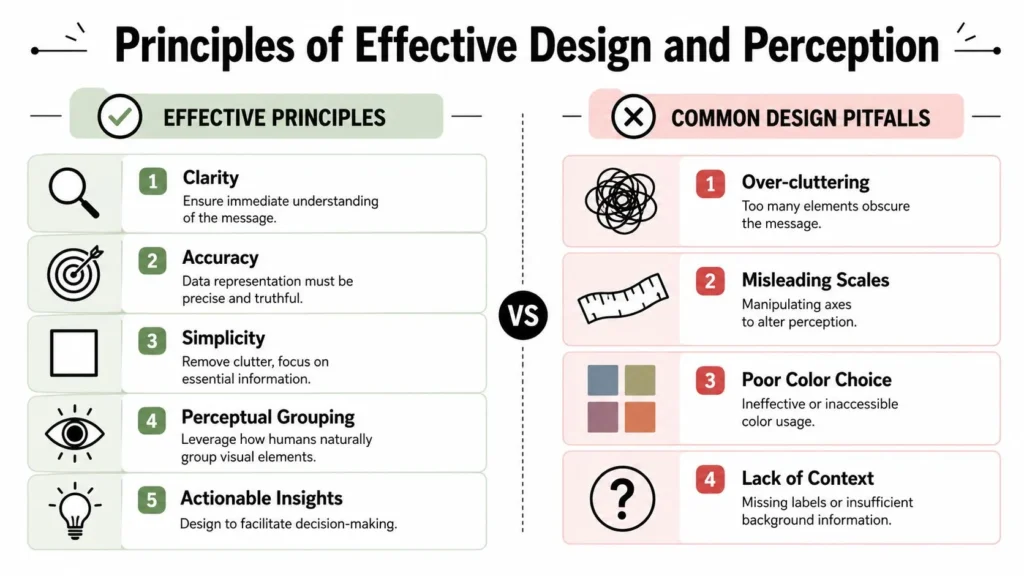
A correct chart can still fail if readers have to work too hard to interpret it. Design isn’t just decoration. It’s cognitive engineering.
If the title is vague, the labels are weak, the colors fight each other, and the layout asks readers to decode too much at once, the chart may be technically accurate while still being practically unhelpful.
Clarity beats ornament
Readers should know what they’re looking at within seconds. That usually means:
- A direct title: state the message, not just the metric
- Readable labels: don’t force people to guess the units or categories
- Restrained color: use emphasis where it helps, not everywhere
- Minimal clutter: remove gridlines, borders, and effects that don’t support interpretation
A useful chart behaves like a well-organized room. You can find what you need without moving furniture around in your mind.
Accessibility is more than a color palette
Many introductions stop at “use color-blind-friendly colors.” That’s helpful, but it’s not enough. Accessibility also means not relying only on color, adding alternate text and captions, supporting zooming, and designing for different screen sizes, as emphasized in Tableau’s guidance on data visualization best practices.
That changes how you build charts in practice.
- Don’t rely on color alone. Use labels, patterns, shapes, or position too.
- Write alt text that says something meaningful. “Bar chart of sales” is weak. “Bar chart showing Product A leading while Products B and C are close together” is better.
- Design for mobile screens. Long legends, tiny labels, and dense dashboards often collapse on phones.
- Support more than one interaction mode. Hover-only details can fail on touch devices.
If you want a practical companion piece on how teams improve data clarity in dashboards, that discussion pairs well with the broader design principles here.
Good design helps honest reading
Visual design also influences trust. A clean scale, legible annotation, and obvious source context make a chart feel interpretable rather than theatrical. If you’re learning the design side from scratch, a beginner-friendly overview of graphic design software for beginners can help you think more clearly about layout, contrast, and typography before you even touch chart settings.
Design test: If someone removed the colors, would the chart still make sense?
That’s one of my favorite questions because it exposes weak design quickly. If the answer is no, the chart may be carrying too much meaning in one fragile visual cue.
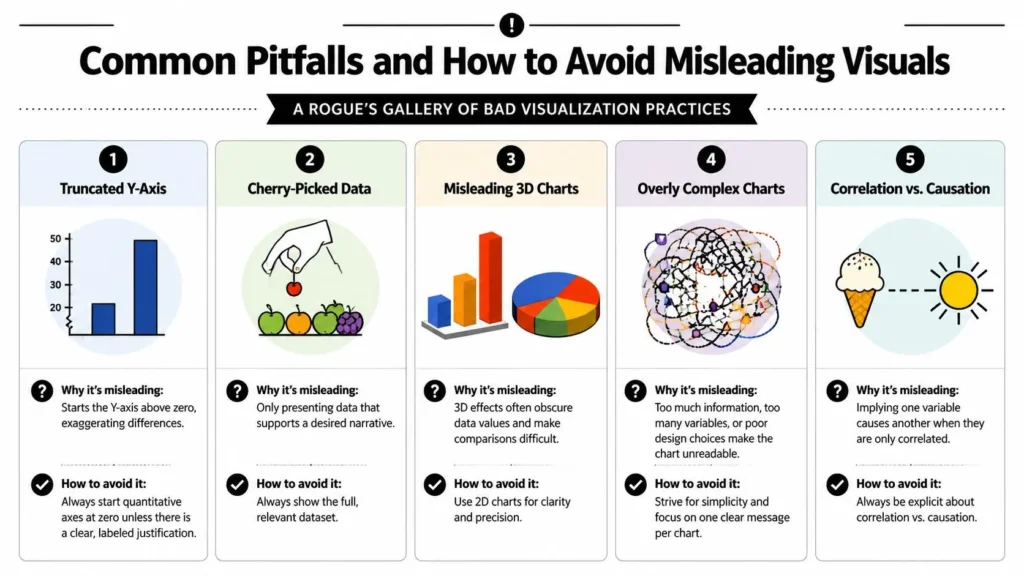
Common Pitfalls and How to Avoid Misleading Visuals
Most misleading charts aren’t created by villains in dark rooms. They’re created by hurried people, default settings, and half-remembered best practices.
Still, the effect can be serious. A chart can exaggerate small differences, hide important uncertainty, or imply a conclusion the data doesn’t support.
Five mistakes worth catching early
- Truncated y-axis: Starting a quantitative axis above zero can make modest differences look dramatic. If you do this for a legitimate reason, label it clearly and make sure the audience can’t miss the scale choice.
- 3D decoration: Three-dimensional bars and pies usually reduce accuracy. They distort area and make comparison harder.
- Too many categories in a pie chart: Once the slices multiply, readers lose the ability to compare them easily.
- Confusing correlation with causation: Two variables can move together without one causing the other.
- Overcrowding: If every color, label, trendline, and annotation appears at once, the chart stops guiding attention.
Before and after thinking
When a chart misleads, ask what the honest alternative would look like.
A distorted 3D bar chart usually becomes a flat 2D bar chart.
A pie chart with many small slices often becomes a sorted bar chart.
A cluttered dashboard may become a small set of focused views.
That “before and after” mindset is useful because it trains your eye to see distortion as a design choice, not as an unavoidable property of the data.
Misleading visuals often come from showing more visual drama than analytical discipline.
A special warning about scatter plots
Scatter plots are powerful, but they tempt people into overclaiming. If points form a loose upward cloud, that suggests association. It does not prove mechanism. The distinction matters in business, health, policy, and education.
When in doubt, use careful language. Say that variables appear related, or that the plot suggests an association. Don’t claim the chart has established cause unless you have evidence from a design that supports that conclusion.
Beyond the Static Chart Interactivity and the Future
Interactive dashboards are often treated as the final stage of chart sophistication. More filters, more drill-downs, more hover states, more tabs. Sometimes that’s useful. Sometimes it’s a maze.
The more important question is not whether a dashboard is interactive. It’s whether the interaction helps the user understand something they couldn’t understand as quickly in a static form.
When interactivity helps
Interactivity is valuable when people need to:
- Explore different slices of the data
- Filter by role, region, or time period
- Drill from summary to detail
- Compare multiple pathways without overwhelming the first view
This is especially useful for analysts, managers, and researchers who return to the same data repeatedly.
When static beats interactive
Many articles treat interactivity as always better, but a more careful view asks how much interaction improves understanding versus adding clutter or false confidence. Guidance often warns about misleading visuals and weak dashboard habits, yet still leaves open the practical question of which technique is best when the goal is fast comprehension rather than deep exploration, as noted in this discussion of effective visualization techniques and dashboard trade-offs.
If your audience needs one takeaway fast, a static chart often wins.
A static chart is better when:
- You need a clear message in one glance
- The audience is mixed in skill level
- The chart will be shared in slides, documents, or on mobile
- Too many options would distract from the main conclusion
This trade-off shows up in many adjacent fields, especially when automated systems generate more information than people can absorb. The same tension appears in what is machine learning, where powerful models can produce complex outputs but still need human-friendly interpretation.
The future of data visualization won’t belong only to more advanced tools. It will belong to people who respect attention. The best visual is the one that helps the right person make the right judgment with the least unnecessary effort.
If you enjoy clear, practical writing on science, technology, business, education, arts, and more, visit maxijournal.com. It’s an independent publication built for curious readers who want approachable ideas without the jargon overload.
Discover more from Maxi Journal
Subscribe to get the latest posts sent to your email.