
Starting a blog really just boils down to a few key decisions: choosing your niche, picking a platform like WordPress, snagging a domain name, and then getting that first post out the door. It might sound like a lot, but you can honestly get the whole thing set up in just a couple of hours. Best of all, it often costs less than a hundred dollars to get through your first year.
Laying the Groundwork for Your New Blog
That feeling of staring at a blank screen, wondering where on earth to begin? We’ve all been there. Every single successful blog you read started from that exact same spot. The journey from a simple idea to a published article isn’t about being a tech wizard; it’s about making a series of smart, foundational choices that set you up for success down the road.
Think of this guide as your personal roadmap. We’ll walk through each critical step together, from pinning down your blog’s purpose to getting those first eyeballs on your content. The goal here is to trade that uncertainty for a clear, confident plan of action.
Understanding the Blogging Landscape
Before we jump in, it helps to get a feel for the world you’re about to enter. Blogging is more popular—and competitive—than ever. There are over 600 million blogs scattered across the web, which really drives home the need to carve out your own unique space and have a solid strategy. On the business side, companies with blogs tend to get twice the email traffic, and marketers who make blogging a priority are 13 times more likely to see a positive return.
“A blog post is a very long and complex search query to find fascinating people and make them route interesting stuff to your inbox.”
This quote really shifts the perspective, doesn’t it? It’s not just about pushing content out into the void. Your blog is a magnet for connection and discovery—for your readers, and for you.
Your First Big Decision: Hosted vs. Self-Hosted
One of the very first hurdles you’ll face is deciding where to actually build your blog. This choice usually comes down to a classic trade-off: simplicity versus control. Are you looking for something super easy that gets you writing in minutes, or do you want a system with total freedom to customize and grow?
This decision tree can help you visualize the choice based on what’s most important to you right now.
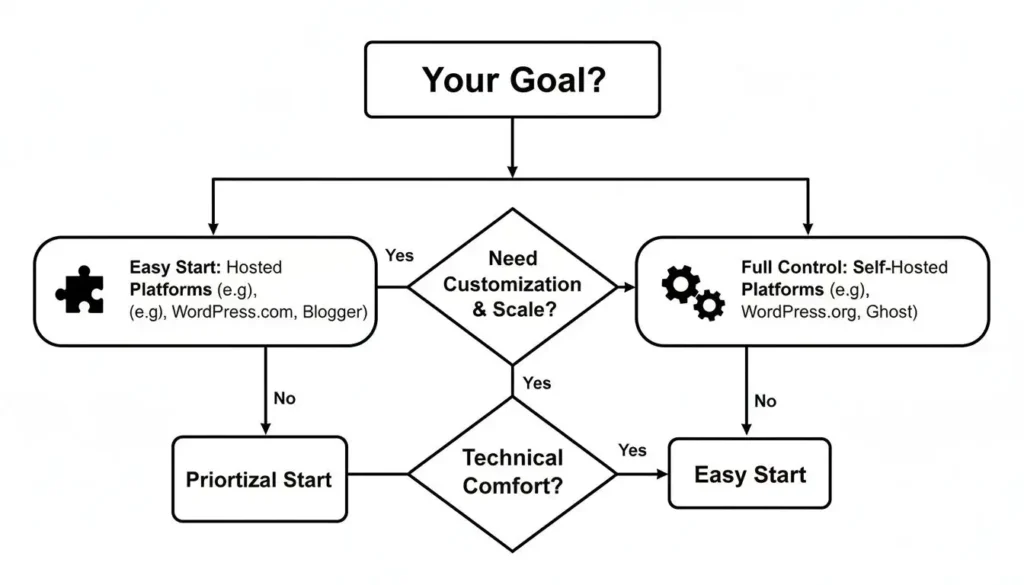
If simplicity and speed are your top priorities, a hosted platform is probably your best bet. But if you’re dreaming big and want complete control over every pixel and plugin, then a self-hosted solution is the way to go.
Here’s a quick breakdown to make the choice even clearer.
Blogging Platform At a Glance Hosted vs Self-Hosted
This table gives you a quick comparison to help you choose the right platform based on your technical comfort, budget, and long-term goals.
| Feature | Hosted Platforms (e.g., Medium, Wix) | Self-Hosted Platforms (WordPress.org) |
|---|---|---|
| Ease of Use | Very beginner-friendly. No technical setup. | Requires some setup (hosting, installation). |
| Cost | Often free with limitations, paid plans vary. | Requires domain & hosting purchase. |
| Customization | Limited design and feature options. | Nearly unlimited customization with themes/plugins. |
| Monetization | Restricted or platform-specific rules. | Full control over ads, affiliate links, etc. |
| Ownership | You’re building on rented land; platform owns it. | You own your site and all your content. |
| Best For | Casual bloggers, simple portfolios, beginners. | Serious bloggers, businesses, long-term projects. |
Ultimately, your blog is your project. A little bit of planning at this stage can save you from some major headaches later. And for those of you starting a blog as a form of personal expression, remember to take care of yourself along the way; you might find our guide on mental health and self-care tips helpful for maintaining balance on your new journey.
Finding Your Niche and Defining Your Ideal Reader
Every single successful blog you admire has a secret weapon: it’s not trying to be everything to everyone. It’s laser-focused on a specific group of people with a shared interest or a common problem. That focus is your niche, and picking the right one is hands-down the most important decision you'll make at the starting line.
If you try to write about travel, tech, and baking, you’ll just get lost in the internet's noise. It’s a recipe for burnout and obscurity. A tight niche lets you build real authority, attract a die-hard audience, and publish content that actually makes a difference.
Think about it. Being the go-to expert for "urban gardening for apartment dwellers" makes you memorable. Being just another "lifestyle blogger" makes you invisible.
Brainstorming Your Potential Niche
The best niches sit at the intersection of three things. I like to think of it as a simple formula for finding a topic with staying power: your passion, an audience's need, and a path to making money later on.
To find yours, just grab a notebook and start jotting down ideas in these three areas:
- Your Passions and Hobbies: What could you talk about for hours? What topics do you find yourself Googling for fun on a Saturday afternoon? That genuine enthusiasm is contagious and will keep you going when motivation dips.
- Your Professional Expertise: What problems are you paid to solve? What skills have you built in your career that other people want to learn? Your 9-to-5 can be a goldmine of proven, valuable content ideas.
- Your Life Experiences: Have you navigated a big challenge? Maybe you trained for your first marathon, paid off a mountain of debt, or finally learned a new language. Sharing your personal journey provides a powerful, relatable roadmap for others walking the same path.
Once you have a list of ideas, it's time for a quick reality check. Jump on Google, YouTube, or Pinterest and search for your topics. See what pops up. Are people asking questions? Are there existing communities? This simple validation step makes sure you're not building your blog on an empty lot.
Creating Your Ideal Reader Persona
Once you've landed on a promising niche, the next move is to get razor-sharp on who you're writing for. It isn't enough to say "I'm writing for beginner photographers." You need to dig deeper. You need to create an ideal reader persona—a detailed profile of the one person you're trying to help.
The purpose of ANY blog post is to solve your audience’s problems. That’s it. You always want to keep your ideal avatar in the back of your mind when you’re writing.
This isn't just a creative writing exercise; it’s a strategic tool. Give this person a name, an age, a job, even a backstory. What are their biggest frustrations with your niche? What are they hoping to achieve? What specific questions are keeping them up at night? For those interested in a structured approach to problem-solving, our guide on what is data science for beginners might offer some interesting parallels.
Let’s say you’re starting a blog about sustainable living for young families. Your reader persona might look something like this:
| Persona Detail | Description |
|---|---|
| Name | “Eco-Conscious Emily” |
| Age | 34 |
| Occupation | Marketing Manager |
| Family | Married with two young children |
| Challenges | Feels overwhelmed by conflicting “green” info. She wants to be more sustainable but is juggling a tight budget and even tighter schedule. |
| Goals | Wants practical ways to reduce her family’s waste, find affordable eco-products, and teach her kids about the environment without it feeling like a chore. |
See the difference? Now you’re not writing for a faceless crowd. You’re writing a personal message directly to Emily. Every headline, every tip, and every product you recommend is crafted to solve her specific problems. This focus is what turns your content from generic advice into an indispensable resource, building the kind of trust that brings people back again and again.
Building Your Blog’s Technical Foundation
Alright, you’ve figured out your niche and have a crystal-clear picture of your ideal reader. Now for the fun part: building the actual home your blog will live in. This is where a lot of people get tripped up by the technical side of things, but I promise it’s more straightforward than you might think.
Getting your own little corner of the internet set up really comes down to three key decisions: picking your platform, registering a domain name, and choosing your web hosting. Let’s break these down so they feel less like a chore and more like the exciting first steps they truly are.

Choosing Your Platform: Why WordPress Is Still King
You’ve probably heard of platforms like Wix or Medium. They’re simple, sure, but that simplicity comes with some serious handcuffs. If you’re serious about growing your blog, there’s really only one choice: self-hosted WordPress.org.
Why? Because it gives you complete ownership. You have endless options for customization and, crucially, the freedom to make money from your content however you want. It powers over 43% of all websites for a reason.
Think of it like owning a house versus renting an apartment. In a rental, you can’t just decide to knock down a wall or install your dream kitchen. With self-hosted WordPress, you own the land and the house. You hold the keys to everything and can build whatever you can imagine.
Securing Your Domain Name
Your domain is your address online—think yourcoolblog.com. It’s a huge part of your brand, so it pays to put some thought into it. The best domain names are easy to remember, simple to type, and give a little hint about what you’re all about.
When you’re brainstorming ideas, keep these pointers in my back pocket:
- Stick with .com: It’s the gold standard. People know it and trust it. While other extensions like
.netor.blogexist,.comshould always be your first pick if it’s available. - Keep it short and punchy: Long, complex names are a recipe for typos and forgotten URLs. Aim for two or three words, max.
- Avoid hyphens and numbers: They just make things clunky.
UrbanGardenGuide.comis way cleaner and easier to say out loud thanUrban-Garden-Guide-247.com. - Make it brandable: A unique name often beats a generic one. “The Savvy Spender” is far more memorable than “My Frugal Living Tips Blog.”
Got a few ideas? Use a domain checker to see what’s available—most hosting providers have one built right into their site. Don’t sweat it if your first choice is taken. Get creative!
Selecting Your Web Hosting
If the domain is your address, hosting is the plot of land your house is built on. It’s a service that stores all of your blog’s files—every post, every image, every line of code—and makes them available to anyone who visits your site. For a self-hosted WordPress blog, picking a solid host is non-negotiable.
Here’s the good news: you don’t need some super expensive, top-tier plan right out of the gate. A basic shared hosting plan from a reputable company is more than enough to get you off the ground.
Your blog is a tiny internet house where you decide the norms. And since there are already countless places where you can’t be yourself, there is no need to build another one of those. The law of the land is that everything you think is funny is funny.
This quote perfectly captures the spirit of self-hosting. You’re in charge. You get to build a space that is 100% yours, without someone else’s rules getting in the way.
So, what should you look for in a hosting provider?
- Reliability (Uptime): Your site needs to be online. Look for hosts that guarantee at least 99.9% uptime.
- Great Support: Because things will go wrong, usually at the worst possible time. 24/7 live chat support is a lifesaver.
- One-Click WordPress Install: Most modern hosts make this incredibly easy. You should be able to get WordPress set up from your control panel with just a click.
- Free SSL Certificate: This is what puts the little padlock next to your URL in the browser bar. It’s a must-have for security and building trust with your readers.
Many hosting companies like Bluehost, SiteGround, or Hostinger have fantastic introductory deals that bundle a free domain name for the first year right in with your hosting plan. This is a great way to simplify the process and keep your startup costs down.
By choosing WordPress, grabbing a great domain, and signing up with a reliable host, you’ve just laid the entire technical foundation for your blog. You officially have a live website—a blank canvas just waiting for your design and your words.
Designing a Professional Blog on a Budget
People decide if they like your blog in milliseconds. A clean, professional design instantly tells visitors you’re a credible source. On the flip side, a cluttered or dated layout will send them clicking away before they’ve even read a single word.
The great news? You absolutely don’t need to hire an expensive designer to create a beautiful, functional blog. With the right tools, you can build a site that looks polished and works flawlessly, all on a shoestring budget. It really comes down to making smart choices with two key parts of your WordPress site: your theme and your plugins. These are the building blocks that define how your blog looks, feels, and what it can do.
Selecting the Perfect WordPress Theme
Think of your theme as the visual foundation of your blog. It’s the template that controls your layout, colors, fonts, and overall style. With thousands of options out there, it’s easy to get lost in the sea of choices. But your decision should be guided by a lot more than just pretty pictures.
Here are the critical factors I always consider when picking a theme:
- Speed: A slow-loading site is a killer for both readers and search engines. You need a lightweight theme that’s built for performance right out of the box.
- Responsiveness: Over 50% of web traffic now comes from mobile devices. Your theme must be fully responsive, meaning it automatically adjusts to look fantastic on any screen, from a giant desktop monitor to a tiny smartphone.
- Customization: A good theme gives you flexibility without being a headache to use. Look for options to easily change colors, fonts, and layouts through the built-in WordPress Customizer—no coding required.
- Positive Reviews: This is your social proof. Check the ratings and read recent reviews in the WordPress theme directory or on the theme’s sales page. A long history of positive feedback is a huge green flag.
A fantastic place to start is with free, top-rated themes like Astra, GeneratePress, or Kadence. They are all famous for being incredibly fast, highly customizable, and super reliable. You can start with their free versions and, if you ever need more advanced features, upgrade to a premium plan down the road.
Must-Have Plugins to Supercharge Your Blog
Plugins are like apps for your website. They add specific features and functions that WordPress doesn’t have by default. While it’s tempting to go on an installation spree, it’s far better to start with a few essential ones to keep your site fast and secure.
Installing one is a piece of cake. From your WordPress dashboard, just navigate to Plugins > Add New, search for the plugin you want, and click “Install” then “Activate.”
Here are the non-negotiable plugins every new blog needs from day one.
For Search Engine Optimization (SEO)
An SEO plugin is your guide to getting your content ranked higher in Google search results. It helps you with things like using keywords, writing meta descriptions, and improving readability.
- Rank Math or Yoast SEO: You can’t go wrong with either of these. Both Rank Math and Yoast SEO provide a real-time checklist as you write, making it incredibly easy for beginners to nail on-page SEO best practices without any technical expertise.
For Performance and Speed
Site speed isn’t just a suggestion; it’s a critical ranking factor and essential for a good user experience. A caching plugin dramatically improves your site’s load time by storing static versions of your pages, so they don’t have to be re-built from scratch for every single visitor.
- WP Rocket (premium) or LiteSpeed Cache (free): WP Rocket is a fantastic premium option that handles everything, while LiteSpeed Cache is a powerful free alternative if your host uses a LiteSpeed server. Both will make your pages load much faster.
For Security and Backups
You have to protect your hard work. A good security plugin guards your site against common threats, and a backup plugin ensures you can restore everything if the worst happens.
“A blog post is a very long and complex search query to find fascinating people and make them route interesting stuff to your inbox.”
Just as you want to attract the right people, you need a strong defense to keep the wrong ones out. Don’t ever skip these.
- Wordfence Security: This is your digital bodyguard. Wordfence provides a firewall and malware scanner to block malicious traffic and keep your site safe.
- UpdraftPlus: This plugin gives you complete peace of mind. UpdraftPlus automatically backs up your entire site to a remote location like Google Drive or Dropbox.
This core set of tools—a fast theme and a handful of essential plugins—is the engine of your blog. With this powerful and secure foundation in place, you’re ready to shift your focus from the technical setup to what truly matters: creating amazing content for your readers. And with the global blogging industry projected to hit $5.3 billion by 2032, there’s never been a better time to build your platform. You can learn more about the growth of blogging and key industry statistics to see just how big the opportunity is.
Writing Your First Foundational Blog Posts
Now that your blog is technically set up and looking sharp, it’s time to focus on the one thing that truly matters: your content. A classic rookie mistake is to just start writing about whatever pops into your head. That’s a fast track to burnout. A much smarter play is to build a solid foundation from the get-go.
That means starting with your first 5 to 10 “pillar” articles. These are the big, comprehensive, evergreen guides that tackle the core problems and burning questions your audience has. Think of them as the main support beams for your entire site. All your future, shorter posts will link back to and expand on these core topics, creating a really strong, interconnected web of content.
Figure Out What Your Audience Actually Wants to Read
Before you type a single word, you need to get inside your reader’s head. The goal is to create stuff people are actively searching for, and the best way to do that is with a bit of simple keyword research. This isn’t about trying to trick Google; it’s about understanding the exact words your audience uses when they’re looking for help.
You don’t need any fancy, expensive tools to start. The platforms you already use are treasure troves of ideas:
- Google Search: Just start typing a broad topic from your niche into the search bar. Pay close attention to the autocomplete suggestions that pop up—those are real phrases people are searching for right now.
- Pinterest: This platform is a goldmine for understanding what people want. Search for your topic and see what kinds of pins are getting a lot of attention. The headlines on popular pins will tell you a lot about common problems and aspirations.
- YouTube: Just like Google, YouTube’s search bar will offer suggestions that give you a direct line into your audience’s mind. And don’t forget to scroll down to the comments on popular videos in your niche—they’re often filled with unanswered questions you can turn into a blog post.
Just an hour spent digging around on these sites can give you a massive list of post ideas you know people are interested in. This simple step ensures you’re not just shouting into the void.
How to Structure Your Posts So People Actually Read Them
Let’s be honest: people don’t read online, they skim. Your job is to make your content incredibly easy to scan, guiding your reader’s eye down the page from one key point to the next.
Your blog posts have one job and that is to solve whatever problem your reader is having. They should be useful, engaging, helpful, and spark emotion for your audience.
To do that, every single post needs a clear, logical structure. This isn’t about being rigid; it’s about creating a smooth ride for your reader. A solid structure makes your ideas hit harder and keeps people from clicking away.
Here’s a simple workflow I use for every post:
- Nail the Headline: The headline’s only job is to get someone to click. It needs to promise a clear benefit or a solution to a specific problem.
- Write a Hooking Intro: You have about three sentences to convince someone to keep reading. State the problem you’re solving and promise them a clear takeaway.
- Outline with Subheadings: Before you write the body, map everything out with descriptive subheadings (H2s and H3s). This breaks up the text into bite-sized, skimmable chunks and creates a logical path for the reader.
- Flesh Out the Body: Write the actual content under each subheading. The key here is using extremely short paragraphs—seriously, stick to 1-3 sentences max. It makes a huge difference on screen.
- End with a Strong Wrap-Up: Quickly summarize the main takeaways and give the reader a clear next step. What should they do now?
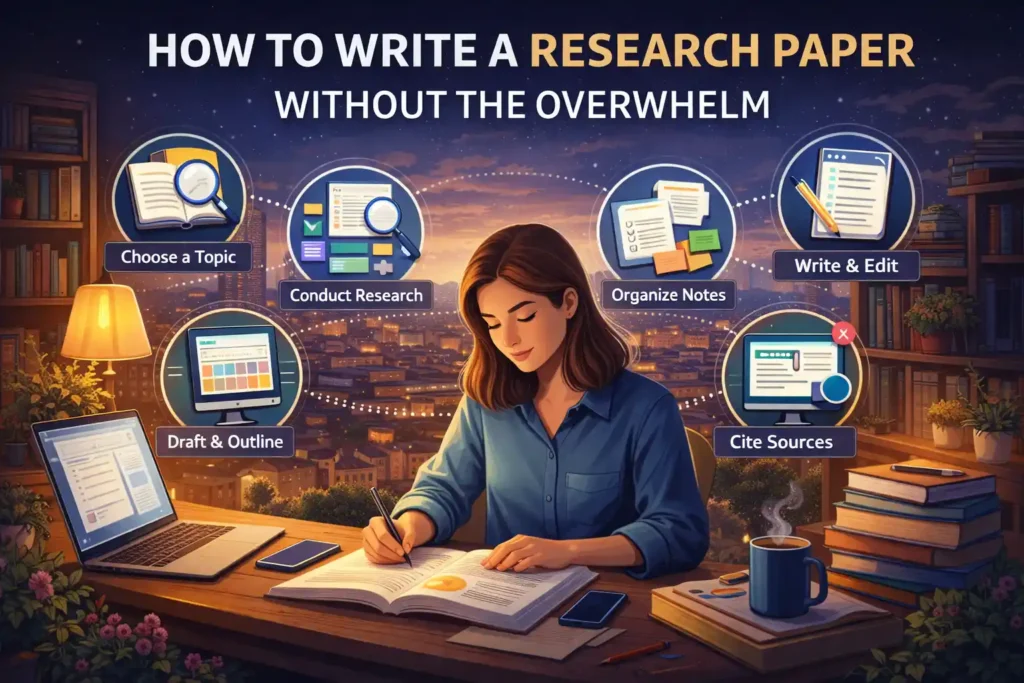
Getting into this habit is a game-changer, especially when you’re just starting out with long-form content. For a much deeper look at organizing complex information, check out our guide on how to write a research paper without the overwhelm. The principles for making information easy to digest are exactly the same.
Hitting “Publish” on Your First Masterpiece
With your pillar articles outlined and a solid structure in mind, all that’s left is to write. Don’t get stuck trying to make your first draft perfect. Just get your ideas down. You can (and should) edit later. Write with your own voice, let your personality shine, and above all, focus on being genuinely helpful.
Once you have a draft, read it over. A great trick is to read it out loud—you’ll immediately catch awkward sentences and typos you’d otherwise miss. Double-check that your formatting is clean, your images look good, and all your links work.
Finally, it’s time. In your WordPress dashboard, navigate to Posts > Add New, paste in your brilliant work, and click that big blue “Publish” button. And just like that… you’re a blogger. Congratulations
Attracting Your First 100 Readers
You’ve hit “publish.” It’s a huge moment, but honestly, it’s just the starting line. A brilliant blog post with no one to read it is like a masterpiece locked away in a dark room. Now comes the fun part: getting your hard work in front of the people who actually need to see it. Getting those first 100 loyal readers isn’t about a massive budget; it’s about being strategic and proactive.
This initial push is all about building momentum. Forget about going viral overnight. Instead, think of it as planting seeds in all the right places, making real connections, and setting yourself up for steady, long-term growth. It’s time to make your content discoverable.
Go Where Your Audience Already Gathers
The absolute fastest way to find your first readers is to join the conversations they’re already having. Don’t sit back and wait for them to stumble upon your blog. Go to them. This means becoming a genuinely helpful member of online communities that are all about your niche.
Your goal here is not to spam links. That’s a quick way to get ignored or banned. The mission is to build a reputation as someone who knows their stuff and provides real value. Answer questions, offer solid advice, and just be a real person.
- Facebook Groups: Find groups dedicated to your topic. If your blog is about vegan baking, join groups where people are swapping recipes and asking for tips. Be a helpful member first. Only share a link to your blog when it perfectly answers someone’s question or adds to the conversation.
- Reddit: Subreddits are hyper-focused communities. Find the ones that fit your niche (like r/PersonalFinance or r/TravelHacks) and become a regular face. Reddit users appreciate genuine expertise and will absolutely check out your profile (where you can link to your blog) if your comments are consistently valuable.
- Quora: This whole platform is built on questions and answers. Search for questions related to your pillar posts and write thoughtful, detailed answers. You can naturally link back to your blog post as a source for anyone who wants to dive deeper.
Use Social Media with a Strategy
Just blasting your new post across every social media channel you have is a waste of time. Every platform has its own vibe and its own rules of engagement. You need to pick one or two where your ideal reader is most likely hanging out and really focus your energy there.
A food blog, for instance, is going to do incredibly well on visual platforms like Pinterest and Instagram. But if your blog is all about B2B marketing, you’ll find a much more receptive audience on LinkedIn and X (formerly Twitter).
The audience is created as a reflection of your curiosity. A blog post is a very long and complex search query to find fascinating people and make them route interesting stuff to your inbox.
Think of your social sharing as an invitation, not an advertisement. You’re offering a solution, a new idea, or a compelling story to connect with people who are on the same wavelength.
Start Your Email List from Day One
Your email list will become the single most valuable asset you build as a blogger. It’s a direct line to your most engaged readers—an audience you actually own, completely untouched by the whims of social media algorithms or search engine updates.
It is absolutely critical to start collecting emails from the very beginning.
- Choose an Email Service: Get started with a free plan from a great provider like MailerLite or ConvertKit. They make it incredibly simple to create sign-up forms.
- Offer a Simple Incentive: You don’t need to write a 50-page ebook. Create something small but mighty—a simple one-page checklist, a resource guide, or a template that solves a specific, nagging problem for your reader. This is often called a “lead magnet.”
- Place Forms Strategically: Add a sign-up form in your blog’s sidebar, at the end of every single post, and maybe even a subtle pop-up. Make it dead simple for people who love your work to hear from you again.
Building this list, even if it’s just one new subscriber a day, is a powerful engine for growth. Every time you publish a new article, you can let this core group of fans know immediately, driving instant traffic and kicking off the sharing cycle.
At maxijournal.com, we believe in the power of sharing knowledge and stories. Explore our curated collection of articles across a wide range of topics and discover your next great read.
https://maxijournal.com
Discover more from Maxi Journal
Subscribe to get the latest posts sent to your email.
Pingback: Measuring Content Performance: A Comprehensive Guide
Pingback: 7 Top Blogs That Accept Guest Posts in 2026 for Marketers
Pingback: Top 12 Graphic Design Software Picks for Beginners in 2026
Pingback: Top 12 WordPress Blog Themes for 2026: An Expert Review
Pingback: Top 10 Digital Marketing Tips for Small Business Growth 2026
Pingback: 12 Best Ecommerce Practices for Growth Strategies in 2026
Pingback: Top Business Books for Entrepreneurs to Aid Startup Growth
Pingback: Submit Your Education Writing for MaxiJournal Contributions
Pingback: 10 Essential Customer Service Best Practices for 2026 Growth
Pingback: Practical Guide to Starting Your Travel Blog the Right Way
Pingback: How to Build an Email List From Scratch - Maxi Journal