You might already be in the exact situation where GDPR starts to feel uncomfortably real. Your site publishes articles, runs Google Analytics, collects newsletter signups through Mailchimp or another email tool, embeds YouTube videos, maybe loads social share buttons, and has an ad tag or two in the template. Nothing about that setup feels unusual. For a small publisher, it feels standard.
That’s also why GDPR compliance for websites catches people off guard. The legal risk usually doesn’t start with some dramatic data product. It starts with ordinary publishing tools that collect or transmit personal data in the background. A contact form logs an email address. Analytics drops identifiers. An embedded video calls a third party before the visitor has chosen anything. An ad script starts syncing data across vendors you didn’t even realize were present.
The good news is that most publisher sites can get into a much better position without turning the whole operation upside down. The work is mostly about visibility, documentation, and restraint. You need to know what your site is doing, why it’s doing it, and which parts should stop until a visitor opts in.
The Publisher’s GDPR Wake-Up Call
A small media site often discovers its GDPR problem sideways. Not from a regulator letter, but from a redesign, a plugin review, or a reader asking a simple question: “Why did your page load advertising cookies before I clicked accept?”
That question opens the whole stack. The homepage has Google Analytics. Article pages embed YouTube clips. The newsletter box sends subscriber data to an email platform. A comments plugin stores names and IP-related data. Social buttons call external domains. Suddenly, what looked like “just a content site” is clearly processing personal data in several different ways.
For publishers, this is a wake-up call. GDPR isn’t limited to giant platforms. If your site can be accessed by people in the EU and your tools collect personal data through forms, cookies, analytics, or third-party services, you’re in the conversation. Editorial organizations already understand governance in other contexts, including transparency topics like conflict of interest policies. Privacy belongs in that same operational category. It’s part of how a publication earns trust.
What changed after GDPR became enforceable on 25 May 2018 is that enforcement became routine rather than theoretical. In its first year, regulators received over 65,000 data breach notifications and 144,000 complaints, while fines reached $63 million, according to Varonis’ GDPR review. That same review said fewer than 50% of businesses were compliant and 4 in 5 were still working toward compliance, which tells you something important. Many sites didn’t launch compliant. They had to retrofit.
Most publisher compliance problems don’t come from the article text. They come from the surrounding technology stack.
That’s the right mindset going forward. Don’t treat GDPR as a one-page policy problem. Treat it as a publishing operations problem.
Conducting Your Website Data Audit
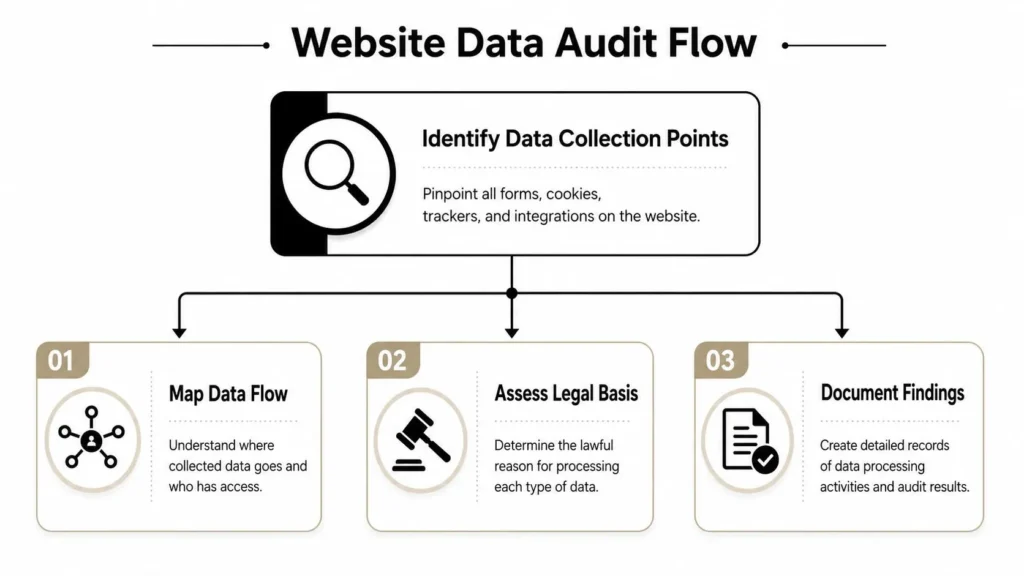
A usable GDPR process starts with one thing. A data inventory. If you don’t know what your site collects and where it sends it, every later step turns into guesswork.
The practical advice from workflows aligned with the UK ICO is straightforward: audit forms, analytics tags, embedded widgets, and third-party plugins before writing or revising your privacy notice. Vanta’s guidance also highlights hidden trackers and nonessential fields as common failure points, which is why a thorough audit comes first in this GDPR website compliance workflow.
Start with the pages readers actually use
Don’t begin in a legal document. Begin on the site itself.
Open your homepage, article template, category pages, search page, contact page, newsletter signup page, and any account or comment areas. Use your browser’s developer tools and look at:
- Visible forms. Contact forms, newsletter boxes, comment fields, author submissions, event registrations.
- Third-party scripts. Google Analytics, Google Tag Manager, Meta Pixel, ad network scripts, heatmaps, chat widgets.
- Embeds. YouTube, Vimeo, Spotify, X posts, Instagram, TikTok, maps, polls.
- Background services. Spam filtering, form delivery plugins, CAPTCHA tools, CDNs, font libraries, video players.
Now ask two questions for each item: what data is touched, and where does it go?
Build a working inventory
A spreadsheet is enough. Fancy software can come later. Create columns like these:
| Item | Where it appears | Data involved | Purpose | Vendor | Starts before consent |
|---|---|---|---|---|---|
| Newsletter form | Article footer | Email address, name | Send newsletter | Email provider | No, if configured well |
| Analytics tag | All pages | Online identifiers, usage data | Traffic measurement | Analytics vendor | Depends on setup |
| YouTube embed | Article pages | Device and viewing-related data | Video delivery | Google/YouTube | Often yes |
That simple table does two jobs. It gives you a site map of processing, and it exposes unnecessary complexity fast.
Practical rule: If you can’t explain why a field or script exists, pause it until someone can.
Don’t miss the hidden collection points
Publisher sites often fail the audit in the places nobody reviews after launch.
A few examples show up repeatedly:
- Extra form fields that aren’t needed, such as collecting a phone number for a basic newsletter signup.
- Old plugins that still load tracking scripts even though the feature is no longer in use.
- Embedded media that contacts third parties on page load.
- Tag manager containers packed with historic marketing tags nobody owns anymore.
In this context, understanding privacy design core principles becomes useful. It pushes the team to reduce collection before debating disclosures. That’s often the fastest route to a cleaner compliance position.
A good audit isn’t glamorous. It’s a controlled inventory of what your site does, not what everyone assumes it does.
Mapping Data to a Lawful Basis
Once you’ve mapped the data, the next question is more strategic than technical. Why are you allowed to process each item at all?
Many website owners go wrong. They install a cookie banner and assume they’ve solved the legal layer. They haven’t. A banner is only one mechanism. It doesn’t decide the lawful basis for each processing activity, and it doesn’t justify tracking that never should have started in the first place.
Recent guidance aimed at website compliance stresses that many guides oversimplify the issue by focusing only on banners. Usercentrics points out that consent must be explicit, granular, documented, and blocked from activating before opt-in, which makes many banner-only setups incomplete for publishers using analytics, ad tech, and social embeds. That’s the core issue discussed in its guide to GDPR compliance for US companies.
The lawful bases publishers usually deal with
For a content site, three lawful bases come up most often.
Consent is the clearest fit when a visitor is given a genuine choice and you can wait for that choice. Marketing email signups are the obvious example. So are many nonessential tracking tools, especially where advertising, personalization, or cross-site profiling is involved.
Contractual necessity applies when processing is required to deliver something the user has asked for. If someone purchases a paid subscription, logs into an account, or requests a service that needs their information, some processing may fall here.
Legitimate interests is where teams get tempted to overreach. It can be relevant in some operational situations, but it isn’t a free pass for anything useful to the publisher. You need a documented rationale, and you need to consider the visitor’s rights and expectations.
A publisher-focused way to think about it
Here’s a practical comparison:
| Website activity | Usually points toward | Why |
|---|---|---|
| Newsletter signup | Consent | The user actively opts in to receive emails |
| Paid membership account | Contractual necessity | You need the data to provide the account |
| Behavioral ad tech | Consent | Tracking and profiling need a real choice |
| Social embeds that load trackers | Often consent | The third-party call itself may be nonessential |
The hard part isn’t memorizing categories. The hard part is assigning a basis to each real-world tool and documenting that decision.
If your answer is “we use consent for everything,” you probably haven’t analyzed the processing closely enough.
If your answer is “we use legitimate interests for everything,” you almost certainly haven’t.
What doesn’t work
A few weak patterns show up all the time:
- One blanket label for all cookies. Analytics, advertising, embedded media, and functional tools don’t all fit under one explanation.
- Confusing user preference with lawful basis. Letting users toggle categories is useful, but you still need a legal rationale for each category.
- No written rationale. If someone asks why a tool runs, “because the plugin came with the theme” isn’t a defensible answer.
A better approach is to add the lawful basis to your audit sheet and make each vendor earn its place. That turns GDPR compliance for websites from vague policy language into a working governance system.
Implementing Compliant Consent and Cookies
For most publishers, the visible face of GDPR is the consent banner. It matters, but the banner only works if the site behavior behind it is configured correctly.
A proper setup usually means using a Consent Management Platform, often called a CMP. On content-heavy sites, a CMP is usually better than a homemade banner because it handles category controls, records user choices, and helps block tags until the right consent state exists.

What a compliant banner needs to do
At minimum, your consent setup should do these things:
- Present a real choice. “Accept all” can’t be the only obvious option.
- Separate categories clearly. Analytics, advertising, and functional tools shouldn’t be bundled into a single yes-or-no switch.
- Block nonessential scripts before opt-in. Many setups fail at this step.
- Let users change their mind later. A persistent settings link in the footer is the cleanest solution.
- Use plain language. Visitors should understand what they’re agreeing to without reading a legal memo.
If you need a benchmark for how this should connect to on-site disclosures, reviewing a well-structured cookie policy can help you align banner categories with the explanations users see after they click for more detail.
Good implementation versus weak implementation
A publisher-friendly CMP setup feels calm and specific.
Stronger example
- Necessary cookies are described as required for core site functions.
- Analytics is optional and disabled until opt-in.
- Advertising and personalization are separate from analytics.
- Embedded media that would trigger third-party tracking is held behind a click-to-load gate or equivalent control.
Weaker example
- Banner appears after scripts have already fired.
- Everything sits under “improve experience.”
- Rejecting is harder than accepting.
- There’s no obvious route to revisit settings.
Script blocking is the real test
Technical teams must exercise precision. Many sites display a banner but still let Google Tag Manager, ad scripts, or media embeds run before consent. That creates the appearance of compliance without the substance.
If your publisher stack uses tools like Google Tag Manager, you need to map each tag to a consent category and confirm the trigger logic waits. The same applies to video embeds, social widgets, and recommendation engines. “Banner installed” isn’t the finish line. “Scripts correctly controlled” is.
A short walkthrough can help clarify what modern cookie controls look like in practice:
Choosing a CMP for a publisher site
You don’t need the most complex product on the market. You need one that fits your stack.
Look for:
- Category-based consent controls that match your actual tools.
- Tag blocking support for scripts, pixels, and embeds.
- Consent logging so choices are recorded.
- Easy updating when plugins or vendors change.
- Support for multilingual notices if you serve multiple audiences.
A cookie banner is compliant only when the page behavior matches the choices it offers.
If you remember one operational rule, make it this one: test the site in a fresh browser session and verify what loads before consent, after partial consent, and after rejection. That single exercise reveals more than hours of policy drafting.
Crafting Your GDPR Privacy Policy
A privacy policy shouldn’t read like a punishment. For a publisher, it’s a working document that tells readers what happens around the content, not just inside a legal silo.
The policy matters because it ties your inventory, lawful-basis decisions, and vendor list into one readable explanation. It also matters because GDPR penalties are significant. Article 83 allows fines of up to €20 million or 4% of worldwide annual turnover, whichever is higher, and by 2023 total fines had exceeded €2.8 billion, with most violations tied to lawful basis and data security issues, according to PrivacyEngine’s GDPR statistics review.
What the policy needs to cover
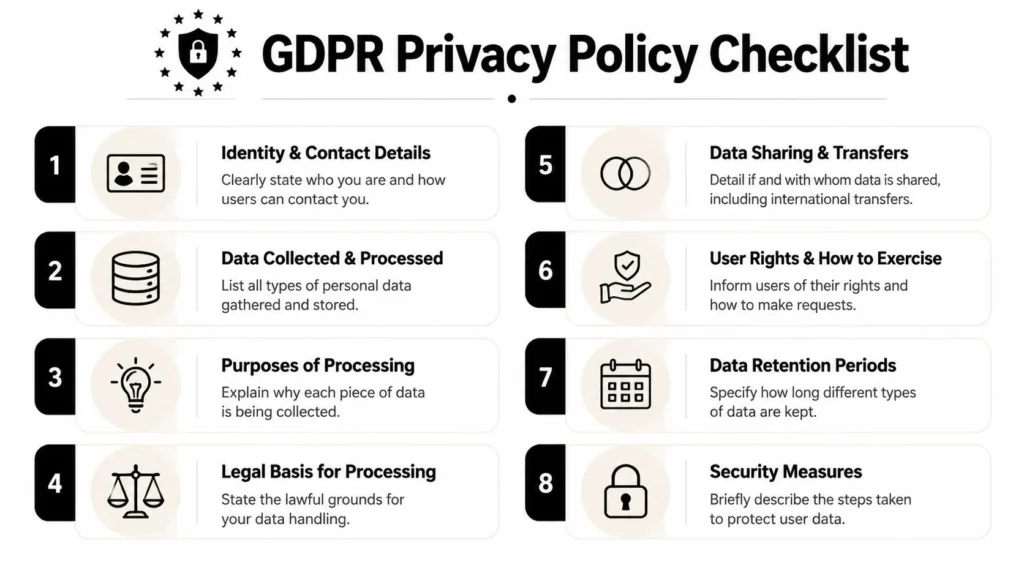
For most content sites, a solid policy includes these elements:
- Who operates the site and how readers can contact you
- What personal data you collect
- Why you collect it
- The lawful basis tied to each major processing activity
- Which vendors or categories of third parties receive data
- How long data is kept
- How users can exercise their rights
- What security measures you apply at a general level
If you want a practical companion resource for the legal drafting side, this overview of website privacy policy requirements is useful because it helps separate essential disclosures from generic filler.
Write for a reader, not just a lawyer
A strong policy is specific and readable. Compare these two approaches.
| Weak wording | Better wording |
|---|---|
| “We may collect data to improve services.” | “We use analytics data to understand how readers use article pages and site navigation.” |
| “We may share information with partners.” | “We use third-party service providers for analytics, email delivery, and media hosting.” |
| “We retain data as needed.” | “We keep subscriber data while the subscription remains active and for related administrative needs.” |
The better version doesn’t try to sound bigger. It tells the truth in plain English.
Clauses publishers often need
These short examples show the right direction:
Reader rights: You can request access to your personal data, ask us to correct inaccurate information, or request deletion where applicable.
For newsletter forms, you might write that email addresses are used to send the requested newsletter and related subscription administration. For analytics, explain whether tracking is optional and how consent affects activation. For embedded media, clarify that third-party services may process data when a visitor chooses to load that content.
Your policy should also align with the consent layer. If the banner says analytics is optional, the policy shouldn’t describe analytics as automatic for everyone.
A practical shortcut is to review examples before drafting. A library of website privacy policy examples can help you compare structure, but don’t copy text blindly. Your policy has to reflect your own data flows, vendors, and decisions.
What usually weakens a privacy policy
Three common problems make policies unreliable:
- It lists tools you no longer use
- It omits vendors that are live on the site
- It describes broad purposes without linking them to real processing
That’s why policy writing should happen after the audit, not before. The privacy policy isn’t where you figure out what the site does. It’s where you explain what you already verified.
Managing Your Third-Party Vendor Risk
For publishers, third-party vendors are often the biggest GDPR exposure on the whole site. Not because they’re unusual, but because there are so many of them. Analytics tools, newsletter platforms, ad tech, video embeds, recommendation widgets, spam filters, form handlers, and social plugins all sit around the editorial product, and each one changes your data footprint.
The simplest way to think about responsibility is this: if you choose the tool and put it on your site, you own the decision. You can’t outsource accountability just because the vendor is larger than you are.
Controller, processor, and why it matters
In plain terms, the publisher often acts as the party deciding why a tool is used on the site. A processor typically handles personal data on that publisher’s behalf for a defined service. In some situations, the roles can get more complex, especially with ad tech and platform tools, but the practical takeaway is the same. You need to understand what each vendor does with reader data before you install or keep it.
That means your vendor review should cover more than branding and price.
A usable vendor review routine
Start with the inventory you built earlier and turn it into a vendor register. For each vendor, check:
- Service purpose. Why is this tool on the site at all?
- Data touched. Email address, usage data, identifiers, support messages, media interactions.
- Contract paperwork. Does the vendor provide a Data Processing Agreement, often called a DPA?
- Privacy documentation. Is the vendor’s processing explained clearly enough to support your own disclosures?
- Operational control. Can you disable tracking, limit data collection, or change default behavior?
If a vendor can’t explain its data role clearly, it’s a poor fit for a publisher that needs defensible compliance.
What to do about ad tech and embeds
Many publisher sites need discipline. Ad and embed ecosystems often bring in more parties than the editorial team expects. A single video player, commenting widget, or monetization script can trigger multiple downstream requests.
That doesn’t mean you have to strip the site down to plain HTML. It means each vendor needs an owner, a purpose, and documentation. If a DPA is available, sign it and store it. If a tool doesn’t offer the contractual and privacy support you need, replace it or remove it.
The strongest publisher setups usually have fewer vendors, clearer consent controls, and less mystery code in the template.
Your Ongoing Compliance Checklist
The biggest mistake after a cleanup is treating GDPR as a finished project. A publisher’s site keeps changing. New sections launch. A marketing plugin gets added. Editorial wants a new embed type. Someone installs a script to test engagement and forgets to tell the person who manages privacy.
That’s why ongoing GDPR compliance for websites works best as a recurring checklist rather than a one-time sprint.
The recurring tasks that matter
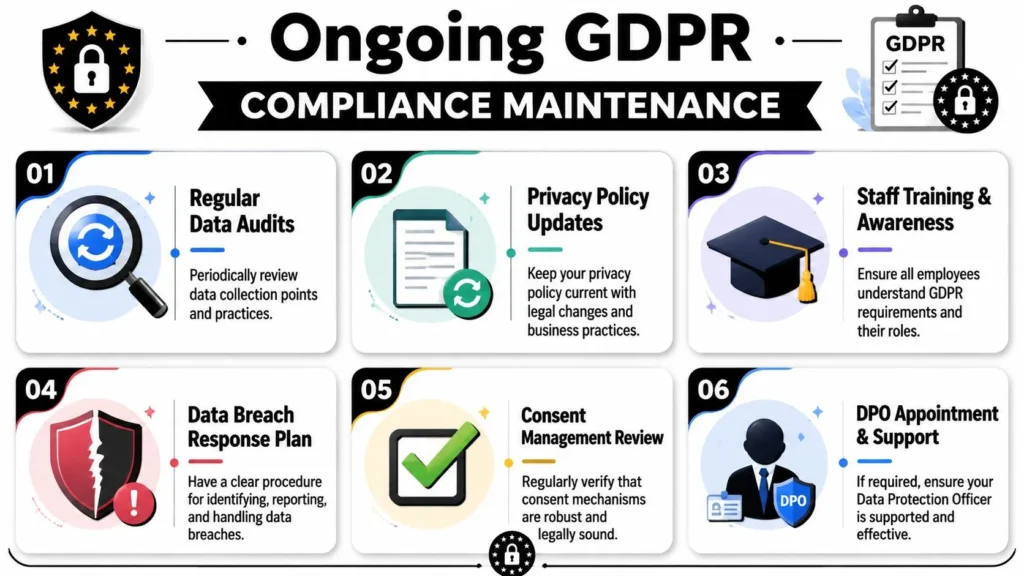
Use a simple maintenance rhythm:
- Review the data inventory regularly. Recheck forms, templates, scripts, and embeds.
- Update the privacy policy when practices change. Don’t wait for an annual rewrite if a new vendor goes live now.
- Vet new tools before installation. The easiest compliance problem to solve is the one you never deploy.
- Keep consent settings under review. Test whether nonessential scripts still wait properly.
- Prepare for rights requests. Know who handles access, correction, and deletion requests.
- Maintain a breach response note. Keep a short internal process for what to document, who to notify internally, and how to gather facts.
Keep the process lightweight but real
Small publishers don’t need a giant bureaucracy. They do need a repeatable system.
A workable internal checklist might look like this:
| Trigger | Action |
|---|---|
| New plugin request | Check data impact, vendor docs, consent implications |
| New newsletter tool | Update vendor register, sign DPA if needed, revise policy |
| New embedded content format | Test whether it loads third-party calls before user action |
| Reader privacy request | Log the request, verify identity, respond through a defined owner |
If you’re also trying to improve your internal governance and documentation habits more broadly, resources that help teams master UK compliance reporting can be useful as a process model, especially for keeping records organized and reviewable.
Don’t let “small site” logic create big gaps
A small publisher can manage this well with clear ownership.
Assign one person to maintain the inventory. Assign one person to approve new vendors. Keep a central folder for privacy policy versions, DPAs, consent settings, and internal notes. Make editors flag any new embed or widget request before it goes live.
That kind of routine is reassuring because it turns GDPR from a legal fog into normal site operations. Once the structure is in place, maintenance gets easier.
If you run or write for maxijournal.com, this is a good time to treat privacy the same way you treat editorial quality. As a living part of how the publication works. Clear policies, thoughtful data use, and careful vendor choices make the site stronger for readers, contributors, and future growth.
Discover more from Maxi Journal
Subscribe to get the latest posts sent to your email.